Architecture photography has a fundamental tension built into it. The photographer's job is to distil a three-dimensional space — with its volumes, light sequences, material textures, and human scale — into a two-dimensional frame. The best architectural images capture that spatial experience in a single composition. But no single frame can tell the whole story.
This is why architecture photography video has become so important. Not as a replacement for stills, but as context for them. A YouTube walkthrough of a building that pauses at each of your hero shots — showing the exact moment you stopped, composed, and fired — transforms your still images from isolated compositions into points on a spatial journey.
The combination of a DJI Action 5 Pro and a Sony RX100 VII is purpose-built for this workflow. The DJI handles the walkthrough video with wide dynamic range that survives interior lighting. The Sony handles the deliberate architectural detail shots with its 1-inch sensor and 200mm-equivalent zoom reach. POV Syncer syncs them automatically using EXIF timestamps.
Why Architecture and Urban Exploration Photographers Need POV Video
The architecture photography market is competitive. Clients shortlist based on portfolio, and portfolios that show only finished stills look identical at the shortlisting stage. A YouTube channel or Instagram presence that shows your process — how you see spaces, how you move through them, how you identify the shots — differentiates you before the conversation even begins.
For urban exploration photographers, the POV walkthrough is the primary content format. The architecture is the protagonist. Your job is to guide the viewer through it in a way that makes them feel present. Your still photographs, appearing as overlays at the moments you captured them, punctuate the journey with the visual interpretations that justify your aesthetic choices.
The format works equally well for:
- Commissioned architectural documentation
- Personal urban exploration projects
- Historic building documentation
- Interior design photography behind-the-scenes
- Real estate photography process content
Get the settings right the first time
Download the free POV Photographer's Cheat Sheet — camera settings, EXIF tips, and export presets for Ray-Ban Meta, GoPro, DJI, and Insta360 on one printable page.
Free PDF, no spam. Unsubscribe anytime.
The Setup: DJI Action 5 Pro + Sony RX100 VII
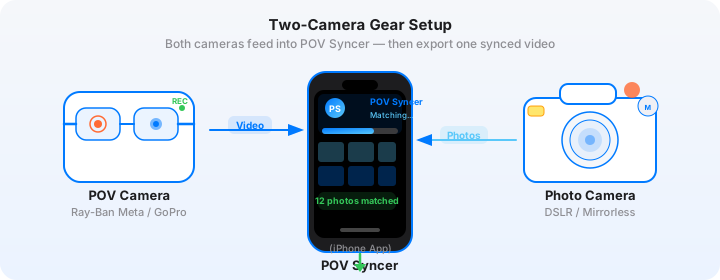
This is a genuinely powerful camera pairing for architecture work, and both devices fit in a jacket's side pockets. Here is what each camera contributes.
DJI Action 5 Pro: Wide Dynamic Range for Interiors
The DJI Action 5 Pro's standout specification for architecture is its dynamic range. DJI claims approximately 14 stops in D-Log M mode — a measurement that holds up in practical testing when shooting interiors with bright windows and dark corners simultaneously. This is the fundamental challenge of interior architecture photography: the window might be 8 or 9 stops brighter than the darkest shadow in the room, and a camera that cannot hold both will produce either blown highlights or crushed shadows in the video.
The Action 5 Pro handles this better than any action camera at its price point. D-Log M footage requires a colour grade to look natural, but the information is there to work with. For social content where you want delivery-ready footage without grading, the Normal colour profile is clean and punchy enough for walkthrough video.
Settings for DJI Action 5 Pro in architecture work:
- Resolution: 4K at 30fps for general walkthrough footage; 4K at 60fps if you want smooth slow-motion for reveal moments
- Colour profile: D-Log M if you will grade the footage; Normal if you want social-ready output without additional processing
- Stabilisation: RockSteady 3.0 on — you need this for walking through confined interior spaces where camera shake is pronounced
- Horizon lock: Enable when shooting in spaces with strong geometric lines — nothing undermines an architectural video faster than a horizon that tilts during a pan
- Mounting: Chest mount for hands-free walking-POV; handheld with a small grip for deliberate room-to-room transitions where you want control over the reveal
- Timestamp: The DJI Action 5 Pro writes precise EXIF metadata to video files that POV Syncer reads directly — set the time from your phone before shooting
Sony RX100 VII: Detail Shots with Reach
The Sony RX100 VII has a 24-200mm equivalent zoom range and a 1-inch BSI-CMOS sensor that produces files considerably cleaner than anything from a phone at matching focal lengths. For architectural detail work — cornicing, material transitions, structural joints, joinery, decorative elements — this combination of compact size and zoom reach is exceptional.
The 200mm equivalent also lets you compress perspective in ways that reveal spatial relationships invisible at wide angles. A shot down a corridor at 200mm makes depth and repetition legible in a way that a wide-angle shot of the same space cannot. These are the images that make architectural walkthrough videos genuinely informative rather than merely atmospheric.
Settings for the Sony RX100 VII in architectural spaces:
- Shutter speed: 1/60s minimum for static architectural subjects; use a monopod for detail shots at longer focal lengths
- Aperture: f/4 to f/8 for architectural detail where you want everything sharp; f/2.8 for deliberate selective-focus detail shots that isolate textures
- ISO: Auto ISO with maximum ISO 3200 — the RX100 VII's 1-inch sensor manages ISO 1600 very cleanly; push to 3200 only in the darkest interiors
- File format: RAW+JPEG — POV Syncer reads the EXIF timestamp from both; use RAW for editing, JPEG for fast previewing and timeline workflow
- Image stabilisation: Optical SteadyShot on — at 200mm equivalent in available interior light you need every advantage the IBIS offers
Composing in Confined Spaces
Architecture photography in confined spaces — narrow corridors, stairwells, small rooms — is technically and compositionally demanding. A few approaches that work consistently:
Use Geometry as a Guide
Architectural spaces are defined by lines: walls, floors, ceilings, beams, window frames, doorways. In confined spaces, these lines converge strongly, which creates natural leading lines toward a subject or a point of exit. Work with this convergence rather than against it. Place your camera at the point where the lines are strongest — usually a corner, a doorway, or the beginning of a corridor — and let the geometry do the compositional work.
The Sony RX100 VII at the Wide End in Tight Spaces
24mm equivalent is not particularly wide, but in a small interior it is enough to capture a room in a single frame without the distortion that an ultra-wide introduces. Keep the camera level and use the electronic level indicator. Keystone correction in Lightroom is straightforward, but starting level means less correction is needed and vertical elements stay honest.
Detail-to-Wide Sequencing
In each space you enter, establish a shooting sequence: one wide establishing shot of the whole space, then two or three tight detail shots at the zoom end. This creates a natural edit rhythm in POV Syncer — the wide shot appears to orient the viewer to the space, then the details appear in sequence to show what you found interesting within it. The DJI POV footage connects the spaces between these shot clusters, giving the viewer a sense of spatial continuity.
EXIF Sync for Architecture Photography Video
The clock sync between your DJI Action 5 Pro and Sony RX100 VII is essential and requires a specific approach for architectural sessions.
The DJI Action 5 Pro synchronises its clock from the DJI Fly app when connected via Bluetooth or Wi-Fi. Before every shoot, open the DJI Fly app with the Action 5 Pro connected and confirm the time is current. The Sony RX100 VII has no GPS and no wireless time sync — its clock must be set manually.
The practical workflow:
- Open the DJI Fly app with the camera connected. Note the displayed time.
- Set the Sony RX100 VII's clock to exactly match — menu, Clock Set, enter the current time.
- Both cameras should now agree within 1-2 seconds.
- Verify: record a short DJI clip, then immediately fire a shot on the Sony. Import both into POV Syncer and check the overlap. If the photo lands at the correct position in the clip, your sync is good.
POV Syncer's 4-strategy EXIF matching system includes a GPS UTC strategy and an OffsetTimeOriginal strategy that handle small clock discrepancies. For practical architecture sessions, a 5-second offset is invisible. A 30-second offset will produce misplacements that need manual correction in the timeline editor.
Ready to try this workflow? Download POV Syncer free and import your first architectural session.
How POV Syncer Builds the Architecture Walkthrough
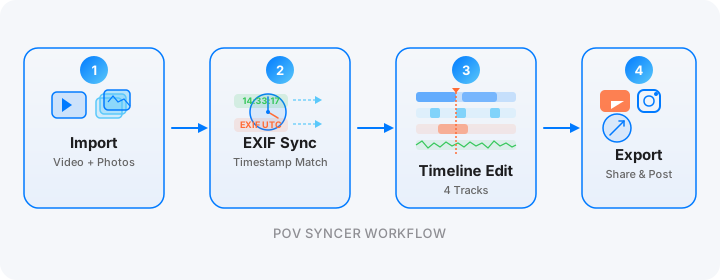
Here is the post-shoot editing workflow for a full architectural session.
Step 1: Import. Transfer the DJI Action 5 Pro footage to your iPhone via the DJI Fly app or a Lightning/USB-C card reader. Your Sony RX100 VII files transfer via the camera's built-in Wi-Fi to the Sony Imaging Edge app, or via a card reader. Create a new project in POV Syncer and import both.
Step 2: Review the auto-matched timeline. POV Syncer reads the EXIF timestamp from each Sony photo and places it on the DJI video timeline at the corresponding second. For a two-hour architectural session with 40 selected photos, you will see a populated 4-track timeline showing exactly where each image was taken during the walkthrough. This is a genuinely useful spatial diagram of your shoot — you can see clustering in the spaces you found most interesting and gaps where you moved quickly through less interesting areas.
Step 3: Adjust photo overlay duration. For YouTube long-form architecture content, longer photo holds are appropriate — 3-4 seconds per image gives viewers time to read the detail. For Instagram Reels, 1.5 seconds keeps the pace engaging. Use the timeline editor to drag each photo clip to your preferred duration.
Step 4: Add titles for spatial orientation. Architecture videos benefit from titles that name each space — "Ground floor atrium", "Third-floor circulation", "Roof terrace" — so viewers understand the spatial sequence as they watch. Use POV Syncer's titles track to add these location labels at the appropriate points, using a clean sans-serif font from the 15 available in Pro.
Step 5: Add AI narration for architectural context. Architecture is a discipline with a technical vocabulary that enriches the viewing experience when explained. Use POV Syncer's AI narration to record a brief commentary on key design decisions, materials, or spatial sequences. "The transition from the compressed entrance vestibule to this double-height space is a classic compression-release sequence" is the kind of narration that makes architectural content compelling to a general audience as well as to specialists.
Step 6: Export for YouTube and Instagram. The same POV Syncer project can generate both a 16:9 landscape YouTube long-form export and a 9:16 portrait Instagram Reels cut. Export the YouTube version first at full quality, then use the portrait preset for Instagram with a tighter clip selection.
Architecture Photography Video for YouTube Long-Form
YouTube rewards long architectural documentation content. A 10-15 minute building walkthrough with POV footage, photo overlays, and narrated context is the kind of content that architecture students, enthusiasts, and clients bookmark and return to.
For YouTube architecture content, consider this structure:
- Exterior approach (0-90 seconds): DJI footage approaching the building, establishing its context and scale, with your exterior photography appearing as overlays
- Entry sequence (90s-3min): The approach to the entrance and entry experience, which is usually the most carefully designed part of any significant building
- Key spaces (3-12min): Room by room, your POV walkthrough with photo overlays at the moments you found compositionally significant. Use the titles track to name each space.
- Detail montage (12-14min): A faster-paced sequence of your detail shots — materials, joinery, hardware, decorative elements — over ambient audio
- Conclusion (14-15min): Return to the exterior, final overview, title card with project information
What the Finished Video Looks Like
A concrete example from an early twentieth-century public building session with the DJI Action 5 Pro and Sony RX100 VII.
The video opens 16:9 in D-Log M footage graded to a warm, slightly desaturated look appropriate for historic architecture. The DJI footage shows an approach from street level: a stone facade, arched entrance, the play of morning light across carved detail. At each point where the Sony fired, the corresponding image appears — a compression of the carved keystone at 200mm, the geometry of the arch entrance at 50mm equivalent, the grain of the stone at macro distance.
The interior sequence opens with the entry hall revealed as a POV push through the main doors — a moment that, with RockSteady stabilisation enabled, is fluid and cinematic rather than jittery. The double-height space is shown simultaneously as a wide still from the Sony and as first-person video from chest height. The title track names each space. The AI narration provides architectural context between the major photo overlays.
The final YouTube export is 12 minutes at 1080p. The Instagram cut is 60 seconds with the five best architectural images. Both come from the same POV Syncer project file.
Start documenting your architecture sessions
Download POV Syncer free. Import your first architectural walkthrough and see the sync in action.
Download on App Store — FreeThe Workflow in Summary
Architecture photography video is not a separate production from your photography practice — it is the documentation of it. The DJI Action 5 Pro running on your chest captures the spatial experience of moving through a building. The Sony RX100 VII captures the images that interpret that experience. POV Syncer connects them using EXIF timestamps, placing each Sony photo at the exact second it was taken in the DJI footage.
The result is a walkthrough video that shows both dimensions of architectural photography: the spatial experience and the photographic interpretation. It is a format that works as a portfolio piece, a client pitch, a YouTube documentary, and a teaching tool. And the post-production workflow, once you have run through it once, takes less time than a basic Lightroom cull.
Pro subscription at $9.99/month gives you all 15 fonts, 10 background styles, AI narration, unlimited projects — the complete toolkit for professional-grade architecture content. Compare the free and Pro plans here.
Related posts: sports photography video sync and daily walk photo story.