Sports photography is one of the most technically demanding disciplines in the field. You are tracking subjects moving at 30 kilometres per hour, making split-second exposure decisions, repositioning constantly, and hoping your autofocus keeps up. The work is exhilarating and the results — when they land — are the kind of images that stop people mid-scroll.
What almost no sports photographer is doing yet: capturing their own process with a second camera, then syncing those process shots to their POV footage to create a behind-the-scenes highlight reel that makes the still images hit even harder.
This is the sports photography video sync workflow. It works with a GoPro Hero 13 or GoPro on your athlete or chest-mounted on yourself, paired with a Sony A7 IV or Sony A9 III as your primary shooting camera. POV Syncer handles the sync automatically.
Who This Workflow Is For
If you shoot any of the following, this workflow produces content that is genuinely valuable to your clients and your portfolio:
- Team sports — football, basketball, rugby, hockey
- Individual action sports — mountain biking, surfing, skateboarding, running
- Athletic events — marathon, triathlon, obstacle course races
- Fitness and gym content for brands or coaches
Athletes and teams want more than photos. They want content that shows the world what they do. A 90-second YouTube video showing a GoPro athlete POV, your shooting process from the sideline, and the actual sports photos you captured — with your name on it — is a product that gets shared, saved, and remembered.
Get the settings right the first time
Download the free POV Photographer's Cheat Sheet — camera settings, EXIF tips, and export presets for Ray-Ban Meta, GoPro, DJI, and Insta360 on one printable page.
Free PDF, no spam. Unsubscribe anytime.
The Setup: GoPro Hero 13 + Sony A7 IV
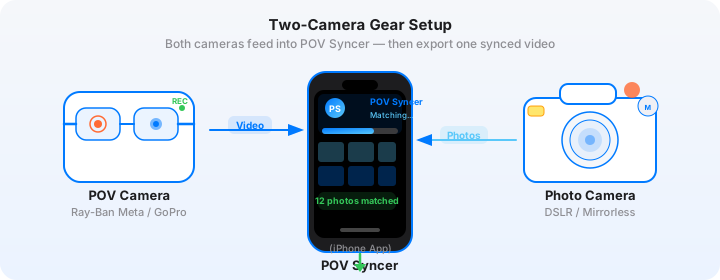
The GoPro Hero 13 is the action camera the sports photography workflow is built around. It shoots 5.3K at 60fps or 4K at 120fps — frame rates that let you pull individual frames that work as usable still images for behind-the-scenes use. More importantly for this workflow, it writes precise GPS-embedded EXIF timestamps to every video file, which is the data POV Syncer uses for matching.
GoPro Hero 13 Mounting Positions
You have two meaningful choices for where the GoPro goes, and each produces a different kind of content:
On the athlete. Chest-mount the GoPro on a surfer, mountain biker, or runner. The footage is immersive, visceral first-person POV — the viewer feels exactly what the athlete feels. When your Sony sports shots appear over this footage, the contrast is powerful: the viewer sees both the raw experience and the photographic interpretation of it simultaneously.
On yourself. Head-mount or chest-mount the GoPro on your own body while shooting from the sideline. This is a genuine behind-the-scenes capture: the viewer watches you track, anticipate, and fire. When your best action shots appear as overlays at the exact moments they were taken, the sequence reveals the craft behind the image in a way that is difficult to fake.
For sports photography marketing content, the on-photographer mount tends to be more powerful for your portfolio. For athlete content, the on-athlete mount generates more engagement from their audience. Run two GoPros if you want both — POV Syncer handles multiple video clips in the timeline editor.
GoPro Hero 13 Settings for Sports
- Resolution: 4K at 60fps for outdoor sports with good light; 2.7K at 60fps if you are shooting in a stadium or gym with mixed artificial lighting
- Stabilisation: HyperSmooth 6.0 on — sport involves a lot of movement and unstabilised footage is unwatchable at the playback speeds used for BTS content
- GPS: Enable GPS in the GoPro settings — this improves the EXIF timestamp accuracy that POV Syncer reads for matching
- Protune: Leave off for BTS social content — GoPro's default colour science is social-ready without grading
- TimeWarp: Useful for transitions, but record at least some real-time footage for the moments where your camera fires
Sony A7 IV Settings for Action Photography
The Sony A7 IV shoots at 10fps continuous in mechanical shutter mode and up to 30fps in the Hi+ mode. For action sports, these settings produce consistently usable frames:
- Shutter speed: 1/1000s minimum for running subjects; 1/2000s for cycling or ball sports; 1/4000s for fast ball sports or motorsport
- Aperture: f/2.8 to f/4 — wide enough to isolate the subject, tight enough to keep moving subjects acceptably sharp
- ISO: Auto ISO with a maximum of ISO 12800 outdoors; cap at ISO 6400 for gym or stadium work
- AF mode: Tracking AF with the subject recognition set to Human — the A7 IV's eye tracking handles most action scenarios reliably
- Drive mode: High-speed continuous at 10fps for general action; reserve Hi+ for decisive moments
- File format: JPEG + RAW — POV Syncer reads EXIF timestamps from both; use RAW for editing, JPEG for fast previewing
The Sony A9 III, if you have access to one, changes the equation with its global shutter. 120fps mechanical, no rolling shutter distortion, perfect for anything involving spinning wheels, fast ball sports, or strobed stadium lights. The EXIF timestamp data is equally precise and syncs just as cleanly in POV Syncer.
How Sports Photography Video Sync Works in POV Syncer
The core value of sports photography video sync is temporal precision. When an athlete makes a save, scores a goal, catches a wave, or clears a jump, you fire a burst of shots. Those frames exist as EXIF-timestamped files. The GoPro, rolling continuously, was recording that exact same second. POV Syncer reads both, matches them, and places your best shots at the precise moment they happened in the action footage.
Here is the post-shoot workflow:
1. Sync your clocks before shooting. Set both the GoPro Hero 13 and your Sony A7 IV to the same timezone and verify the time against a reference. The GoPro's GPS time is highly accurate — set your Sony to match it within 5 seconds for reliable matching. POV Syncer has a 4-strategy EXIF matching system that handles small offsets, but starting close gives the best results.
2. Cull your best shots first. After a sports shoot you might have 2,000 frames on the Sony. Before importing into POV Syncer, cull to your 20-40 best images. These are the frames that appear as overlays in the highlight reel. Import the GoPro footage and your curated selections into a new POV Syncer project.
3. Let EXIF matching run. POV Syncer reads each photo's timestamp and places it on the video timeline at the corresponding second. For a sports shoot, you will see clusters of photos at the moments of peak action — the goal, the finish line, the trick landing. These clusters are your video's natural high points.
4. Edit the timeline for pacing. Use POV Syncer's 4-track timeline editor to control how long each photo holds on screen. For social content, 1.5 to 2 seconds per photo works well. For a longer YouTube highlight reel, you can let signature shots hold for 3-4 seconds with a title overlay. Drag the photo clips, adjust titles on the titles track, and add your AI narration script on the voice track.
5. Add narration or music context. For sports content, AI narration works well as a factual layer — camera settings, location, athlete name — while ambient crowd or ambient environment audio plays underneath from the GoPro footage itself. POV Syncer's Pro tier lets you import custom audio if you want to use a licensed music track instead.
Ready to build your sports photography video sync workflow? Download POV Syncer free and import your next event's footage.
Exporting Sports Photography Content for YouTube and Instagram
Sports photography behind-the-scenes content performs on two different platforms with fundamentally different requirements. POV Syncer handles both from the same project.
YouTube Long-Form Export
YouTube rewards longer content for professional photography channels. A 5-10 minute behind-the-scenes sports photography video — showing the approach, the best moments from the GoPro, your action shots appearing in context, and a final gallery of the session's best images — is a format that builds audience and drives search traffic for months.
For YouTube export from POV Syncer:
- Export at 1080p 16:9 landscape format
- Include a title card at the start with the event name and your brand
- Use the full-length GoPro footage as the base, not shortened clips
- Let photo overlays run at a pace that gives viewers time to read captions
Instagram Highlight Reel Export
Instagram Reels and Stories have different needs. Thirty to ninety seconds, portrait or square format, fast pacing. For your best 10-12 action shots from the session:
- Export at 9:16 portrait for Reels
- Trim the GoPro footage to the highest-action 45-second window
- Use POV Syncer's photo overlay timing at 1-1.5 seconds per image for Reels pacing
- Lead with your single best shot, then build the sequence
Tips for Best Results in Sports Environments
Handle the Time Sync Problem Before It Happens
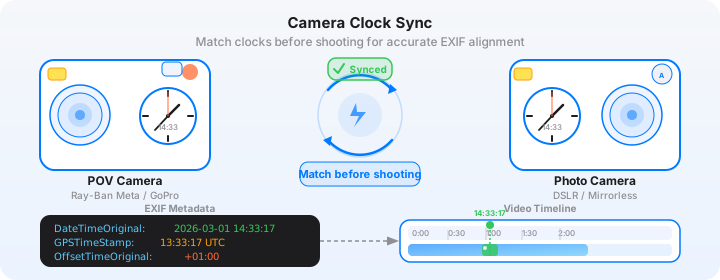
Camera clocks drift. A Sony A7 IV left on battery backup between shoots can drift by 30-60 seconds over a week. The GoPro Hero 13 resets its clock from GPS every time it acquires a satellite lock. Before every sports shoot, power on the GoPro, wait for GPS lock (the GPS icon turns solid), then set your Sony's clock to match exactly.
POV Syncer's EXIF matching uses four fallback strategies to handle clock drift, but the more accurate your source timestamps, the more precisely your action shots land in the video. Within 2 seconds is excellent. Within 10 seconds is still workable. Beyond 30 seconds and you will see misplaced overlays that need manual correction in the timeline.
Burst Selection Strategy
The Sony A7 IV at 10fps generates 300 frames per 30 seconds of action. For POV Syncer's sync to feel satisfying, you want a clear best frame from each burst — not fifteen almost-identical images all stacked at the same timeline position. Cull to one or two frames per burst before importing. The timeline will be cleaner, the pacing will be more intentional, and the finished video will be more watchable.
GoPro Battery and Recording Management
The Hero 13 gives approximately 90-120 minutes of recording at 4K60 before the battery needs a swap. For full-day sports events, carry two batteries and swap at a natural break. When you create a new project in POV Syncer, you can add multiple GoPro video clips to the same timeline — the app handles clip sequencing so you can cover a full day's event in one project without gaps.
What the Finished Video Looks Like
Here is a concrete example from a mountain biking session.
The GoPro footage opens on the trail: the athlete's hands on handlebars, trees blurring past, the creak and rattle of the bike translated through the chest mount. The Sony A7 IV shots — the athlete airborne over a gap jump, front wheel lifted on a steep root section, a lens-flare moment cresting a rise — appear over the footage at the exact seconds they were taken. Each photo holds for two seconds with a clean caption in a bold condensed font, then the GoPro POV resumes.
The 4-track timeline gives you control over every layer: the photo timing, the caption text and font, the AI narration, and any effects. The finished YouTube export is 6 minutes of content that shows the session completely. The Instagram cut is 60 seconds with the five best shots.
Both export formats come from the same POV Syncer project file, which you can reopen and re-export at any time.
Build your sports photography highlight reel
Start free. No credit card required. Import your first sports shoot and see the sync in action.
Download on App Store — FreeThe Workflow in Summary
Sports photography video sync is not a complicated workflow once it is set up. A GoPro Hero 13 on the athlete or on yourself, a Sony A7 IV doing what it does best with continuous AF, and POV Syncer connecting the two by matching every EXIF timestamp from your action shots to the exact frame in the GoPro footage.
The output is a behind-the-scenes highlight reel that serves multiple purposes: it markets your work to potential clients, it gives athletes shareable content, and it builds the kind of audience that understands the craft behind the images.
Pro subscription unlocks unlimited clips, all 15 fonts, 10 background styles — everything you need for professional-grade client deliverables. At $9.99 per month or $99.99 per year, it pays for itself on the first client shoot. Compare plans here.
Related reading: food photography behind the scenes video and architecture photography POV.