5 Budget POV Street Photography Setups Under $500
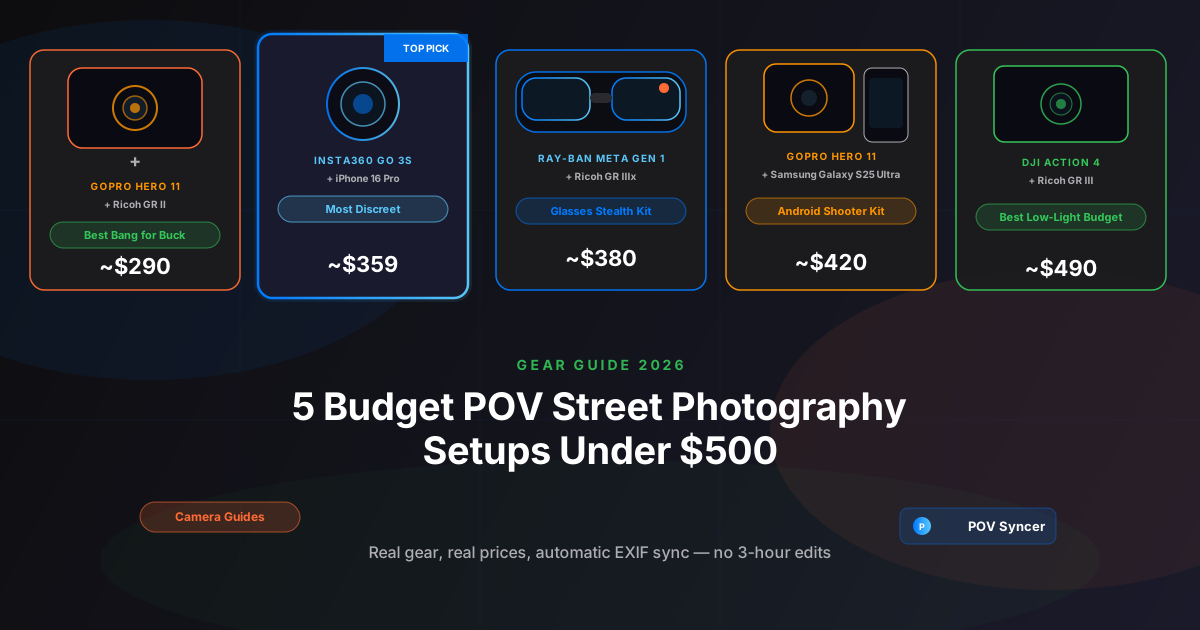
There is a version of street photography content creation that costs thousands of dollars. A Fujifilm X100VI at $1,599. A Leica Q3 at $5,995. A Ray-Ban Meta Gen 2 at $299. A POV Syncer subscription. Nice if you can swing it. But here is the thing — the best street photography POV video I have ever watched was shot on a GoPro Hero 11 and a second-hand Ricoh GR II, and the photographer had less than $300 in the entire rig.
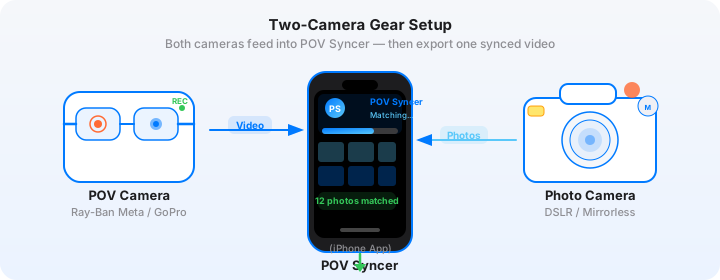
The formula for a compelling POV street photography video does not require expensive gear. It requires decent footage from a camera you are wearing, decent stills from a camera you are carrying, and a way to sync the two together without spending your entire Saturday afternoon in Premiere Pro scrubbing through footage one frame at a time. That last part is what kills most people's motivation to make these videos — not the gear cost, but the editing time. Three hours of manual timeline work for a 10-minute video is a grind that even expensive gear cannot fix.
What follows are five specific budget POV street photography setups — with exact current prices, real camera settings, and honest assessments of what each one is good at and where it falls short. Every setup comes in under $500 total. All five work with POV Syncer's automatic EXIF sync, which means the editing grind disappears regardless of which budget kit you choose.
What You Are Actually Buying With "Budget" Gear
Before the list, a quick framing note. Budget does not mean compromised. It means you are buying the previous generation of excellent gear, or pairing a capable action camera with a smartphone you already own, or shopping used for a compact camera that was considered premium two or three years ago.
The GoPro Hero 11, for example, shoots 5.3K video with HyperSmooth 5.0 stabilization. It was the flagship action camera in 2022 and it is still genuinely excellent. The fact that the Hero 13 exists does not make the Hero 11 bad — it makes the Hero 11 affordable. The same logic applies to the DJI Action 4, the Insta360 GO 3S on sale, and the Ray-Ban Meta Gen 1.
Street photography stills from a second-hand Ricoh GR II or a Ricoh GR III are not budget stills. They are excellent stills from cameras that professional street photographers have used for years. The GR series has a cult following for a reason — that 28mm equivalent fixed lens, that snap-focus system, that pocketable form factor. You are not settling when you buy one used.
Get the free POV Photography Cheat Sheet
Optimal settings for all five budget setups in this guide — ISO, aperture, frame rate, EXIF sync tips, and export presets — on one printable page. Free for subscribers.
Free PDF, no spam. Unsubscribe anytime.
Setup 1: GoPro Hero 11 + Ricoh GR II — The Classic Budget Kit (~$290)
This is the setup I recommend to anyone who asks me what to buy first. The GoPro Hero 11 can be found new for around $180-200 or used for under $150. A second-hand Ricoh GR II — the model that preceded the popular GR III — can be had for $120-160 from reputable used camera dealers or eBay. Total outlay: approximately $290. The results will surprise you.
Why This Combination Works
The GoPro Hero 11 introduced the new 1/1.9-inch sensor that the Hero 12 and Hero 13 kept. This means the image quality difference between the Hero 11 and the current flagship is minimal in good light — you are not giving up much. HyperSmooth 5.0 stabilization is excellent; the footage from a walking session through a market or along a busy street is smooth and watchable. Mount it on a chest harness, a bag strap, or a hat clip. For street use, the chest mount tends to produce the most natural-feeling footage — close enough to eye height without looking down at the ground.
The Ricoh GR II shoots 16.2MP JPEGs with the same 28mm equivalent f/2.8 lens that made the GR series famous. Set it to Aperture Priority at f/5.6, ISO Auto with a ceiling of 3200, minimum shutter speed 1/250s. Enable Snap Focus — pre-focused at 2-3 meters, it fires the moment you press the shutter. You are not waiting for autofocus. For street photography at normal interaction distances, this is faster and more reliable than any phase-detect AF system.
GoPro Hero 11 Settings for Street
- Resolution: 4K30 (or 1080p60 if you prefer smoother slow-motion in edit)
- Field of view: Linear mode — removes fish-eye distortion, approximately 16mm equivalent
- Stabilization: HyperSmooth 5.0, Boost mode disabled for wider FOV
- Color: Natural (easier to colour-match with JPEG stills in the edit than Flat/Log)
- White balance: Auto — on a mixed-light street, manual WB is rarely worth the effort
- Audio: Stereo, Wind reduction on
Ricoh GR II Settings for Street
- Mode: Aperture Priority, f/5.6 (deep depth of field suits candid street work)
- ISO: Auto, ceiling 3200, minimum shutter 1/250s
- Focus: Snap Focus, 2.5m distance
- File format: JPEG Fine (EXIF timestamps are embedded automatically; RAW works too but JPEG is faster to process)
- Image stabilization: Sensor-shift SR on
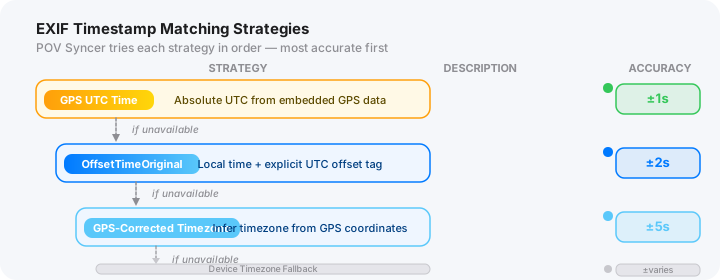
The key detail for automatic EXIF sync: make sure the GR II's clock is set to match your phone's time before the session. On the GR II, go to Setup menu, then Date/Time, and compare to your phone. Thirty seconds of setup eliminates the most common reason photo-to-video matching goes wrong.
Best for: First-time POV video makers, photographers who want to try the format before committing to expensive gear, anyone who already owns a used Ricoh GR camera.
Setup 2: Insta360 GO 3S + iPhone 16 Pro — The Minimal Kit (~$360)
If your goal is a street kit that fits in your jacket pocket and produces footage that nobody knows is being recorded, this is it. The Insta360 GO 3S is a 26mm cube — smaller than a large marble — that clips magnetically to a collar, shirt button, bag strap, or cap brim. It weighs 35 grams. You will genuinely forget it is there. The iPhone 16 Pro fits in your other jacket pocket. Total outlay for the GO 3S alone is approximately $360 on sale; you almost certainly already own the iPhone.
Why This Combination Works
The iPhone 16 Pro is not a budget camera by any reasonable definition. But if you already own one, the marginal cost of adding the GO 3S to create a POV street setup is just $360 — well within budget. The iPhone 16 Pro's 48MP main sensor, computational photography, and ProRAW capability produce stills that equal or exceed dedicated compact cameras in most daylight conditions. The 24mm equivalent main lens is a natural street focal length.
The GO 3S footage has one characteristic that makes it particularly compelling for street use: because the camera is at collar height rather than chest height, and because it is so small, the footage has a genuinely candid quality. It does not look like action camera footage. It looks like something you might capture with your eyes.
Insta360 GO 3S Settings for Street
- Resolution: 2.7K30 (the 4K mode requires the Action Pod; standalone 2.7K is excellent for social)
- Field of view: Wide (FlowState stabilization engaged)
- Stabilization: FlowState enabled — critical for collar-level mounting where movement is more pronounced than chest level
- Color: Vivid for direct social posting; Flat if you plan to colour-grade in POV Syncer's export
- Exposure: Auto, with Exposure Lock when you find a good starting value for the ambient light
iPhone 16 Pro Settings for Street
- Lens: 24mm main camera (1x) — matches the GO 3S field of view more closely than the ultra-wide
- Format: ProRAW or HEIF Fine — both embed
DateTimeOriginalEXIF timestamps that POV Syncer reads perfectly - Shutter: 1/500s minimum in Auto mode via Camera app settings
- Focus: Lock focus on a point at 2-3m; relock when the scene changes substantially
One practical note: the GO 3S clock syncs to your phone automatically via the Insta360 app. Open the app, connect the camera, and the clocks are aligned. This is the simplest clock-sync process of any camera in this guide — there is nothing manual about it.
Best for: iPhone shooters who want to add POV video without buying a second camera; photographers who prioritise absolute minimalism and discretion; anyone shooting in warm weather when jacket pockets are not available (the GO 3S clips to a bag strap just as effectively).
Setup 3: Ray-Ban Meta Gen 1 + Ricoh GR IIIx — The Glasses Stealth Kit (~$380)
The Ray-Ban Meta Gen 1 is the predecessor to the Gen 2, released in 2021. It can now be found used for $120-180, which puts a genuine smart glasses POV camera within reach of a budget kit. Pair it with a second-hand Ricoh GR IIIx — the 40mm equivalent version of the GR III, perfect for urban street photography — at around $550 new or $380-420 used, and you have a genuinely stealthy kit for approximately $380 total if you shop carefully on both.
Wait — I know the GR IIIx costs more than that new. The math only works if you buy both used, or if you buy the GR III (28mm) instead, which goes for less on the used market. I am including this setup because the glasses-plus-compact formula is uniquely compelling for street photographers, and the Gen 1 makes it accessible.
Ray-Ban Meta Gen 1 vs Gen 2: What You Are Giving Up
The Gen 1 shoots 1080p video at up to 30fps versus the Gen 2's 1080p60. The sensor is slightly smaller, and the low-light performance is noticeably weaker — you will see grain above ISO equivalent 400. The five-microphone array of the Gen 2 is reduced to two microphones on the Gen 1, and wind noise is a real problem in anything above a gentle breeze. The battery life is roughly similar at 45-60 minutes continuous recording.
What you are not giving up: the fundamental reason to own glasses-camera POV footage. The footage looks like what a person sees. Subjects behave naturally because there is no visible camera equipment. When you raise the GR IIIx to frame a shot, the glasses have already recorded the moment you saw the person, the composition forming in your head, the instinct that preceded the shutter press. That documentary quality is the same on the Gen 1 as the Gen 2.
Ray-Ban Meta Gen 1 Settings for Street
- Resolution: 1080p30 — the only mode, which simplifies decisions
- Capture mode: Video, not Stories (Stories compresses aggressively)
- LED indicator: Leave enabled — this is legally and ethically important in public spaces
- Clock sync: Via Meta View app — ensure your phone has location services enabled for automatic time sync
Ricoh GR IIIx Settings for Street
- Mode: Aperture Priority, f/4-5.6
- ISO: Auto, ceiling 6400 (the GR IIIx sensor handles high ISO very well for a compact)
- Focus: Snap Focus at 2.5m, or Full-Press Snap for instant firing
- Image effects: High Contrast Mono or Standard — JPEG straight from the GR IIIx is often ready to post without any editing
- EXIF: Date/Time set to match Meta View app's displayed time
For a deeper dive into this specific pairing — including mounting tips for the glasses and how to manage the 1080p footage in an edit — see our dedicated post on stealth street photography setups and the Ray-Ban Meta street photography guide.
Best for: Photographers who want the glasses-level POV experience without paying Gen 2 prices; anyone who shoots in environments where visible camera equipment creates social friction; street photographers who want the most authentic first-person perspective available in a budget kit.
Download POV Syncer Free — Create Your First POV Video in 60 SecondsSetup 4: GoPro Hero 11 + Samsung Galaxy S25 Ultra — The Android Kit (~$420)
If you shoot on Android rather than iOS, this is your setup. The Samsung Galaxy S25 Ultra is a remarkable street photography tool — the 200MP main sensor, the 3x and 5x optical zoom lenses, and Samsung's computational photography produce stills that are genuinely competitive with dedicated compact cameras. If you already own one, the GoPro Hero 11 at $180-200 is the only addition required to build a complete budget POV street setup for around $200 in incremental spend.
If you are buying both, the Samsung Galaxy S25 Ultra costs around $1,300 — which puts the combined price far above $500. But like the iPhone setup above, this entry is for photographers who already carry the phone daily and want to add a POV camera layer for minimal additional cost.
Why the S25 Ultra Works for Street Photography
Most smartphone cameras are optimised for computational portrait photography: bokeh, skin tone rendering, face-detection autofocus. The S25 Ultra is different in that its 200MP sensor and multiple optical zoom lenses make it genuinely useful for candid street work at varied distances. The 3x zoom (equivalent to a 70mm lens) is particularly useful for compressing distance between you and a subject — the GoPro is recording the wide context at eye level while the S25 Ultra captures a tighter moment without you physically approaching.
GoPro Hero 11 + S25 Ultra Sync Notes
POV Syncer works with photos from any camera that embeds standard EXIF DateTimeOriginal timestamps — including Samsung JPEG and RAW files. The Galaxy S25 Ultra writes standard EXIF timestamps to every image it captures, which means the EXIF matching workflow is identical to using a dedicated compact camera. Import your GoPro footage, import your S25 Ultra photos, let POV Syncer match timestamps automatically.
- GoPro settings: Same as Setup 1 — 4K30, Linear mode, HyperSmooth 5.0, Natural colour
- S25 Ultra settings: 50MP mode (full 200MP is slower to process; 50MP is the sweet spot for street shooting speed), Rear camera, Single Take or Pro mode for manual control
- Clock sync: Android's automatic network time keeps the S25 Ultra clock accurate; sync GoPro clock via the GoPro app before shooting
Best for: Android photographers; photographers who want a single device to serve as both street camera and editing/posting platform; anyone who values the variable zoom range of a flagship smartphone for mixed-distance street work.
Setup 5: DJI Action 4 + Ricoh GR III — The Low-Light Budget Kit (~$490)
This is the most capable setup in the list, and it sits right at the $500 ceiling. The DJI Action 4 can be found new for around $260-280 on sale, or used for around $200-220. The Ricoh GR III — the current model with the newer 24.2MP sensor and improved autofocus over the GR II — goes for around $800 new but is widely available used for $380-480 from reputable dealers. The math gets you to approximately $490 if you are patient on both purchases.
Why the DJI Action 4 Earns Its Place Here
The DJI Action 4 is the predecessor to the DJI Action 5 Pro, which we cover in our full DJI Action 5 Pro guide. The sensor on the Action 4 is a 1/1.3-inch unit — larger than the GoPro Hero 11's 1/1.9-inch sensor, and meaningfully better in low-light conditions. RockSteady 3.0 stabilization is excellent. Battery life at approximately 130 minutes at 1080p30 covers a generous street session without a swap.
Low-light performance is the reason to choose this combination over Setup 1. If you shoot in shaded alleys, covered markets, subway stations, dusk light, or in cities where winters mean golden hour arrives at 3pm, the Action 4's sensor handles conditions where the Hero 11 footage becomes noticeably noisy. The D-Log M colour profile gives you flexibility to match the footage to the GR III's output in post.
DJI Action 4 Settings for Street
- Resolution: 4K30 or 1080p60
- Field of view: Normal (Linear mode), approximately 19mm equivalent
- Stabilization: RockSteady 3.0 enabled
- Color: D-Log M for maximum editing flexibility; Normal if you prefer straight-to-post footage
- ISO limit: Auto, max 3200 for clean footage; the larger sensor handles 6400 in the darkest conditions
- Audio: Stereo, Wind Reduction on
Ricoh GR III Settings for Street
- Mode: Aperture Priority, f/5.6 in good light; f/2.8 in low light
- ISO: Auto, ceiling 12800 — the GR III's sensor is remarkably clean at high ISO for a compact
- Focus: Snap Focus, 2.0m or 2.5m depending on typical subject distance
- Image stabilization: Sensor-shift SR on at all times
- Crop mode: 35mm crop available if you want a slightly tighter frame for street portraits
- Clock sync: Set manually via Setup menu before each session, compared to GoPro app's displayed time
One useful DJI-specific sync note: the DJI Mimo app (available for iOS and Android) keeps the Action 4's clock in sync when you connect before a session. Do this before you start shooting and the EXIF matching in POV Syncer will be frame-accurate without any manual offset correction.
Best for: Photographers who shoot in challenging light; anyone who wants the best low-light video quality available in a sub-$500 budget kit; photographers already invested in the Ricoh GR III ecosystem who want to add POV video without compromising on their primary camera.
Want settings cheat sheets for 20+ camera combos?
Join 1,000+ photographers getting weekly tips — including dedicated cheat sheets for every budget setup in this guide plus premium combos. Optimal settings, EXIF sync notes, and export presets. All free.
Free weekly tips. Unsubscribe anytime.
The Editing Problem Is the Same at Every Price Point
Here is the honest reality that nobody talks about in gear comparison posts. Whether you spend $290 on a Hero 11 and GR II or $5,000 on a Ray-Ban Meta Gen 2 and a Leica Q3, the editing problem is identical. You come home from a two-hour street session with 45 minutes of POV footage and 80 stills. You need to turn that into a 10-minute process video.
In Premiere Pro or Final Cut Pro, that workflow looks like this: import the footage. Import the photos. Scrub to find the approximate moment you raised the camera for the first shot. Drag the JPEG to the timeline. Adjust the position by 2-3 seconds because the manual timestamp estimate was off. Repeat 79 more times. Add titles. Adjust the export. Two to four hours, minimum, for a photographer who knows what they are doing. Longer for someone new to the software.
That manual editing grind is the real reason most photographers who start making POV street videos stop making them after two or three attempts. It is not the gear cost. It is the time cost.
How POV Syncer Replaces the Manual Workflow
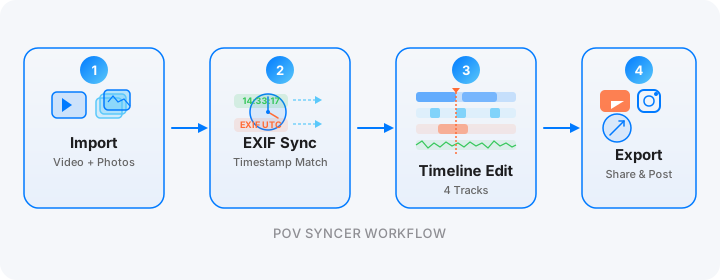
POV Syncer reads the DateTimeOriginal field from every photo's EXIF metadata — this timestamp records the exact second the shutter fired. It reads the start timestamp from your POV camera's video file. It calculates where every photo belongs on the video timeline and places them automatically.
For a session with 80 photos and 45 minutes of footage, what took hours manually takes under 60 seconds. You get a fully populated timeline. Trim the start and end, add a title card from the 15 available fonts, optionally add an AI narration voice-over that describes the session, and export. Total finishing time for a 10-minute street video: 15-20 minutes.
Every camera in this guide writes standard EXIF timestamps that POV Syncer reads. The GoPro Hero 11 embeds timestamps in the MP4 container. The DJI Action 4 uses the same format. The Insta360 GO 3S writes its own file structure that POV Syncer parses automatically. The Ray-Ban Meta Gen 1 and Gen 2 both embed timestamps that the app handles. Your street camera — whether a Ricoh GR II, GR IIIx, GR III, iPhone, or Samsung — writes DateTimeOriginal to every image file it captures.
After the Auto-Match: The Finishing Steps
Once the automatic EXIF sync places your stills on the timeline, the finishing workflow is the same regardless of which budget setup you used. Trim the beginning and end of the video to remove any footage before and after the session. Cut dead time in the middle — long stretches where you were walking without shooting. Add a title card with location and date. Add a brief spoken intro using the AI narration feature if you want to give context to the video. Export in the format suited for the platform — vertical for Reels and TikTok, horizontal for YouTube.
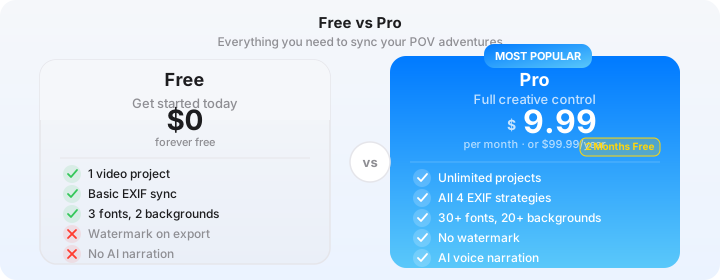
See the features page for a full walkthrough of the timeline editor, and the pricing page for a comparison of free and Pro tiers. The free tier is fully featured — Pro only adds AI voice narration on top.
Budget Setup Comparison at a Glance
Here is the quick summary for reference:
- Setup 1 — GoPro Hero 11 + Ricoh GR II (~$290): Best bang for buck. Classic action camera quality, legendary GR street optics, second-hand pricing makes both cameras accessible. Best for first-time POV video makers.
- Setup 2 — Insta360 GO 3S + iPhone 16 Pro (~$360): Most discreet. The GO 3S is invisible; the iPhone is already in your pocket. Best for minimal-carry photographers and anyone who already shoots on iPhone.
- Setup 3 — Ray-Ban Meta Gen 1 + Ricoh GR IIIx (~$380): Glasses stealth kit. Authentic eye-level POV footage, compact prime-lens stills camera, maximum social anonymity. Best for photographers who want the glasses-camera experience without Gen 2 pricing.
- Setup 4 — GoPro Hero 11 + Samsung Galaxy S25 Ultra (~$420): Android kit. Best for photographers who already carry the S25 Ultra and want to add a POV layer with minimal incremental cost.
- Setup 5 — DJI Action 4 + Ricoh GR III (~$490): Best low-light budget kit. The largest sensor in any budget action camera, the cleanest high-ISO performance in a compact street camera, excellent battery life. Best for photographers who shoot in challenging light or long sessions.
Conclusion: The Gear Is Not the Barrier
You do not need to spend thousands of dollars to start making POV street photography videos. Any of the five setups in this guide — from the $290 Hero 11 and GR II pairing up to the $490 DJI Action 4 and GR III combination — will produce footage and stills that translate into compelling, shareable process content. The gear is not the barrier.
The barrier, for most photographers, is the editing. Scrubbing through footage. Manually placing 60 or 80 photos on a timeline in Premiere Pro. Three hours of tedious timeline placement for a 10-minute finished video. That is what stops people. Not the camera cost — the time cost. POV Syncer's automatic EXIF sync eliminates that barrier in record time. Import footage and photos, let the app match timestamps automatically, finish the video in 15 minutes, post it.
Pick the setup that fits your budget and your shooting style. Then spend the time you save on manual editing actually out on the street, shooting. That is where the good frames are.
Turn any of these budget setups into a finished video today
Download POV Syncer free and connect your POV camera footage to your street photography stills — automatic EXIF sync works with every camera in every setup in this guide. AI narration, 15 premium fonts on Pro.
Or get the free cheat sheet for all 5 budget setups in this guide:
Free PDF. No spam. Unsubscribe anytime.