Dog Walker's POV: Street Photography While Walking Your Dog
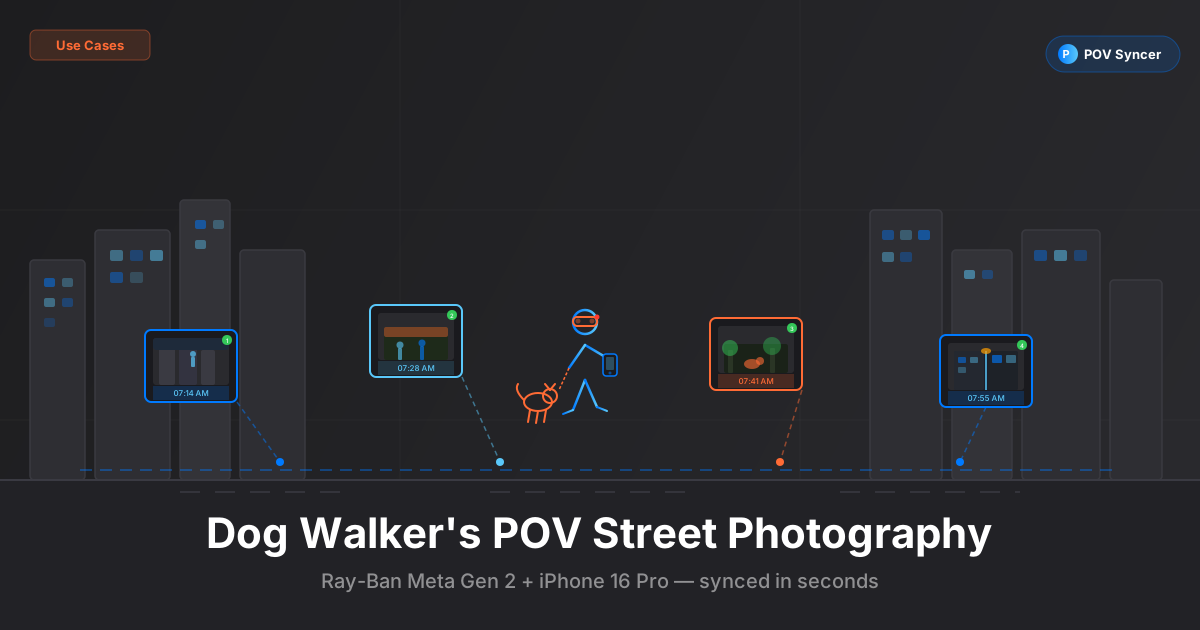
It is 6:50 in the morning. The street outside is quiet in that specific way streets are only quiet for about forty minutes before the city fully wakes up. You are standing on the pavement with a leash in one hand, a coffee in the other, and a dog who has already found something interesting about a lamppost. You are also wearing your Ray-Ban Meta Gen 2 glasses and you have your iPhone 16 Pro in your jacket pocket. Whether you realize it yet or not, you are already set up for one of the best street photography sessions you will have all week.
Dog walkers are invisible. Not literally, but photographically. Nobody gives a second glance to someone being pulled gently toward a patch of grass. Your hands are occupied. You look unhurried. You are a neighborhood fixture, not a tourist, not an observer — just another person on a morning errand with an animal. That combination of ordinariness and regularity gives you access to moments that a photographer with a camera bag and a conspicuous lens simply never gets.
The problem — and this is where most people stop — is that documenting this kind of casual, everyday street photography process used to require hours of manual editing. You would come home, transfer the Ray-Ban Meta footage and the iPhone photos, open Final Cut or Premiere, and spend the next two to three hours scrubbing through footage, manually placing photos on a timeline, and trying to remember which lamppost moment matched which street shot. The editing grind was so painful that most people quietly gave up on the idea entirely.
POV Syncer eliminates that problem. It reads the EXIF timestamps from your iPhone 16 Pro photos and matches them to your Ray-Ban Meta Gen 2 footage automatically, in seconds. What used to consume a Sunday morning now takes less time than making your second cup of coffee.
Get the free POV Photography Cheat Sheet
Optimal settings for Ray-Ban Meta Gen 2, iPhone 16 Pro, and 20+ other camera combos — all on one printable reference card. Join 1,000+ photographers getting weekly tips.
Free PDF, no spam. Unsubscribe anytime.
Why the Dog Walk Is the Best Street Photography Session You Are Already Having
Street photography thrives on routine. The photographers who consistently make the best work are rarely the ones who clear their schedule for a dedicated shooting session — they are the ones who build shooting into what they already do. The dog walk is a daily ritual that puts you on the same streets, at roughly the same times, in every season and every kind of weather. That repetition is a genuine asset.
You learn your neighborhood in a different way when you walk it every day at eye level with a dog. You notice the light on the wall of the corner shop at 7:15 in the morning in February and you know it will not be there in June. You notice that the man from the third floor always smokes on his steps at quarter past seven. You notice the school run starting, the delivery trucks blocking the cycle lane, the retired couple who always walk their spaniel in the opposite direction and always nod. These observations accumulate over months into a genuine intimacy with a place — and intimacy produces better photographs than novelty almost every time.
The Candid Advantage of Having a Dog
There is a social dynamic at work here that is worth understanding explicitly. A person standing still with a camera is suspicious. A person walking a dog and occasionally glancing at their phone is entirely unremarkable. When you raise an iPhone 16 Pro to take a photo, the presence of the dog provides a kind of social cover — the natural assumption is that you are photographing the dog, not the street scene beyond. This is not manipulation; it is simply the reality of how people interpret behavior in public spaces. Your subjects relax, and your photographs are better for it.
The Ray-Ban Meta Gen 2 extends this advantage to your POV footage. The glasses look like glasses. Nobody knows you are recording. The combination of the two — a person, a dog, a pair of glasses that happen to be a 1080p camera — is about as unobtrusive as street photography gets without specialist kit.
The Camera Setup: Ray-Ban Meta Gen 2 + iPhone 16 Pro
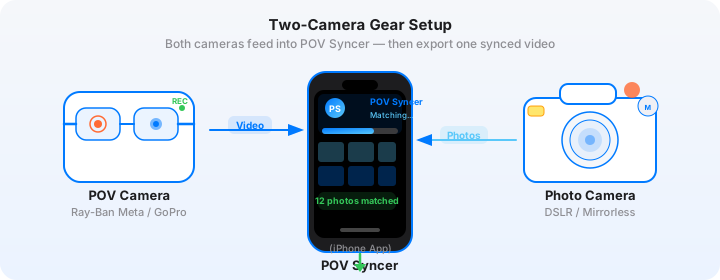
This is a setup that asks very little of you logistically. The Ray-Ban Meta Gen 2 is already on your face. The iPhone 16 Pro is already in your pocket. You are not carrying extra gear, you are not wearing a chest mount, you are not doing anything that suggests "photographer on assignment" to anyone around you. The entire rig weighs essentially nothing beyond what you carry anyway.
Ray-Ban Meta Gen 2 Settings for Morning Walks
The Ray-Ban Meta Gen 2 shoots video at 1080p30 — that is the primary mode you will use for street walking content. The field of view closely matches natural human vision, which means your POV footage feels genuinely first-person rather than the distorted wide-angle look you get from a GoPro or action camera mounted on your chest.
Key settings to dial in before you leave the house:
| Setting | Recommended Value | Why |
|---|---|---|
| Resolution | 1080p at 30fps | Natural motion cadence for walking footage; Instagram Reels compatible |
| Recording mode | Continuous (long press) | Captures everything; no risk of missing a moment during the shoot |
| Capture button | Double-tap for photo | Use this sparingly — let iPhone 16 Pro handle stills for quality |
| Auto-stop | 30 minutes | Conserves battery on longer walks without losing meaningful footage |
| Import method | Meta View app — Wi-Fi transfer | Quick download to iPhone Camera Roll before opening POV Syncer |
One practical note: the Ray-Ban Meta Gen 2 battery provides roughly 30 minutes of continuous video recording. For a typical morning dog walk of 30-45 minutes, start recording when you leave the front door and let it run. If your walks are longer, consider starting the recording once you reach your primary shooting area rather than during the walk there.
iPhone 16 Pro Settings for Street Photography
The iPhone 16 Pro is a remarkably capable street camera that gets overlooked in photography discussions because it lacks the romance of a Leica or Fujifilm. That is a mistake. The 48MP main sensor with f/1.78 aperture, the computational photography engine, and — most importantly for this workflow — the EXIF timestamp accuracy make it an excellent pairing with the Ray-Ban Meta Gen 2.
For dog walk street photography, the 24mm main lens is your default. It is wide enough to capture full scenes and context, and the f/1.78 aperture handles early morning light without requiring you to reach for the Pro settings. However, the 48MP 2x crop mode (effectively a 48mm equivalent at full resolution) is worth knowing — it gives you a slightly more compressed, less "phone-looking" perspective that works well for single-subject street portraits.
| Setting | Recommended Value | Why |
|---|---|---|
| Camera app | Native Camera app | EXIF timestamps written correctly for POV Syncer to read |
| Format | HEIF (default) or JPEG | Both carry full EXIF data including DateTimeOriginal |
| Main lens | 24mm (1x) or 48mm crop (2x) | 24mm for scenes, 2x for subjects — switch with a tap |
| Exposure mode | Auto with -0.3 EV compensation | Slight underexposure protects highlights in mixed morning light |
| Live Photo | OFF | Keeps shutter instant and files manageable for batch import |
| ProRAW | Optional — JPEG/HEIF faster for batch EXIF sync | ProRAW files are larger; use for hero shots you plan to print |
| Action mode | OFF (video) / not applicable (stills) | Keep phone camera for stills only in this workflow |
The One Clock Step That Makes Everything Work
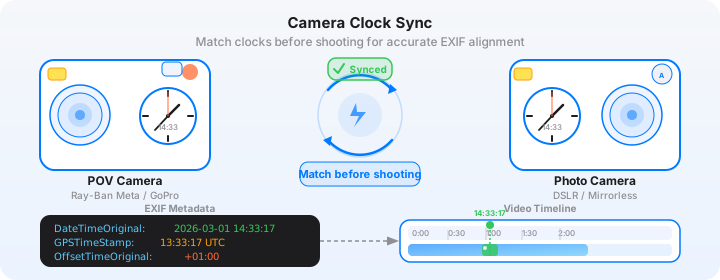
The iPhone 16 Pro syncs its clock automatically over cellular, so there is nothing to configure. The Ray-Ban Meta Gen 2 sets its video file timestamps via the Meta View app on your phone, which also synchronizes to network time. In practice, both devices will share the same timestamp reference without any manual intervention — which is one of the genuine workflow advantages of using an iPhone alongside the Ray-Ban Meta compared to pairing the glasses with a dedicated camera that has a drifting internal clock.
The one thing to verify: open the Meta View app and confirm the glasses are connected before you leave home. If the glasses have been sitting disconnected for several days, reconnect them and let the app sync settings. This takes thirty seconds and ensures your video file timestamps are accurate.
The Pain of Manual Editing — and Why It Killed This Idea Before
If you have ever tried to edit Ray-Ban Meta footage with phone photos manually, you know the problem. You come home after a 35-minute walk with 31 minutes of footage and 60 photos. You open Premiere Pro or Final Cut Pro. You drop the video on the timeline. Now you need to find where each photo was taken within that footage.
The Meta footage does not have a visible shutter sound. Your iPhone photos do not produce a flash of light visible in the video. So you are left scrubbing through footage, trying to remember — was that shot of the butcher's window at around the twelve-minute mark, or was it closer to seventeen? You check the photo timestamp. 7:23 AM. You check when you started recording. Something around 7:11, you think. So somewhere around the twelve-minute mark. You scrub to twelve minutes, scan the footage, think you see the moment, drag the photo to the timeline, play it back, realize it is off by about forty-five seconds, adjust, move on to the next photo.
Sixty photos. Three to four hours of tedious timeline placement. And that is for a casual morning dog walk — not even a dedicated shooting session. The editing grind made the whole thing feel unsustainable. Most people who tried it gave up and just posted the photos on their own without the process video context.
The POV Syncer Workflow: From Walk to Finished Video
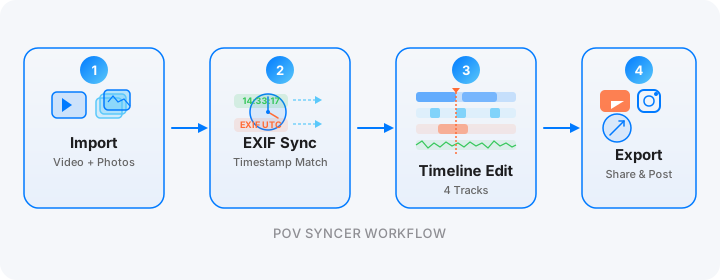
POV Syncer replaces the entire manual process with automatic EXIF sync. Here is how the complete workflow runs, from the end of your walk to a finished video ready to post.
Step 1: Transfer Ray-Ban Meta Footage to Your iPhone
Open the Meta View app on your iPhone and navigate to the Gallery. Select the clips from today's walk and download them to your Camera Roll. For a 30-minute walk, you are typically downloading two to three clips (the glasses split recordings at 10-minute intervals). Wi-Fi transfer usually takes two to three minutes — do this while you take off your shoes and fill the dog's water bowl.
Step 2: Import Into POV Syncer and Sync
Open POV Syncer and create a new project. Add the Ray-Ban Meta video clips as your base footage. Then import the iPhone 16 Pro photos from your Camera Roll — you can select all the shots from today's walk in one batch. Tap "Sync."
POV Syncer reads the DateTimeOriginal field from each iPhone photo's EXIF data, compares it to the video start timestamp from the Meta footage, and calculates the exact frame position for every photo. The whole sync runs in seconds — even for a 60-photo session. You will see every photo appear as a marker on the video timeline, placed at precisely the moment you pressed the shutter.
What took three hours of manual scrubbing in Premiere just happened automatically in under 60 seconds. That is not a marginal improvement — it is a categorically different experience of editing.
Download POV Syncer Free — Create your first POV video in 60 secondsStep 3: Trim and Edit the Timeline
With photos auto-placed on the timeline, you can now edit around the content rather than searching for it. Trim the beginning of the video — the first minute of any dog walk is usually just pavement and the dog investigating the immediate vicinity — and keep the sections where you were actively moving through interesting areas or where the footage shows you engaging with a scene you then photographed.
POV Syncer's timeline editor lets you adjust the display duration of each photo overlay, set the transition style, and reorder clips if you want to restructure the narrative. For a morning walk video, a simple chronological edit usually works best. The story tells itself: you walk, you see something, you stop, you shoot, the photo appears.
Step 4: Add a Title Card and Audio
The Ray-Ban Meta Gen 2 captures ambient audio through its built-in speakers-as-microphones system. Morning street audio — birdsong, traffic starting up, the specific acoustic quality of an empty pavement — is evocative and worth keeping in the mix. Do not bury it.
Add a simple title card at the opening using one of POV Syncer's 15 premium fonts. Something minimal: the neighborhood name and the date, or just the time. "Dalston, 7:15 AM" over a second of quiet empty-street footage sets the scene perfectly and tells the audience exactly what kind of content they are watching before a single photo appears.
If you want to add narration, POV Syncer's AI-powered narration feature lets you type a short script and apply a premium voice. For casual dog walk content, spoken narration should be brief — 30 to 50 words is usually enough context. Think of it as a caption rather than a voiceover: a sentence or two about what you noticed, why you stopped, what drew your eye. The footage and the photos carry the rest.
Want settings cheat sheets for 20+ camera combos?
Ray-Ban Meta Gen 2 + iPhone 16 Pro is one of 20+ camera pairings covered in our free weekly tips email. Get optimal settings, EXIF troubleshooting guides, and export presets for every major POV and street camera setup.
Free, weekly. Unsubscribe anytime.
Tips for Better Dog Walk Street Photography
The mechanics are straightforward. The craft takes a little more thought. Here are the things that have made the biggest difference in the quality of dog walk POV content.
Stop Walking Before You Shoot
The temptation is to shoot while moving — the dog is pulling, the moment is brief, you grab the iPhone and fire without breaking stride. This produces blurry photos and POV footage that is mid-step when the shutter fires. Instead, make a habit of pausing completely before raising the iPhone. A half-second stop produces sharper stills and gives the Ray-Ban Meta footage a natural beat that reads in the video as "photographer sees something, stops, shoots." That rhythm is part of what makes process videos compelling — audiences can follow your decision-making.
Let the Dog Be Part of the Frame
Some of your strongest iPhone photos will include the dog — a leash entering the bottom of the frame, a tail visible to one side, the dog's reaction to whatever drew your attention in the first place. This is not a compromise; it is a feature of the format. The dog grounds the content in the casual, everyday quality that makes it distinctive. The viewer understands immediately that this is a morning walk, not a posed editorial shoot, and that authenticity is exactly what casual street photography on social media rewards.
Shoot in Both Directions
The Ray-Ban Meta Gen 2 faces forward, recording what you are walking toward. But often the best street photograph is behind you — the light you just walked through, the scene that was interesting from the other side. When you turn to photograph something behind you, briefly turn your whole body rather than just rotating your head, so the glasses footage shows the turn and the iPhone photo makes sense in context.
Use the Same Route for a Week
The single best thing you can do for dog walk street photography is commit to the same route for a minimum of five consecutive days. On day one, you are learning the route. On day two, you know the light. On day three, you start recognizing people. By day five, you have a genuine series — the same streets, the same time of day, different light, different people, different incidents. A week-long series exported as a multi-day project in POV Syncer produces content that is genuinely more interesting than any single-session walk, because the repetition reveals how a place changes.
Morning vs Evening Walks: What Changes
Morning walks have quiet streets, low-angle directional light, and a specific social texture — people going to work, dogs being exercised, the city starting up. Evening walks have warmer light, more pedestrian density, shop fronts glowing, the social energy of people finishing their day. Both are excellent for street photography and produce visually distinct content. If you walk the dog twice daily, you have a natural two-part structure for your videos — morning out, evening return — that you can develop into a consistent content format across weeks and seasons.
What the Finished Video Looks Like
A well-executed dog walk POV video has a specific quality that is distinct from both dedicated street photography sessions and vlog content. The Ray-Ban Meta Gen 2 footage at 1080p30 has a natural, slightly intimate quality — you are seeing what the photographer sees at eye level, in real time, without the dramatic wide-angle distortion of a chest-mounted action camera. The iPhone 16 Pro stills that appear on the timeline are sharp and well-exposed in a way that the Ray-Ban's own camera cannot match, so the combination delivers the authenticity of continuous eye-level footage and the photographic quality of dedicated stills, together.
The dog walk format also has an inherent pacing advantage. A 30-minute walk produces roughly 25 to 30 minutes of usable Ray-Ban footage and anywhere from 20 to 80 iPhone photos, depending on how actively you shoot. Edited down to a 90-second Instagram Reel or a 3-minute YouTube short, the pacing is naturally varied — some stretches of pure walking footage, then a cluster of photos from a busy intersection, then more movement, then a single strong image held for a moment. This rhythm keeps viewers engaged in a way that a slideshow of photos alone, or uncut walking footage alone, simply does not.
Export Formats That Work for This Content

- Instagram Reels (90 seconds, 9:16): The sweet spot for this content. Trim to your two or three strongest iPhone photos and build 90 seconds of Ray-Ban context footage around them. The vertical crop of the glasses footage works naturally for Reels without any reframing required.
- TikTok (60-90 seconds, 9:16): Slightly faster pacing than Reels. Lead with your strongest moment rather than a chronological edit — the hook matters more on TikTok. A striking iPhone photo appearing at the five-second mark, then context footage explaining how you got it, performs well.
- YouTube Shorts (60 seconds, 9:16): Works well for single-image process videos. One strong shot with 45 seconds of context footage and a clean title card. Quick to produce, quick to watch, and builds an audience among people interested in photography process.
- YouTube long-form (5-12 minutes, 16:9): A full week of walks condensed into a single video. Five days, five different sessions, the same neighborhood in different light. This format builds a genuinely loyal audience and positions you as a photographer with a consistent practice, not just a hobbyist with a phone.
Building a Consistent Dog Walk Photography Series
The most successful street photography content on social media in 2026 shares one characteristic: consistency. A photographer who posts one dog walk POV video per week for three months will build a following more effectively than a photographer who posts one extraordinary single-session video and then disappears for a month. The dog walk format is one of the very few photography content types that has a built-in mechanism for consistency — you are already walking the dog every day regardless of whether you are making content.
The question of what to make consistent is worth thinking about. Consistency does not mean identical — it means predictable. Viewers should know what to expect from your dog walk series in terms of format, pacing, and aesthetic, even if every episode is shot in different conditions or features different subject matter. A consistent opening title format, a consistent edit length, a consistent musical or ambient audio choice — these small repetitions create a series identity that makes individual episodes feel like part of something larger.
POV Syncer makes this kind of serial content genuinely sustainable for the first time. When one walk produces a finished video in fifteen minutes rather than three hours, the idea of doing it every day — or every week — is no longer an aspirational goal. It is just Tuesday morning.
Conclusion: The Best Camera Is the One You Already Have with You
There is no purer expression of that old cliche than the dog walk photographer. The Ray-Ban Meta Gen 2 is already on your face. The iPhone 16 Pro is already in your pocket. The walk is already happening. The only thing that was missing was a way to turn the raw material of that walk into a finished, shareable video without surrendering three hours to the editing grind.
POV Syncer's automatic EXIF sync removes that barrier entirely. Import the Ray-Ban footage and the iPhone photos, let the app match them in seconds, do a light edit, and export. The manual editing that used to make this workflow impractical is gone. What is left is one of the most accessible, sustainable, and genuinely enjoyable forms of street photography content creation available — and it happens every morning before most people have finished their first coffee.
Ready to turn your next dog walk into a POV video?
Download POV Syncer free and sync your Ray-Ban Meta Gen 2 footage with iPhone 16 Pro photos automatically. Your first video in under 60 seconds — no manual editing required.
Download POV Syncer FreeOr join 1,000+ photographers getting weekly tips:
Free PDF, no spam. Unsubscribe anytime.