Street Photography POV Video: Show How You Got the Shot
You have been shooting street photography for years. Your images are good — genuinely good. But your Instagram captions are fighting a losing battle trying to explain what it feels like to wait in a doorway for forty minutes until the light changes and a stranger walks into exactly the right position.
Words cannot do it. A static photo cannot do it either — it only shows the result, not the seconds of attention, anticipation, and instinct that preceded the shutter click. The only format that communicates the full experience of street photography is video. Specifically: your eye-level POV in the moments before and during the shot, followed by the image itself.
This is the "reveal" format that has made street photography process videos some of the highest-performing content in photography on Instagram and TikTok. The viewer watches you move through a city scene, registers the same visual tension you registered, and then sees the photo that captured it. The connection is immediate and visceral. It is the closest thing to being inside a photographer's head.
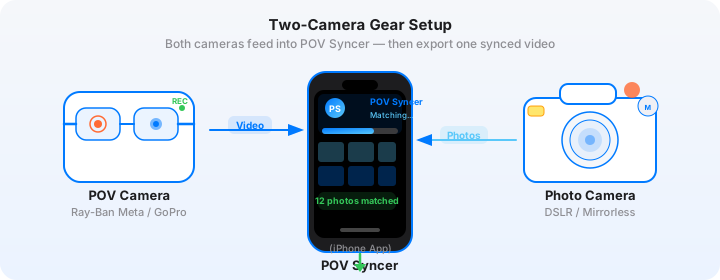
The setup that makes this possible without an invisible camera operator: Ray-Ban Meta glasses recording your natural eye-level POV, paired with a Fujifilm X100VI for the actual stills. And POV Syncer to join them together using the EXIF timestamp from every Fujifilm JPEG.
Why Street Photographers Struggle to Explain Their Process
Street photography has a communication problem. The images look effortless. The technical explanation — 1/500s, f/8, zone focus at 2.5m, waited for the decisive moment — sounds clinical and misses the emotional content entirely. And the usual solution, a talking-head video explaining your philosophy, requires either comfort in front of a camera or a videographer following you around, both of which change the dynamic of the street entirely.
The "behind the shot" format sidesteps all of this. You are not explaining anything. You are showing. The viewer observes your physical perspective — the direction you are looking, the speed of your walk, the moment you stop and raise the camera — and then sees the image that resulted. The explanation is built into the format. You do not need to say a word.
Fujifilm X100VI users are already producing this content. The camera's compact size, silent electronic shutter, and JPEG film simulations make it uniquely suited to street shooting. The JPEGs come out of the camera with colour and tone that posts well directly — no Lightroom required. Combined with Ray-Ban Meta POV footage and POV Syncer's automatic timestamp sync, the workflow from shoot to posted Reel takes under 20 minutes.
The Camera Setup: Ray-Ban Meta + Fujifilm X100VI
This is arguably the most natural-looking two-camera street setup available. Neither camera announces itself. The Ray-Ban Meta glasses are indistinguishable from regular eyewear at conversational distance. The X100VI's fixed 23mm f/2 lens (35mm equivalent) is compact enough that passersby register it as a tourist camera rather than a professional one. You move through the city without altering the scenes you are trying to capture.
Ray-Ban Meta: Settings for Street Shooting
Set the glasses to 1080p at 30fps. Street photography is a contemplative practice — 30fps reads as natural and unhurried, which matches the pace of good street work. The footage has a slightly documentary quality that suits the content format perfectly.
The ultrawide lens on the Ray-Ban Meta captures a broader field of view than your Fujifilm's 35mm equivalent. This is useful: the viewer sees more environmental context than you included in the photograph. That contrast — wide environmental view versus tightly composed still — is part of what makes the reveal format compelling.
Keep the glasses recording continuously while you shoot, rather than starting and stopping clips. Long continuous footage is easier to work with in POV Syncer than many short clips, because the app can match photos to any point across the full video duration. Battery life at 1080p/30fps is around 60 minutes; carry the charging case for longer sessions.
Before leaving home, ensure the glasses are paired with your iPhone via the Meta View app. This syncs the glasses' clock to your phone's atomic-accurate time, which is the foundation of precise EXIF matching.
Fujifilm X100VI: Settings for EXIF-Perfect Street Shooting
The X100VI's built-in clock needs to match the Ray-Ban Meta's clock for accurate sync. Set the X100VI's date/time under Setup menu to match your phone's time exactly, then enable GPS via the Fujifilm Camera Remote app — the app can push your phone's GPS-accurate time to the camera. This eliminates clock drift between the two devices.
Film simulation: Classic Chrome for colour street work; Acros for black and white. Both are camera-ready out of the camera with no post-processing required. Classic Chrome's desaturated, slightly low-contrast rendering looks exceptional on Instagram Reels when it appears as a photo overlay against the Ray-Ban's more neutral video.
Focus mode: Zone focus with the X100VI's AF distance indicator set to 2.5m to 4m. This covers most street shooting distances without hunting, which means the shutter fires when you press it rather than after an autofocus negotiation. Speed matters at the decisive moment.
Shutter: Electronic shutter, silent. No mechanical sound, no mirror slap. The silence is not just about discretion — it also means you can shoot in hushed indoor environments (galleries, stations, markets) where a mechanical shutter would be intrusive.
Image format: JPEG Fine in your chosen film simulation. The X100VI's EXIF data on JPEGs is complete and consistently formatted — DateTimeOriginal, OffsetTimeOriginal (timezone), GPS if your phone pushed coordinates via Camera Remote. POV Syncer's matching algorithm handles all of this without any additional setup.
Get the settings right the first time
Download the free POV Photographer's Cheat Sheet — camera settings, EXIF tips, and export presets for Ray-Ban Meta, GoPro, DJI, and Insta360 on one printable page.
Free PDF, no spam. Unsubscribe anytime.
The "Reveal" Video Format: How It Works
The reveal format has a simple structure that works reliably because it mirrors the viewer's own experience of discovering a great photograph.
Act 1 (0–20s): The scene. GoPro footage — in this case the Ray-Ban Meta footage — from your perspective as you move through the environment. The viewer sees what you see: a street corner, a patch of light, people in motion. The tension builds naturally without any editorial intervention.
Act 2 (20–40s): The moment. The footage continues, and then — exactly at the frame where you raised the X100VI and pressed the shutter — the corresponding photograph appears on screen. The viewer sees the precise visual that prompted the decision. The mechanical shutter sound that POV Syncer adds at this moment is a punctuation mark: this was it.
Act 3 (40–60s): The hold. The photo stays on screen for four to five seconds — longer than a typical overlay duration — so the viewer can actually study it. Then the video resumes for a final few seconds. Optional: a simple caption identifying the location.
This structure works at 60 seconds, which is the ideal Reel length for this content type. Longer versions (90 seconds, covering three or four decisive moments in a single session) also perform well on YouTube Shorts, where watch time is weighted more heavily by the algorithm.
Building the Video in POV Syncer
Step 1: Import
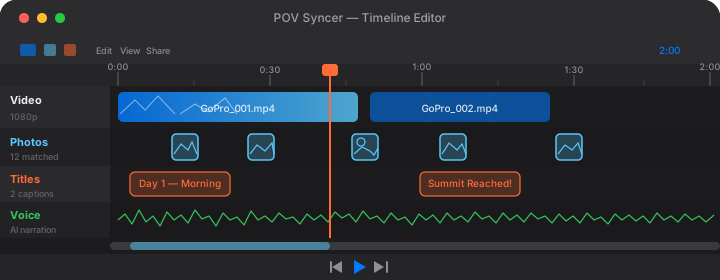
Transfer the Ray-Ban Meta footage to your iPhone via the Meta View app. Import your Fujifilm JPEGs via the Fujifilm Camera Remote app's camera roll transfer, or directly from a card reader. Open POV Syncer, create a new project, and add both.
For street photography content, you do not need to import your entire take. Select five to ten of your best frames from the session — the ones where the light, the geometry, and the human element all resolved simultaneously. You are building a story, not a proof sheet.
Step 2: Automatic EXIF Sync
POV Syncer reads the DateTimeOriginal and OffsetTimeOriginal fields from each Fujifilm JPEG and matches them to the corresponding frame in the Ray-Ban Meta video. If you used GPS via Camera Remote, the app also cross-references GPS UTC timestamps for added precision. The sync process takes about 10 seconds per 10 photos.
The result is a timeline with your photos placed at the exact video frames where you pressed the shutter. On a 45-minute session, you might see six or seven photos distributed across the footage at the precise moments they were taken.
Step 3: Build the Edit
Use POV Syncer's trim handles to isolate the best reveal sequence — usually the 30 to 60 seconds of footage leading up to and immediately following your single strongest image. Extend the photo display duration to 4 or 5 seconds for this format; the longer hold is what makes the reveal feel like a reveal rather than a slideshow cut.
Add a location title if it serves the content. "Hackney Wick, 7am" or "Marais, Paris" gives the viewer context without explaining anything. Skip the motivational caption — let the image do the work.
If you want narration, keep it to one sentence: what you saw that made you stop. "The shadow was moving toward the doorway. I had about three seconds." That is enough. It adds intention without over-explaining.
Step 4: Export
Export at 9:16 for Instagram Reels and TikTok. For the Fujifilm Classic Chrome look, the warm, slightly desaturated tones will display correctly in POV Syncer's export — it preserves the JPEG rendering without additional processing.
Try POV Syncer free on the App StoreWhat Makes Street POV Content Build an Audience
The photographers who build the largest audiences with this format share a few consistent characteristics — and none of them are about having the best images.
Generosity
Showing your process is an act of generosity. You are not gatekeeping your approach; you are sharing it. Audiences respond to this with the kind of loyalty that portfolio content does not generate. They watch your videos to learn, and they stay because the learning is ongoing.
Specific Locations
Content tagged with specific locations — not just "London" but "Brixton Market, Coldharbour Lane" — reaches audiences who know those places and feel the recognition. It also makes your content discoverable to people searching for photography content in specific areas.
Consistency Over Quality
One video per week, even if the image is not your strongest work, outperforms irregular posting of your best work. The algorithm rewards consistency, and your audience builds a habit of watching you. The Fujifilm X100VI and Ray-Ban Meta combination makes consistency achievable because the gear is always with you and the editing workflow is fast enough to not feel like a burden.
The Ricoh GR III Alternative
Everything described here applies equally to the Ricoh GR IIIx. The 40mm equivalent lens, snap focus, and compact size make it a comparable tool for street process videos, and POV Syncer handles its EXIF timestamps identically. If you shoot with a GR rather than a Fujifilm, the workflow is the same.
Growing Your Audience as a Street Photographer
Street photography has a dedicated global audience on both Instagram and TikTok. The viewers are a mix of photographers who want to improve, non-photographers who appreciate the art form, and people in the cities you photograph who feel the recognition of familiar places made unfamiliar by a good frame.
Process videos speak to all three groups simultaneously. The photographer in the audience watches for technique. The non-photographer watches for the story. The local watches for the location. One piece of content, three different kinds of engagement.
For building a following that translates into print sales, workshop bookings, or commercial commissions, this content type is more effective than any other format in street photography right now. It is not just entertainment — it is a sustained demonstration of expertise and vision.
Getting Started
You do not need to change anything about the way you shoot. Keep the Fujifilm X100VI settings you already have. Add the Ray-Ban Meta glasses — available from $299 — and pair them before your next shoot. The EXIF timestamps in your Fujifilm JPEGs will do the rest automatically, once you have POV Syncer to read them.
Download POV Syncer free and run the complete workflow on your next street session before committing to Pro. One import, one sync, one export. See whether the reveal format works for your images. It almost certainly will.
Show how you got the shot — automatically
Download POV Syncer free. Import your Ray-Ban Meta footage and Fujifilm JPEGs. Have your first reveal video ready in under 20 minutes.
Download POV Syncer Free