GoPro HERO + Leica Q3: Documentary Street Photography
Two cameras that shouldn't work together. One shooting everything. One shooting nothing until it shoots the right thing. Used together, they produce street photography documentary content that neither can achieve alone.
An Unlikely Pair That Makes Perfect Sense
The GoPro HERO costs around $200. The Leica Q3 costs close to $6,000. One is designed to capture everything without you thinking about it. The other is designed to capture one thing precisely because you thought hard about it.
Put them together and you have the core tension of great documentary photography: the wide, relentless context of the world as it flows, interrupted by the sharp, decisive punctuation of a single image that says something.
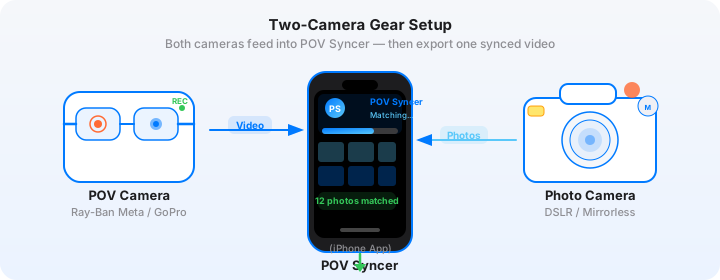
This combination isn't about gear fetishism. It's about what each camera is physically capable of doing in the street photography context — and how POV Syncer's EXIF timestamp matching bridges the gap between two completely different camera systems to create a unified documentary narrative.
Why These Two Cameras Work Together
The GoPro HERO: Context Machine
The GoPro HERO shoots at up to 4K/60fps with a wide-angle lens that captures roughly 155 degrees of field of view in the default setting. On the street, mounted to a chest rig or clipped to a bag strap, it documents everything — the approach, the hesitation, the miss, the lucky accident, the conversation that follows a shot. It records the world as you move through it.
That footage is rarely beautiful on its own. It's shaky. The lens distorts. The exposure is automatic and sometimes wrong. But it's honest. It shows the chaos and chance and physical reality of street photography in a way that no interview, no slideshow, no narration alone can replicate. The GoPro gives your audience the visceral experience of being there with you.
For documentary street photography content, set the GoPro HERO to 1080p/60fps rather than 4K. This gives you smoother motion during movement, smaller file sizes, and more flexibility in editing. Stabilisation set to HyperSmooth Boost. Lens at Wide. AutoExposure enabled — you're not controlling this camera, you're letting it observe.
The Leica Q3: Decision Machine
The Leica Q3 is built around a 60-megapixel full-frame sensor behind a fixed 28mm f/1.7 Summilux lens. In street photography terms, this means extraordinary resolution, beautiful rendering of light, a field of view that's wide enough to work in tight spaces but not so wide that everything feels distorted, and the ability to shoot at ISO 6400 or higher in low light without significant noise penalty.
Crucially, the Q3 includes precise EXIF timestamp data embedded in every JPEG and DNG file it produces. The camera timestamps with millisecond accuracy, and when your phone and camera clocks are synchronised (more on this below), POV Syncer can match each Q3 photograph to the exact second it appears in your GoPro footage.
Set the Q3 to shoot DNG + JPEG simultaneously. The JPEG gives POV Syncer the EXIF data it needs for matching; the DNG gives you the full editing latitude you want in your photo workflow. Aperture priority at f/4 for maximum depth of field on moving subjects, ISO Auto with a ceiling of 6400, minimum shutter speed 1/250s to freeze motion.
Get the settings right the first time
Download the free POV Photographer's Cheat Sheet — camera settings, EXIF tips, and export presets for Ray-Ban Meta, GoPro, DJI, and Insta360 on one printable page.
Free PDF, no spam. Unsubscribe anytime.
Documentary Storytelling vs. Highlight Reels
Before we get into workflow, it's worth being clear about the creative difference between documentary storytelling and a highlight reel. Most photography videos are highlight reels: a sequence of the best images set to music, with location text and a satisfying edit rhythm. They're fine. They do their job. But they don't tell a story.
Documentary storytelling has a different structure. It has a beginning (you arrive somewhere, you have an intention or a question), a middle (things happen, you make decisions, some work and some don't), and an end (what you found, what you didn't find, what it meant). The photographs are evidence within that story, not the story itself.
The GoPro makes the beginning and middle visible. The Q3 photographs are the evidence. POV Syncer is what connects them — placing each piece of evidence at the exact moment in the story where it belongs.
Structure Your Shoot Around the Story, Not the Shots
Before you go out, spend 5 minutes writing down a single sentence that describes what you're looking for or what question you're exploring. "What does Sunday morning look like in a neighbourhood that's changing?" or "How do people use umbrellas in rain differently depending on where they're going?" It doesn't have to be grand. It just has to give you a thread to follow.
That thread becomes the documentary structure. Your GoPro footage captures you following it. Your Q3 photographs are the moments where following it produced something worth seeing. Your narration in POV Syncer is you reflecting on what you found.
EXIF Sync Across Two Very Different Camera Systems
This is where a lot of photographers get tripped up when combining a camera like the GoPro with a premium camera system like the Leica Q3. The two cameras use completely different time reference systems, and if they're not synchronised before you shoot, your photo placements in POV Syncer will be off by minutes — or more.
Sync Both Cameras Before Every Shoot
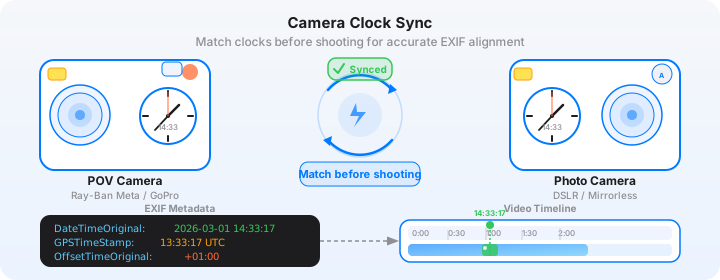
The GoPro HERO sets its internal clock via the GoPro app when connected to your phone. The Leica Q3 can be set manually via the menu or synced via the FOTOS app. Before every shoot, verify both cameras show the same time to within 1 second.
The easiest method: take a reference photo on the Q3 at the exact moment you tap "record" on the GoPro. If both devices are correctly synced, that photo should appear at timestamp 00:00 in the POV Syncer timeline. If there's a visible offset, you can apply a global time correction in the app before proceeding.
POV Syncer uses four EXIF matching strategies for maximum accuracy: GPS UTC timestamps (most reliable), OffsetTimeOriginal fields, GPS-corrected timezone data, and device timezone as a fallback. For the Q3, which writes full GPS EXIF data when location services are enabled, you get the most accurate sync path available. Enable GPS tagging in the Q3's settings menu before you shoot.
The Leica Q3's EXIF Advantages
The Q3 writes particularly rich EXIF data compared to most cameras. Beyond the standard timestamp fields, it includes GPS coordinates (when enabled), precise altitude, and detailed lens and exposure data. POV Syncer reads all of this, and the GPS UTC timestamp provides a timezone-independent time reference that makes syncing between the Q3 and GoPro footage almost completely automatic.
Try POV Syncer Free — Sync Your Q3 Photos NowBuilding a Photo Essay with Video Context
The most powerful output from this camera combination is what you might call a "contextualised photo essay" — a format that gives each still image the video context it needs to be fully understood, while letting the image carry the emotional weight that video alone cannot.
The Three-Layer Structure
Think of your final video as having three layers operating simultaneously.
Layer 1: The GoPro footage. This is always running. It's the continuous thread of time and space. Your audience rides along with you, experiencing the flow of the city or location. The wide angle and constant motion establish immersion — the viewer is with you, not watching you.
Layer 2: The Q3 photographs. These appear at the moments they were taken, surfacing from the continuous GoPro footage like memories surfacing in real time. The contrast between the GoPro's wide chaotic view and the Q3's precise, composed image is the heart of what makes this combination powerful. The photograph says: "Among everything happening here, this is what I saw worth keeping."
Layer 3: Narration. This is optional but usually valuable. POV Syncer's AI narration tools let you add voiceover on a dedicated track, timed precisely to where photos appear and what's happening in the GoPro footage. The narration provides what neither image format can: your thought process, your intention, the things you noticed that the camera didn't quite catch.
Long-Form Narrative Structure for YouTube
For a YouTube documentary video in the 10-15 minute range, structure your GoPro and Q3 content like this:
0:00-1:30 — Opening context. GoPro footage of arriving at your location. Set the scene. One or two early Q3 photographs that establish the visual character of the place. Narration establishing your intention for the day.
1:30-10:00 — The exploration. The bulk of your GoPro footage and Q3 photographs. Aim for one photograph appearing roughly every 60-90 seconds of footage — enough to feel like punctuation, not so frequent that photos lose their impact. Group photographs thematically where possible: light, people, geometry, moments.
10:00-13:00 — Resolution. The photographs that answer the question you started with, or the moment where things came together. These should be your strongest images, held on screen longest, with the most considered narration.
13:00-15:00 — Reflection. GoPro footage of leaving. Final narration. A closing image. What you take away from the session.
Editing in POV Syncer's Timeline
Once your media is imported and auto-matched, spend time on the timeline curating rather than including everything. A documentary photo essay with 12 images lands harder than one with 40. Be ruthless. If a photograph doesn't advance the story or reveal something the GoPro footage alone doesn't show, cut it.
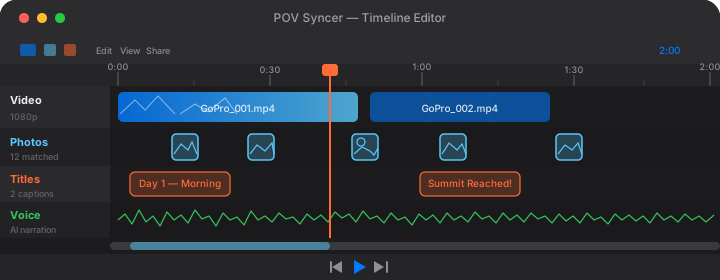
Use POV Syncer's 10 background styles to distinguish different sections of your documentary. A film-grain treatment for the exploration section, a clean minimal treatment for the reflection section, creates a subtle visual rhythm that supports the narrative structure without being distracting.
Tips for Shooting Street Documentary Style
Wear the GoPro, Don't Hold It
The worst thing you can do with a GoPro in a street documentary context is hold it in your hand and point it at things. Mount it to your chest with a chest harness, or clip it to a bag strap at shoulder height. This keeps both hands free for the Q3 and produces footage that flows naturally with your movement rather than feeling directed and self-conscious.
Let the GoPro Run Continuously
The instinct to conserve battery and storage by stopping and starting the GoPro will cost you. Street photography moments often happen in the transitions — while you're walking to your next spot, while you're reviewing an image on the Q3, while you're pausing to eat. A GoPro that's always running catches these moments. A GoPro you're managing catches nothing you didn't plan.
In 1080p/60fps, the GoPro HERO produces approximately 3-4GB per hour. Bring a 128GB or 256GB card and charge the battery fully before each session. A 3-hour street session typically produces 10-12GB of GoPro footage and 200-400 Q3 photographs, of which you'll use perhaps 10-20 images in your final video.
The Q3's Snap Focus in a Documentary Context
The Leica Q3 has a snap focus system where you can pre-set focus distances (1m, 2m, 3m, 5m, infinity) and snap between them using the physical focus tab. In documentary street shooting, pre-set to 3m for most of your work. Zone focusing at 3m with f/8 gives you sharp focus from roughly 1.5m to infinity at 28mm. This means you can raise the camera and shoot without waiting for autofocus, which is essential when working in the continuous-movement documentary style that complements the GoPro footage.
What the Finished Video Looks Like
Imagine 12 minutes of footage from a Sunday morning in a changing neighbourhood. The GoPro shows you arriving by train, walking through streets where old shopfronts sit next to new cafes, pausing at a market, entering a courtyard. The footage is rough and real — a cat runs across your path, a kid on a scooter almost collides with you, a woman hangs laundry from a window two floors up.
And then, every 60-90 seconds, a Q3 photograph surfaces from that footage. The geometry of the courtyard, where the morning light cuts at exactly the right angle. A face in the market crowd that carries the entire weight of the scene. The juxtaposition of a spray-painted wall and a hand-painted sign from 40 years ago. Each one appearing at the exact moment it was taken, placed in the GoPro footage by POV Syncer's EXIF matching.
The narration — a quiet, observational voice — speaks in the spaces between images. Not describing what you can see, but offering what you noticed and what you thought about while you were there.
That's the output this combination produces. A documentary photograph essay with motion context. A format that no single camera, no matter how expensive, can create alone.
Start your documentary street photography workflow
POV Syncer handles the EXIF sync between your GoPro and Leica Q3 automatically. Import both, let the app match your photographs to the video timeline, and start editing your documentary.
Download POV Syncer Free