Wedding Photography Behind the Scenes: Show Your POV Process
Your best marketing asset isn't your portfolio. It's showing couples how their photos get made. A POV camera and POV Syncer turn every wedding into a client acquisition tool.
Why Wedding Photographers Need BTS Video Content
The wedding photography market is more competitive than it has ever been. Couples browsing Instagram or Google can find dozens of talented photographers in their area with similar price points and comparable portfolios. What differentiates one photographer from another — what actually makes a couple choose you — is trust and personality.
Behind-the-scenes POV content builds both faster than almost any other format. When a prospective client watches footage of you working at a real wedding — how you move, how you interact with people, what you're seeing and choosing to photograph — they're not just evaluating your skills. They're deciding whether they want you in their wedding photographs. Whether they want to spend 10 hours with you on one of the most important days of their lives.
A POV camera worn as a chest or head mount, combined with your wedding stills synced through POV Syncer, produces something that no amount of posed behind-the-scenes photography can replicate: actual process documentation. The moment you saw the light change. The expression you moved quickly to capture. The wedding ring closeup placed exactly when you took it in the GoPro's wide-angle view of the dressing room.
This content attracts clients who already understand what you do and have decided they want it. Qualified enquiries, higher conversion rates, and couples who trust your creative direction from day one because they've already seen how you work.
Get the settings right the first time
Download the free POV Photographer's Cheat Sheet — camera settings, EXIF tips, and export presets for Ray-Ban Meta, GoPro, DJI, and Insta360 on one printable page.
Free PDF, no spam. Unsubscribe anytime.
Choosing the Right POV Camera for Wedding Work
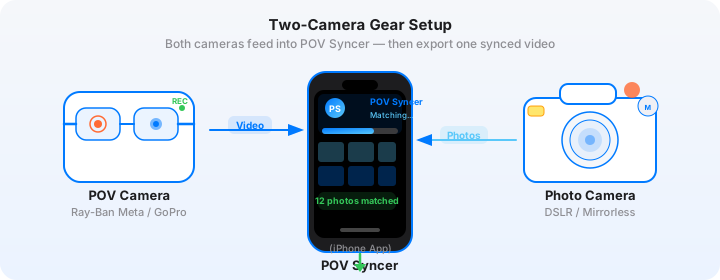
Wedding photography has unique constraints that affect which POV camera works best. You need something small and discrete enough not to disturb the ceremony or draw attention from guests. It needs to run for 6-10 hours on a single charge or swappable battery. And the footage quality needs to hold up well enough in mixed lighting — candles, mixed tungsten and daylight, evening reception uplighting — to be usable.
DJI Action 5 Pro: The Premium Choice
The DJI Action 5 Pro is the strongest performer for wedding POV work. Its 1/1.3-inch sensor handles low light significantly better than the smaller sensors in GoPro cameras, which matters enormously in church ceremonies, candlelit receptions, and indoor preparation shots. RockSteady stabilisation is excellent for the slow walking movements of wedding work. Battery life runs to approximately 3 hours, and hot-swap batteries allow continuous shooting across a full day.
Set the DJI Action 5 Pro to 4K/30fps with RockSteady enabled, Colour Profile set to D-Log M, and Auto White Balance. The D-Log M profile gives you colour grading latitude in post while keeping file sizes manageable. Auto White Balance handles the rapidly changing light conditions of a typical wedding day without requiring constant adjustment.
GoPro HERO: The Practical Choice
The GoPro HERO works well for outdoor ceremonies, garden receptions, and destination weddings where light is plentiful. It's smaller than the DJI Action 5 Pro and more resistant to rain, which matters when you're working outdoors with no control over the weather. Set to 1080p/60fps for smooth motion, HyperSmooth Boost enabled, and Wide lens setting for maximum coverage.
The GoPro's weak point is indoor low light — noise becomes visible above ISO 800 and the footage can feel flat and grey in challenging lighting. For primarily indoor weddings, the DJI Action 5 Pro is the better choice.
Camera Mounting for Wedding Work
Chest Mount: The Workhorse
A chest harness mount is the most practical option for wedding photography POV. It keeps the camera stable during movement, positions the lens at a natural height that captures the scenes you're working in, and leaves both hands completely free for your primary camera. The chest perspective shows viewers exactly what you're looking at — when a photo appears in POV Syncer's synced video, the viewer can see in the GoPro footage that you were standing right there.
For weddings specifically, wear the chest harness under a jacket or blazer to make it less visible. The harness itself can be worn over a dress shirt with the camera sitting just below the jacket lapel. At normal social distances, guests rarely notice it.
Glasses Mount: More Discreet, More Limited
Ray-Ban Meta smart glasses work well for preparation and portrait sessions where you want maximum discretion. Guests rarely register them as a recording device. The footage perspective is higher — roughly eye-level rather than mid-chest — which changes the visual character considerably. Eye-level POV footage feels more intimate and personal; chest-level feels more documentary and observational.
The limitation with Ray-Ban Meta at a wedding is battery life — typically 30-60 minutes of continuous video recording, which rules out all-day coverage. Use them selectively for the preparation and portrait phases, then switch to a chest-mounted DJI or GoPro for the ceremony and reception.
What to Avoid During the Ceremony
During the ceremony itself, be conservative. A chest mount worn visibly during the vows reads as intrusive to some couples and families. Tuck the camera inside your jacket, or switch to a very low-profile mount. The ceremony footage is the least important part of the BTS video — what matters is the lead-up, the portraits, and the reception. Let the ceremony speak through your still images.
Try POV Syncer Free for Your Wedding BTS WorkflowEXIF Sync with Rapid-Fire Wedding Stills
Wedding photography produces a volume of images that's unlike almost any other genre. A busy ceremony sequence might generate 300-400 frames in 20 minutes at 10fps. Portrait sessions might yield 5-10 images per minute with careful, selective shooting. Reception dancing produces bursts of 8-12 frames for a single moment.
POV Syncer handles this volume efficiently. The app reads EXIF timestamp data from every image you import, then applies its four matching strategies — GPS UTC timestamps, OffsetTimeOriginal, GPS-corrected timezone, and device timezone fallback — to find the correct position in the video timeline for each photograph.
Syncing Your Cameras Before the Wedding Day
For wedding work, time synchronisation is not optional — it's critical. A 10-second offset between your mirrorless camera and your GoPro or DJI means portrait photographs appearing in the GoPro footage 10 seconds after the moment they were taken. In a fast-moving ceremony, 10 seconds is an entirely different scene.
Set up a time-sync routine the morning of every wedding. Take your primary camera (Sony A7C II, Nikon Z6 III, Canon R6 Mark II — whatever you shoot with) and your POV camera. Open a clock app that displays seconds. Photograph the clock display with your primary camera. At that exact moment, start a recording on the POV camera. This gives you a reference frame — the photo of the clock tells you exactly when sync was established, and if there's any drift during the day, you have a baseline to correct from in POV Syncer.
Choosing Which Photos to Include in Your BTS Video
A wedding day produces hundreds of images, but your BTS video should include a curated selection of 15-30 photographs maximum. More than this and the video becomes a slideshow rather than a narrative document. The selection criteria for BTS video is different from your final delivery gallery:
- Images that show your decision-making: a detail shot that explains why you moved to a specific position in the GoPro footage
- Images where the GoPro context adds meaning: the portrait that shows what the venue looked like before you found the right corner of light
- Technically interesting images that photographers will appreciate: creative use of reflection, compression, or depth that demonstrates skill
- Emotionally resonant moments that speak to prospective couples: the first look reaction, the vow teardown, the joy of the first dance
Do not include every image from a sequence. One image per moment is enough. Choose the strongest frame.
Creating Client Marketing Videos
Beyond the portfolio BTS video, there's a second use case for POV Syncer in wedding photography: the client delivery video. This is a short video you create for your clients — a 3-5 minute highlight of their wedding day that pairs POV footage of their wedding with a curated selection of your photographs from the day.
This is different from a videographer's wedding film. It's a photograph-forward video — the stills are the hero, the POV footage is context and atmosphere. Clients love it because it shows them moments they didn't see (you working to get that perfect shot of the dress details, the expression you captured while they weren't looking) alongside the images they'll treasure.
The Client Video Workflow in POV Syncer
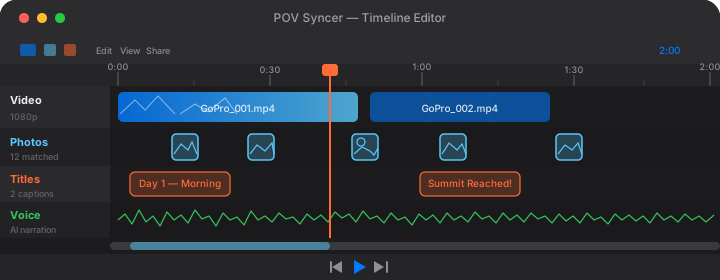
Import the POV footage from your DJI or GoPro alongside a curated selection of 20-30 images from your delivery gallery. POV Syncer's EXIF matching places the photographs automatically on the timeline. Review the placement, cut any footage sections that aren't serving the narrative, and use the timeline editor to set photo hold times appropriately — shorter for fast moments like the first dance, longer for quiet moments like the bride getting ready.
Add a narration track using POV Syncer's AI voices — a warm, reflective voice describing what you noticed during the day. Not a running commentary, but a few sentences per section that offer what the images can't show: your observation of who these people are and what made their wedding day specific to them.
Choose a background style and font from POV Syncer's options that matches your brand aesthetic. If your photography style is clean and minimal, use one of the simpler background treatments and a serif or clean sans-serif font. If you have a warmer, film-influenced style, use a film-grain background with a softer typeface.
Export in 16:9 for YouTube or AirDrop delivery, or 9:16 for an Instagram version. Total production time once you're familiar with the workflow: 20-30 minutes per client video. That's a powerful marketing and client relationship tool for a fraction of the effort of producing a full video edit.
Building a Portfolio with Process Content
The most effective use of wedding POV content for portfolio building is not a highlight reel of multiple weddings. It's a single, deep documentary of one wedding — how the day unfolded, what decisions you made, what you saw and why it mattered. This format demonstrates skill in a way that a curated image gallery alone never can.
Structure for a Portfolio Documentary
A 10-12 minute YouTube documentary covering a single wedding day should move through the natural structure of the day while selecting the moments that reveal your eye and your approach:
Preparation (0-2 minutes). Getting ready rooms, detail shots, the first looks between members of the wedding party. This section shows your eye for light and detail. Let the GoPro footage establish the venue and atmosphere. Surface 4-5 images from preparation that show what you're noticing.
Ceremony (2-5 minutes). This is the emotional centre of the video. Choose your strongest ceremony images — often the reactions rather than the main moments, since those are what your style makes unique. Keep narration minimal here. Let the images breathe.
Portraits (5-8 minutes). This section is where the documentary element is most powerful. The GoPro footage shows how you work with couples — the directions you give, how you move around them, the moment before the shutter fires. Your portrait images appear at the exact moments they were captured. Prospective clients watching this section are learning exactly what it's like to work with you.
Reception (8-12 minutes). Dancing, speeches, the details of an evening in full swing. End with your strongest single image from the day — the one that captures something essential about who these people are — and let it hold the screen for 4-5 seconds before the closing narration.
Practical Tips for Discreet Wedding POV Shooting
Mute the Camera
Both the DJI Action 5 Pro and GoPro HERO make sounds when starting and stopping recording. Go into the camera settings and mute all audio cues before you arrive at the venue. The last thing you need is an action camera beep drawing attention during a quiet ceremony moment.
Use Silent Mode on Your Primary Camera
When POV footage shows you taking photographs, the sound of a mechanical shutter draws attention to the camera. Use your mirrorless camera's electronic silent shutter mode during ceremony and any quiet formal moments. The absence of shutter sound makes the POV footage more discreet and also makes the occasional natural shutter sound you allow in portraits feel more intentional.
Brief Your Couples in Advance
Tell couples during the booking consultation that you wear a small POV camera to capture behind-the-scenes footage that you use for your portfolio and optionally create a short client video from. Most couples love this — it's an additional deliverable they didn't expect. Get written consent to use the footage for marketing purposes. This is both good practice and often legally required depending on your jurisdiction.
Battery Management
A typical wedding day runs 8-10 hours from preparation through to reception. Bring three batteries for your POV camera and a portable power bank that can charge while the camera runs on battery. Swap batteries during natural breaks — cocktail hour, while the couple is seated for speeches, while you're reviewing cards.
Start creating wedding BTS content that wins clients
POV Syncer automatically syncs your wedding stills to your DJI or GoPro footage using EXIF timestamps. Create portfolio documentaries and client videos in 20 minutes. Pro plan from $9.99/month.
Download POV Syncer Free