How I Shot This: Rainy London Streets with Ray-Ban Meta Gen 2 + Leica Q3
It was 8:15 in the morning when I stepped off the Overground at Shoreditch High Street. The platform was slick with rain. My jacket was already damp at the shoulders. The forecast had said "light showers," which is London's meteorological optimism for "bring a better coat." The Leica Q3 was under my arm, wrapped loosely in a dry bag I had not quite bothered to seal properly, and the Ray-Ban Meta Gen 2 were on my face, lens already recording. I had roughly four hours before my afternoon meeting and a city that looked like someone had turned the contrast up to maximum and hosed the whole thing down.
Three hours of manual editing in Premiere later — scrubbing through footage, manually dragging JPEG files onto a timeline, guessing at sync points — is not how I wanted to spend my evening. That is exactly what I used to do. Now I import the Meta footage and the Q3 JPEGs into POV Syncer, wait about forty seconds for the automatic EXIF sync to run, and the session is assembled. Start to export takes under three minutes.
This is a walkthrough of that session. Three London neighborhoods, one very wet morning, one of the best camera pairings I have found for urban rain photography, and the complete workflow for turning the raw material into a finished video people will actually want to watch.
Get the free POV Photography Cheat Sheet
Optimal Leica Q3 and Ray-Ban Meta settings for rain, low light, and golden hour — plus EXIF sync tips for every major camera brand — on one printable page.
Free PDF, no spam. Unsubscribe anytime.
The Setup: What I Carried and Why
The Leica Q3 is a full-frame fixed-lens compact with a 28mm f/1.7 Summilux. It weighs 743 grams with the battery — substantial enough to feel serious in your hand, light enough that you will not think about putting it down after an hour. The weather sealing is genuine. I have shot with it in heavy rain on multiple occasions and had no issues. On a wet London morning, that sealing is not a nice-to-have feature; it is the reason I chose this camera over alternatives.
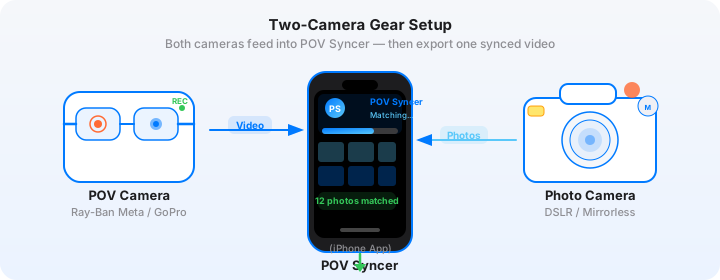
The Ray-Ban Meta Gen 2 are my daily glasses, which means I am already wearing them when I leave the house. That is actually the whole point. They look identical to regular wayfarer-style frames. Nobody on Brick Lane is going to clock that you are recording. The Gen 2 camera sits at 12MP for stills and records video at 1080p — the field of view is wide, approximately 90 degrees, which captures peripheral context the Q3 would never see from where it is held.
Both devices synced to my iPhone 16 Pro before I left the flat. The Meta View app updated the glasses' clock automatically via Bluetooth. The Q3 clock I set manually through the camera menu — matching it precisely to my iPhone's displayed time, to the second. That five-second setup step is the foundation of accurate EXIF sync later. Miss it and you are manually nudging offsets in post.
Camera Settings for Rain and Low Light
A rainy London morning is a specific lighting challenge. The sky is white-grey, diffuse, and directional light is almost completely absent. Contrast comes from wet surfaces: shiny black cobbles on Brick Lane, the mirror-flat Thames at South Bank, puddles catching the orange of sodium streetlights that have not yet switched off. Here is what I ran on the Q3 throughout the session.
- Aperture: f/2.8 for the first hour (dull dawn light), moving to f/4 as daylight increased around 9:30. The Q3's 28mm Summilux resolves beautifully wide open — there is no real sharpness penalty at f/1.7, but I prefer a touch more depth of field for moving subjects in rain.
- Shutter speed: 1/250s as a minimum. Rain streaks require at least this to freeze. At 1/125s you get motion blur in the individual drops, which can look good in the right frame but is inconsistent across a session.
- ISO: Auto ISO, ceiling at 12500. The Q3's sensor handles ISO 6400 without meaningful color noise — grain at 12500 adds texture rather than degrading the image. On a grey morning I was consistently at ISO 800-3200.
- White balance: Auto, locked to Kelvin at 5500K once I was settled in each location. Auto white balance in rain shifts unpredictably as cloud cover changes. Locking to 5500K preserves the blue-grey cool tonality of rain light, which is part of the mood I was after.
- Format: DNG + JPEG Fine. The JPEG is what goes into POV Syncer; the DNG is the archival file. The Q3's JPEGs are excellent and do not need any warmth adjustment for this kind of tonal work.
- Profile: Standard. The Q3 does not have a flat video profile, but its Standard JPEG rendering is measured and does not blow highlights in overcast conditions — which matters on wet streets where the sky is always trying to clip.
The Ray-Ban Meta Gen 2 settings are simpler. I run 1080p at 30fps for street work. The glasses have no manual exposure controls — the automatic exposure is reasonably competent in overcast conditions, though it will occasionally overexpose puddle reflections. That is a minor edit in post if it matters, and for social content it usually does not.
Brick Lane: 8:20 to 9:40
Brick Lane on a wet Tuesday morning is one of the better London street photography locations. The market stalls are mostly closed, which means the street belongs to residents heading to the Overground and café staff setting up for the day. The light bounces off the paving stones in a way that generates natural leading lines straight down the middle of the frame. The typography on the shuttered shops is strong enough that partial compositions — a fragment of a sign, a reflection of a neon in a puddle — work as standalone images.
I shot roughly forty frames in this stretch. The frames I ended up using in the final video were twelve — selected not for technical quality but for how they read in context with the glasses footage. A shot of a woman under an umbrella works as a static image. In the video, where you see her approaching from thirty meters out in the glasses footage, then the Q3 image appears at the exact moment I raised the camera, the timing becomes part of the story. Automatic EXIF sync does not just save time — it makes that timing readable to your audience without any annotation from you.
The rain intensified around 9:00. I ducked under the awning of a closed bagel shop for four minutes and just watched. The glasses kept recording. There is a sequence in the video where you see the rain hitting the cobbles from my eye level, then the Q3 image appears — the reflection of a red Routemaster bus in a puddle, shot at f/2.8, ISO 2500, 1/250s. That image took about one second to make. In the video it is visually obvious that I saw the scene from my standing position and then immediately shot it. No narration needed to explain the process.
Managing the Glasses in Heavy Rain
The Meta Gen 2 frames are not weather-sealed. The camera module and the electronics in the temples are exposed to light rain without issue, but I was cautious in the heaviest downpour. I keep a small folded cloth in my jacket pocket — the kind that comes with prescription glasses — and wipe the lens before any sequence I think might be worth keeping. A water spot in the center of the frame in footage you cannot reshoot is a frustration worth avoiding with thirty seconds of prevention.
Soho: 10:00 to 11:15
I walked across to Soho via Old Street and Clerkenwell. The glasses recorded the whole walk — about forty-five minutes of footage I trimmed heavily in edit. That is the reality of this format: a morning session generates one to two hours of raw footage, most of which is transitional. The editing is not slow because the EXIF sync is difficult; it is slow because you have to decide what to keep. Or rather, it was slow before POV Syncer made that decision less costly.
Download POV Syncer Free
Import your Ray-Ban Meta footage and Leica Q3 JPEGs. Automatic EXIF sync assembles your session in under 60 seconds. No scrubbing. No timeline guesswork.
Create your first POV video in 60 secondsSoho in the rain has a quality that Soho in sunshine completely lacks: theater. The neon signs that are invisible in daylight become luminous through wet glass and puddle reflections. The narrow streets channel rain runoff in sheets along the gutters. The mix of independent businesses — old Italian delis, record shops, Cantonese restaurants — provides a density of visual material within short walking distances that makes it ideal for the kind of compact, location-focused video that performs well on Instagram Reels.
I worked Berwick Street, Old Compton Street, and the back alleys around Wardour Street. The most productive twenty minutes were around the market stalls on Berwick Street, where a handful of stallholders were setting up in the rain with what I can only describe as admirable indifference to the weather. One frame — a stallholder in a yellow waterproof arranging apples, face half-turned, rain-soaked wooden crates in the foreground — ended up as the thumbnail for the YouTube version of the video.
The Pain of Manual Editing — and Why I Stopped
I want to be honest about what this workflow looked like before POV Syncer, because it is relevant to understanding why I use it now. A three-hour session like this one would generate approximately ninety minutes of usable glasses footage and sixty to ninety JPEG files. In Premiere Pro, syncing them manually meant:
- Importing both sets of files and placing the video on a timeline
- Opening each JPEG's metadata, reading the EXIF timestamp, calculating the offset from the video start time
- Dragging the JPEG onto the timeline at that calculated position
- Playing back the section to verify the sync looked right, adjusting by a frame or two if not
- Repeating for every single image
For sixty images: roughly two to three hours of editing grind, on top of the shooting time. For a session I had already spent four hours on, that is a working day gone for one video. The session would sit unedited on my drive for weeks while I waited for a block of free time. Most of the sessions I shot in 2024 never became videos at all.
With POV Syncer's automatic EXIF sync, the same sixty images are matched and placed on the timeline in under sixty seconds. The editing time shifts from assembly to creative decisions: which clips to trim, what titles to add, whether to use AI narration or ambient audio. That is time I am willing to spend.
South Bank: 11:30 to 12:30
I took the Jubilee line to Waterloo and walked down to the South Bank. By this point the rain had softened to a persistent fine drizzle — the kind that is almost invisible until you look at your jacket and realize it is completely saturated. The Thames was flat and grey. The Tate Modern loomed on the opposite bank. The Millennium Bridge pedestrians had their hoods up, heads down, moving fast.
South Bank is more tourist-oriented than Brick Lane or Soho, which changes the dynamic. People are paying more attention to their surroundings and to each other, which makes street photography both more difficult (subjects are more self-aware) and more rewarding (there is more happening). I focused on the details rather than the portraits: the pattern of wet umbrella spokes against grey sky, the reflections of the OXO Tower sign in the puddles along the riverside walk, the contrast of food market steam against cold air.
The Leica Q3 in the Rain: A Practical Note
The Q3's weather sealing held completely throughout the session. I did not use any additional protection beyond keeping it under my jacket during the heaviest downpour on Brick Lane. The lens cap was in my pocket from the moment I started shooting. The front element of the Summilux collected water regularly — I wiped it every ten to fifteen minutes with the cloth I mentioned earlier. A water-beaded lens creates diffusion and ring-shaped flare artifacts that are occasionally beautiful but more often just distracting.
One practical note on the Q3's rain performance: the touch screen becomes unreliable when wet. I switched to physical controls exclusively for the middle two hours — the dedicated ISO dial on the top plate and the aperture ring on the lens barrel let me make exposure adjustments without touching the screen at all. This is one of the Q3's underrated strengths as a rain camera: the physical controls are intuitive enough that you do not need to interact with the display to make the common adjustments.
The POV Syncer Workflow: From Raw Footage to Finished Video
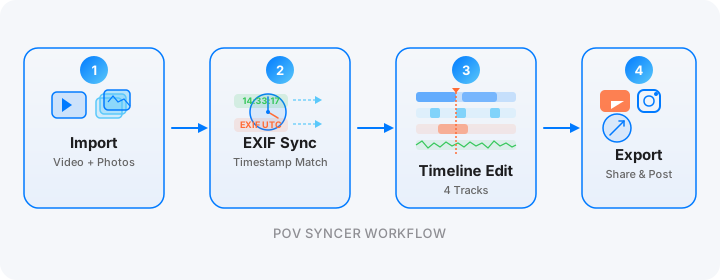
Back at the hotel around 1pm with three glasses video clips (I had stopped and restarted recording between neighborhoods) and 73 JPEGs from the Q3, I opened POV Syncer on my iPhone and started the import. The whole assembly process, from first tap to playable draft timeline, took approximately forty-five seconds.
What Automatic EXIF Sync Actually Does
Each Q3 JPEG carries a full EXIF block including DateTimeOriginal and OffsetTimeOriginal. POV Syncer reads the EXIF timestamp on each image, compares it against the video's start timestamp and frame rate, and calculates the exact video frame where the Q3 shutter fired. For a 30fps video, that is frame-accurate placement — the photo appears within one-thirtieth of a second of the actual capture moment.
Because I synced the Q3 clock to my iPhone before the session, the timestamps were clean. POV Syncer's four-strategy matching — GPS UTC first, then OffsetTimeOriginal with timezone correction, then device timezone fallback, then filename parsing — worked through the Q3's EXIF without any manual offset adjustment from me. The seventy-three images were distributed correctly across three video clips covering three different neighborhoods.
Titles and Narration
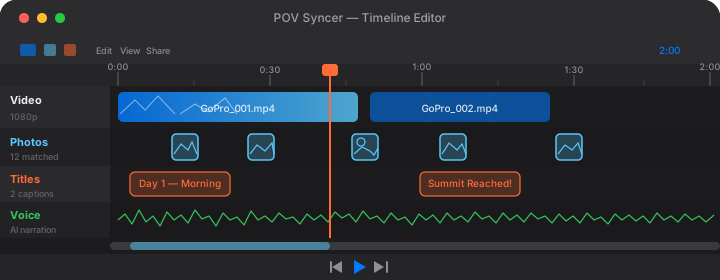
For this video I used minimal titles — a location/time card at the opening of each neighborhood section (Brick Lane, 8:20am / Soho, 10:00am / South Bank, 11:30am) set in one of the editorial serif fonts from POV Syncer Pro's 15 premium fonts. Simple, dateline-style typography that suits the documentary register of the content.
For the narration I wrote about 80 words covering my approach to shooting in rain — why the weather is an advantage rather than an obstacle, what I look for in wet surfaces, the specific quality of London winter light. I chose a measured, unhurried AI voice from the POV Syncer voice library, previewed three options with my actual script, and rendered the final narration in seconds. The narration sits under the ambient audio from the glasses rather than replacing it — you can hear the city throughout.
Total editing time from import to exported video: eleven minutes. Compare that to the two to three hours of editing grind I described earlier. The difference is not marginal — it changes whether these sessions become videos at all.
Want settings cheat sheets for 20+ camera combos?
Join 1,000+ photographers getting weekly tips — including specific cheat sheets for Leica Q3, Ray-Ban Meta Gen 2, GoPro Hero 13, DJI Action 5 Pro, and more.
Free, weekly, unsubscribe anytime.
What the Finished Video Looks Like — and How It Performs
For Instagram Reels: The 90-Second Edit
I exported a 9:16 vertical version for Instagram Reels. The vertical crop of the Meta Gen 2's footage works particularly well for rain photography because it emphasizes the height of London's streets — buildings receding upward, rain falling down the frame, reflections stretching away at the bottom. I kept this cut to 88 seconds, focusing on Brick Lane and South Bank and leaving Soho for a separate Reel the following week. One strong location tells a better story than three compressed ones.
The thumbnail image — the Berwick Street stallholder in the yellow waterproof — was generated directly from the JPEG that appeared in the timeline at that moment. No separate thumbnail shoot needed; the Q3 images are good enough at full resolution to stand alone as Instagram thumbnails.
For YouTube: The Full Session
The YouTube version is the full session, exported at 16:9 in 1080p, running approximately fourteen minutes. The three-neighborhood structure gives it natural chapter breaks. I added YouTube chapter timestamps in the description (00:00 Brick Lane / 05:20 Soho / 09:45 South Bank) to improve session retention. The narration is the same 80-word script from the Reels version, with the full ambient audio from the glasses carrying the rest of the audio track.
YouTube's photography audience responds well to process content that shows genuine conditions rather than optimized ones. A rainy session, with the Q3 images appearing at their natural moment in the glasses footage, is more compelling than a polished sunny-day highlight reel because it is obviously real. That authenticity is what this format offers that no other content type can replicate.
Tips for Your Own Rainy London Session
A few specific things I would change or emphasize based on this session, for anyone planning a similar shoot:
- Start early. Pre-9am London has a quality of emptiness that disappears fast. Rain-slicked streets with almost nobody on them, long reflections, one or two figures under umbrellas — the visual vocabulary of the session I wanted to shoot. By 10am, Brick Lane is populated enough that the mood shifts.
- Sync clocks before you leave, not when you arrive. I did this correctly on this session. On a previous trip I synced at the first location and lost the first twenty minutes of footage to an offset that was too large to auto-correct cleanly. Five seconds before you leave the flat.
- Shoot into the light, not with it. On an overcast day the light is directionless, but wet surfaces still create specular reflections toward the camera position. Turn into the street lamps and lit shop windows rather than keeping them behind you. The Q3's Summilux handles backlit flare gracefully.
- Let the ambient audio breathe. The Meta Gen 2 microphones pick up rain beautifully — the ambient texture of London rain on cobbles, on umbrellas, on café awnings. Do not cover it completely with music. The sound design of a rain video is half the atmosphere.
- Wipe the Q3 front element and the Meta lens every fifteen minutes. Set a quiet timer if you need the reminder. Consistent clear footage is more valuable than one technically perfect image bookending by hazy water-spotted shots.
Conclusion: The Camera Pair That Makes Rainy Days Worth Shooting
The Ray-Ban Meta Gen 2 and the Leica Q3 are not an obvious pairing on paper. One is a consumer tech product selling for a few hundred dollars; the other is a premium full-frame camera that costs several thousand. But they solve two completely different problems — the Meta records your uninterrupted point of view without announcing itself; the Q3 produces images that do not need any apology — and together they create a rainy London morning session that becomes a finished, publishable video in eleven minutes rather than three hours.
What used to be hours of manual editing — scrubbing footage, tedious timeline placement, matching audio to shot moments — is now automatic EXIF sync in under sixty seconds. The rainy days that used to feel like lost sessions are now the ones I look forward to most. Wet surfaces, moody light, the particular quality of London winter streets: the camera pair captures it all, and POV Syncer assembles it in record time.
Turn your next rainy session into a finished video
Download POV Syncer free and create your first POV video in 60 seconds. Automatic EXIF sync works with Leica Q3, Ray-Ban Meta, and every major camera brand.
Free PDF, no spam. Unsubscribe anytime.