POV Street Photography in Tokyo: Camera Gear & Video Workflow
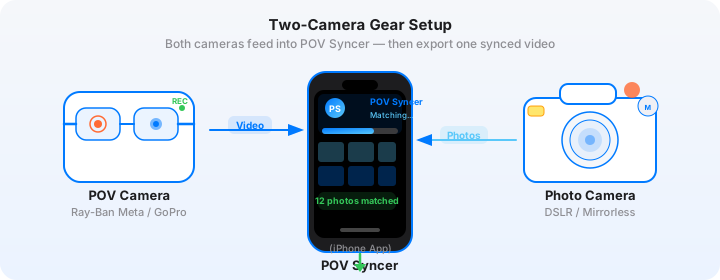
It is seven in the morning and I am standing at the south exit of Shinjuku Station with my Fujifilm X100VI hanging from my wrist strap and a pair of Ray-Ban Meta Gen 2 glasses on my face. The city is already moving — delivery trucks threading between taxis, convenience store workers stocking shelves behind enormous glass windows, a salaryman sprinting for a bus in full suit and briefcase. Tokyo does not warm up slowly. It is simply on, all the time, at full intensity.
I shoot for two and a half hours. I come home with 340 frames and 47 minutes of 1080p footage on the glasses. In the past, that would mean an evening of purgatory: loading everything into Premiere, manually scrubbing footage looking for the exact frame each shot was taken, dragging stills onto a second track, nudging them frame by frame, adding titles, checking sync. Call it three hours minimum for a 10-minute finished video. Often four.
Now I open POV Syncer on my iPhone while I am still on the subway home. By the time I reach my station, the edit is done. Automatic EXIF sync matched all 340 frames to the exact moment in the video footage. What took hours now happens in under 60 seconds. That is the Tokyo street photography workflow I want to walk you through in this post.
Why Tokyo Is the Perfect City for POV Street Photography
Every city has a character that shapes the kind of photography you make there. Tokyo's character is density, contrast, and relentless visual interest. In a single block of Shibuya you get neon signage from four decades competing for the same airspace, pedestrians in everything from business suits to elaborate fashion, the angular geometry of elevated rail lines cutting across the sky, and quiet alleys that feel completely removed from the chaos around them.
For POV video, this means your glasses footage is never boring. There is always something happening in the frame — and more importantly, there is always context surrounding the moment you raise your X100VI for a shot. A photograph of a businessman crossing a wet street in Shinjuku is stronger when the video shows what you walked past to get there: the pachinko parlour spilling light and noise, the vending machine selling hot coffee, the shrine tucked behind a car park. The walk is the story. Tokyo provides an extraordinary walk.
The Gear: Ray-Ban Meta Gen 2 and Fujifilm X100VI
Why Ray-Ban Meta Gen 2 Works in Japan
The invisibility factor of the Ray-Ban Meta Gen 2 matters more in Japan than almost anywhere else. Japanese street culture tends toward a strong social contract about public space and privacy — pointing obvious camera hardware at people on the street can feel intrusive in a way that raising a small camera briefly does not. The Meta glasses look exactly like glasses. Nobody on a Tokyo street gives them a second look.
The Ray-Ban Meta Gen 2 records at up to 1080p and captures spatial audio through its built-in microphones. That ambient audio is particularly valuable in Tokyo — the texture of city sound changes dramatically between Shibuya's crossing, Yanaka's quiet shopping streets, and the covered arcades of Koenji. The audio you capture without thinking about it becomes a significant part of the finished video's atmosphere.
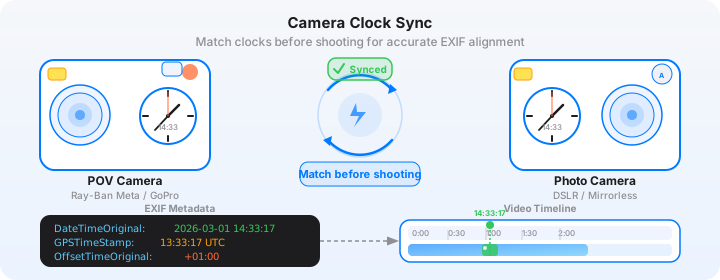
One practical note: Japan sits in the same timezone (JST, UTC+9) throughout the year — there is no daylight saving time adjustment to worry about. Set your Meta glasses' time once via the Meta View app and it stays accurate. This matters for EXIF sync, which I will cover in detail below.
Why Fujifilm X100VI Is the Right Tokyo Street Camera
The Fujifilm X100VI was practically designed for Tokyo. The fixed 23mm f/2 lens (35mm equivalent) is the classic street focal length — wide enough to include environment and context, tight enough to focus on a specific moment or subject. The built-in ND filter means you can shoot at f/2 even on a bright afternoon in Harajuku. The IBIS means handheld shots in dim alley light at the end of the day are usable.
Crucially for Tokyo, the X100VI is small and quiet. The leaf shutter makes almost no sound. The camera does not attract attention when you bring it to your eye. And Fujifilm's film simulations — particularly Classic Chrome and Acros — render Tokyo's mix of concrete, neon, and natural light in ways that feel cinematic without any colour grading work from you.
Get the free POV Photography Cheat Sheet
Optimal Ray-Ban Meta Gen 2 and Fujifilm X100VI settings for Tokyo — plus EXIF sync tips and export presets for Instagram and YouTube. One printable page, free.
Free PDF, no spam. Unsubscribe anytime.
Camera Settings for a Tokyo Shoot
Ray-Ban Meta Gen 2: Settings for the Street
For a Tokyo street photography session, set the glasses to 1080p at 30fps. The 30fps frame rate gives the footage a slightly documentary quality that suits the genre — 60fps can feel too smooth and clinical for street work. At 1080p30, battery life is approximately 60 minutes of continuous recording, which is long enough for a focused session in any single neighbourhood. Pack the charging case for all-day shoots.
The glasses' automatic exposure system handles Tokyo's challenging lighting well. Shibuya at midday has extremely high contrast between deep shadow and bright neon — the glasses expose for midtones and let highlights and shadows clip naturally, which is actually the aesthetic you want for the urban environment. In very low light (Shinjuku Golden Gai alley bars at night, for instance), the footage will be grainy but watchable at 1080p, and the grain reinforces the atmosphere.
Leave the Meta View app's default colour processing in place for Tokyo. The warm, slightly saturated output complements the city's colour palette — the orange glow of combini fluorescents, the blue-white of vending machine panels, the red of torii gates. It requires no correction for Instagram export.
Fujifilm X100VI: Settings for Tokyo
Here are the specific settings I run on the X100VI for Tokyo street sessions. These are tuned for the city's visual character — high contrast, mixed artificial and natural light, subjects that require quick reactions.
| Setting | Value | Why |
|---|---|---|
| Film Simulation | Classic Chrome or Acros+R | Classic Chrome for colour; Acros+R for moody black and white with punchy reds |
| Aperture | f/5.6–f/8 (zone focus) / f/2 (selective) | Zone focus at f/8 gives depth of field from 2m to infinity at 23mm; f/2 for subject isolation |
| ISO | Auto ISO 200–6400 | ISO 6400 on the X100VI sensor is usable; lets the camera handle rapid light changes |
| Minimum shutter | 1/250s | Freezes fast pedestrian movement; Shibuya crossing needs at least 1/250s |
| Format | JPEG Fine + RAF | JPEG imports directly to POV Syncer; RAF is your archival file |
| AF Mode | Zone or Manual (MF + AFL) | Pre-focus to 3m at f/8 — raise, shoot, move. No AF hunting. |
| Dynamic Range | DR200 or DR400 | Protects highlights in Tokyo's extreme contrast environments |
The single most important setup step for this workflow is syncing the X100VI's clock to the precise time before you start shooting. The camera does not have GPS or network time sync, so its clock drifts. Before every session, open the Clock app on your iPhone, note the exact seconds, and go to the X100VI's setup menu (wrench icon, Date/Time) to match it precisely. This ensures that when POV Syncer reads the EXIF DateTimeOriginal field from your JPEGs, it can calculate the exact video frame each shot corresponds to.
Tokyo timezone tip: Japan does not observe daylight saving time, so UTC+9 is constant year-round. When POV Syncer reads the OffsetTimeOriginal EXIF field from your X100VI files, it will correctly see "+09:00" and resolve the timestamp without any adjustment needed on your part.
The Manual Editing Pain — and Why It Kills Momentum
Before I explain the POV Syncer workflow, I want to be honest about what manual editing actually costs a photographer who wants to document their Tokyo sessions consistently.
Imagine coming home from four hours in Shibuya with 280 JPEG frames and 70 minutes of footage from the glasses. In Premiere Pro or Final Cut Pro, you load the video and start scrubbing through footage looking for the moment you shot each image. The EXIF metadata shows you a timestamp — say 09:47:23 — but you have to find that moment in a 70-minute timeline manually. One frame at a time. For 280 photos. That is hours of the editing grind just to place stills on a timeline, before you have touched colour grading, titles, narration, or export settings.
Most photographers do this once, produce one video, post it, and never do it again because the return on time is too low. The content dies. The audience they were building never grows. And the Tokyo sessions — which produced extraordinary material — stay locked on a hard drive.
Tedious timeline placement and scrubbing through footage is the reason POV process videos are rare despite the gear being widely available. The editing is the bottleneck. POV Syncer removes it entirely.
The POV Syncer Workflow: Tokyo in 60 Seconds
Here is exactly how the workflow runs after a Tokyo shoot. I am on the subway from Shinjuku heading home. The entire edit happens before I reach my stop.
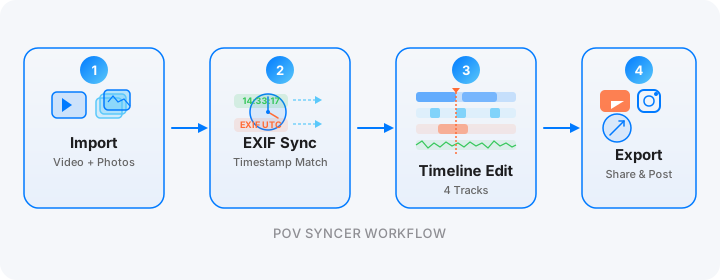
Step 1: Import Video and Photos
Transfer the glasses footage and JPEG files to your iPhone. The Meta View app syncs glasses footage to your iPhone's Camera Roll automatically over Wi-Fi. Your X100VI JPEGs transfer either via a USB-C cable or through Fujifilm's XApp over Wi-Fi. Both happen in minutes. POV Syncer works directly from your Photos library — no extra transfer step needed.
Step 2: Automatic EXIF Matching
Select your glasses footage in POV Syncer, then add your JPEG folder from the shoot. POV Syncer's four-strategy EXIF matching engine reads the DateTimeOriginal and OffsetTimeOriginal fields from every JPEG, calculates the offset from the video's start time, and places each photo at the precise frame it was captured. For a 280-frame Tokyo shoot, this takes two to three seconds. What took hours of manual editing now happens automatically in record time.
The matching tolerance is configurable. For Tokyo street work where you are shooting quickly and moving fast, I set a two-second tolerance window, which ensures even a slightly imprecise camera clock produces accurate sync. Photos that fall outside the video's time range are flagged separately so you can review them — typically these are shots taken before you started the glasses recording or after you stopped.
Download POV Syncer Free — Create Your First Tokyo POV VideoStep 3: Timeline and Titles
POV Syncer's 4-track timeline editor gives you video, photos, titles, and narration on separate tracks. For a Tokyo photo walk video, I use the title track to add a simple location card at the opening — neighbourhood name and time of day, set in a clean typeface against a frosted glass background. Then one or two text cards mid-video identifying specific locations: "Shibuya Crossing, 08:15" or "Yanaka Ginza, 09:40." These context cards are what make the video educational as well as aesthetic.
The 15 premium fonts in POV Syncer Pro include clean sans-serif and editorial options that suit the Tokyo aesthetic. Avoid anything decorative — the visual richness of the city provides all the decoration needed. The text is purely for orientation and information.
Step 4: AI Narration
The voice track is where Tokyo photo walk videos really become compelling content. Instead of music over footage, add a short narration: what neighbourhood you were in, what you were looking for, what drew your eye to a particular scene. I write 60-80 words — three or four sentences — and choose one of POV Syncer's measured, thoughtful AI voices. The narration renders in seconds and sits under the ambient city audio rather than replacing it.
The combination of Tokyo's ambient sound — trains, vending machine hum, the pre-recorded pedestrian crossing melody, the distant sound of crowds — with a quiet narration creates exactly the meditative quality that makes this format work. It sounds like a photographer thinking out loud while walking through a city they love.
Tips for Specific Tokyo Locations
Shibuya Crossing: Volume and Timing
Shibuya Crossing is probably the most-photographed intersection in the world, which means the challenge is not finding good material but finding a perspective that is not identical to ten thousand existing shots. My approach is to shoot from mid-stream, inside the crossing during the pedestrian phase, rather than from the elevated position at Starbucks. The glasses capture the first-person experience of moving through the crowd — which is genuinely unique footage. The X100VI finds individuals within the mass: a woman checking her phone, a tourist looking up at the screens, a delivery worker pushing through in the opposite direction.
Shoot at 1/500s or faster in the crossing. The pace of movement means 1/250s can produce micro-blur on the foreground pedestrians closest to you. At ISO 800-1600 in daylight crossing conditions, 1/500s at f/5.6 gives you sharp freeze-frames throughout.
Shinjuku Golden Gai: Low Light and Atmosphere
Golden Gai is six alleys of tiny bars, each holding eight to twelve people maximum, built in the post-war reconstruction period and barely changed since. At night it is almost impossibly atmospheric. The glasses footage here is all about the warm glow of lit interiors against dark alley walls, the smoke, the narrow perspectives. Push ISO to 6400 on the X100VI and shoot the light that is there rather than trying to overexpose the shadows. Acros+R in low light with strong orange-warm sources is extraordinary — the red filter simulation lifts skin tones and flattens the yellow-orange glow into grey, giving the images a timeless quality.
Yanaka: Pace and Quiet
Yanaka survived the 1923 earthquake, the 1945 firebombing, and the post-war development boom with most of its traditional architecture intact. Walking through Yanaka Ginza or the cemetery path to Nippori, you are in a Tokyo that no longer exists almost anywhere else. The POV footage here is slower and more contemplative — the narrow lanes, the cats, the wooden shopfronts, the quiet between footsteps.
In Yanaka, shoot fewer frames more deliberately. The X100VI at f/8 zone-focused gives you the depth of field to capture a whole alley in a single frame. The video that surrounds those shots is as important as the shots themselves — give the footage room to breathe between moments of capture.
Want settings cheat sheets for 20+ camera combos?
Join 1,000+ photographers getting weekly tips — including location-specific settings guides for Tokyo, London, New York, and beyond. Free, direct to your inbox.
No spam. Unsubscribe anytime.
Exporting Your Tokyo Photo Walk for Instagram and YouTube
Instagram Reels: The 90-Second Tokyo Edit
For Instagram Reels, export at 9:16 (1080x1920). The vertical crop of the Meta glasses' 16:9 footage works well for Tokyo street photography — it naturally tightens around vertical elements that define the city's visual character: the height of buildings above narrow alleys, the towering LED screens, the compressed verticals of Golden Gai. Set a maximum duration of 90 seconds for best algorithm reach and pick your single most compelling scene rather than trying to compress a two-hour session.
Use the timeline editor to cut from the glasses footage to a still, then back to footage, within that 90 seconds. Two or three photos maximum in a Reel — let each one land and hold for two to three seconds before returning to the video. The one-tap photo matching in POV Syncer means the timing between footage and stills is already accurate; the Reels edit is just about selecting which moments to include.
YouTube Long-Form: The Full Photo Walk
YouTube supports the longer form of a full neighbourhood photo walk. Ten to fifteen minutes of Tokyo footage with narration and matched stills is a legitimate piece of content for the photography audience on the platform. Export at 16:9 for YouTube's standard aspect ratio. The timeline editor's 4-track layout gives you the structure to build a proper documentary: opening title card with location and date, footage leading to the first shot, narration explaining what you were seeing, a pause on the still, back to footage. Repeat for each key moment.
Add chapter timestamps in the YouTube description — "0:00 Shinjuku West Exit / 4:30 Golden Gai / 9:15 Kabukicho at Night" — to improve watch time by letting viewers jump to specific sections. YouTube's algorithm rewards watch time more than any other metric for this type of content.
What the Finished Video Looks Like
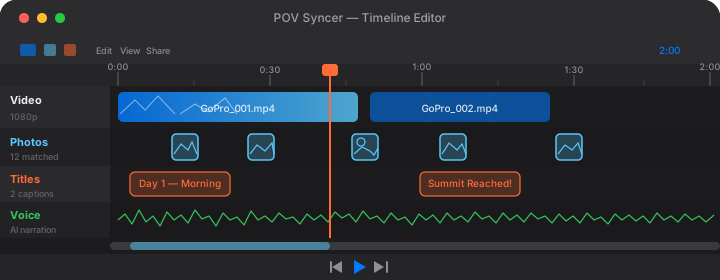
A finished Tokyo POV street photography video made with this workflow is genuinely unlike most photography content online. The glasses footage gives your audience an experience they cannot get from a photograph or a vlog to camera — they see through your eyes, walking the same streets, noticing the same scenes before you commit to raising the X100VI. When the photo appears in the video at the exact moment of capture, the connection between intention and result is immediate and visceral.
For photographers building an audience, this kind of content works harder than portfolio posting. It demonstrates your eye, your decision-making, your knowledge of the city, and your technical competence all at once. The Tokyo street photography audience on Instagram and YouTube is large and genuinely engaged — and process content that shows a specific, real session in a specific, real city consistently outperforms generic technique posts.
POV Syncer Pro unlocks AI narration, 15 premium fonts, 10 background styles for $9.99 per month or $99.99 per year. The free tier gets you started immediately — your first Tokyo video takes about 10 minutes from import to export, not the three to four hours of manual editing the old workflow required. See the full pricing comparison or explore the complete feature set before you download.
The Gear List, Summarised
For anyone planning a Tokyo photo walk with this setup, here is everything in one place.
- POV camera: Ray-Ban Meta Gen 2 — 1080p 30fps, ambient audio, charge case for full-day sessions
- Street camera: Fujifilm X100VI — fixed 23mm f/2, IBIS, Classic Chrome or Acros+R
- Editing app: POV Syncer on iPhone — automatic EXIF sync, 4-track timeline, AI narration, App Store
- Transfer: Meta View app (glasses to iPhone), Fujifilm XApp or USB-C (X100VI to iPhone)
- Export: 9:16 1080p for Instagram Reels; 16:9 1080p for YouTube
The entire kit — glasses, camera, phone — fits in a jacket pocket and a small shoulder bag. For Tokyo, where you will be covering significant distances on foot and on the train, keeping the kit minimal is not an aesthetic choice but a practical one. The less you are carrying, the more you move like a local, and the better your footage and photographs will be as a result.
Conclusion: Tokyo in Seconds, Not Hours
Tokyo is one of the world's great cities for street photography, and with Ray-Ban Meta Gen 2 and Fujifilm X100VI you have a setup perfectly matched to what the city demands: small, quiet, visually sophisticated, capable of handling extreme contrast and rapid change. The footage you come home with from a morning in Shibuya or an evening in Golden Gai is genuinely compelling raw material.
What POV Syncer does is remove the only obstacle between that raw material and a finished video that other photographers want to watch. Automatic EXIF sync eliminates hours of manual editing in record time. The 4-track timeline, 15 fonts, and AI narration give you production tools that match the quality of the footage. And the whole thing runs on your iPhone while you are still on the subway home from the shoot.
That is the Tokyo street photography POV workflow. Shoot more, edit less, share faster.
Create your first POV video in 60 seconds
Download POV Syncer free and turn your Tokyo street footage into a finished video before you reach your station.
Or get the settings cheat sheet for 20+ camera combos delivered to your inbox:
Free PDF, no spam. Unsubscribe anytime.