Troubleshooting & Sharing Logs
When something doesn't look right, POV Syncer keeps a detailed log of every decision the renderer made. Reading the log usually points straight at the cause — and if it doesn't, you can send the log to support with a single tap.
Common problems and what to check first
Photos I expected to match didn't
Open Match Preview, find the video, expand it. If the expected photo isn't listed, the EXIF timestamp probably falls outside the tolerance window. Common causes:
- Camera clock off — your POV camera's time is set wrong, by minutes or hours. Photos taken on a phone with the right clock won't match.
- Timezone confusion — POV Syncer prefers GPS UTC, but if your camera doesn't write GPS, it falls back to local time. Travel across timezones makes this brittle.
- Tolerance too tight — try increasing it to ±30s or ±60s on the Adjust Tolerance sheet (see Reading the Match Preview).
Photos matched but didn't appear in the rendered video
This is the iCloud-not-downloaded case. POV Syncer asked PhotoKit for the full-resolution image and got nothing back — usually because the photo hasn't been downloaded from iCloud to the device. The log will say something like:
❌ Could not load image for IMG_2531.HEIC (PHAsset returned nil —
  likely iCloud not downloaded or access denied). Skipping overlay at 12.3s.
Fix: open the Photos app, find the missing photo, wait for it to download (you'll see a small cloud icon while it's loading), then re-process the video.
The export failed mid-render
The log shows an AVFoundationErrorDomain code followed by a diagnostics block listing the video's dimensions and audio tracks. Most common causes:
- Source video has unusual audio — e.g. 5.1 surround on a 3rd-party camera. AVFoundation's preset can't always remix these
- Out of memory — usually visible as a SIGKILL or jetsam termination in the system crash report
- Permissions issue — Photos library or microphone access denied
The app got killed when I locked the screen
POV Syncer disables auto-lock during rendering, so the screen stays on. But if you manually lock it or switch apps for more than ~30 seconds, iOS suspends the export to save battery. The next time you open the app, you'll see the partial results.
Best practice: plug the phone into a charger, leave it face down, and don't touch it until rendering finishes. The phone won't sleep, won't get hot (Azure renders TTS in the cloud), and won't get backgrounded.
Sharing the log with support
If you can't figure it out from reading the log, POV Syncer can package it up and upload it to our diagnostics endpoint with one tap. We don't store personal photos or videos — only the log messages and your device model.
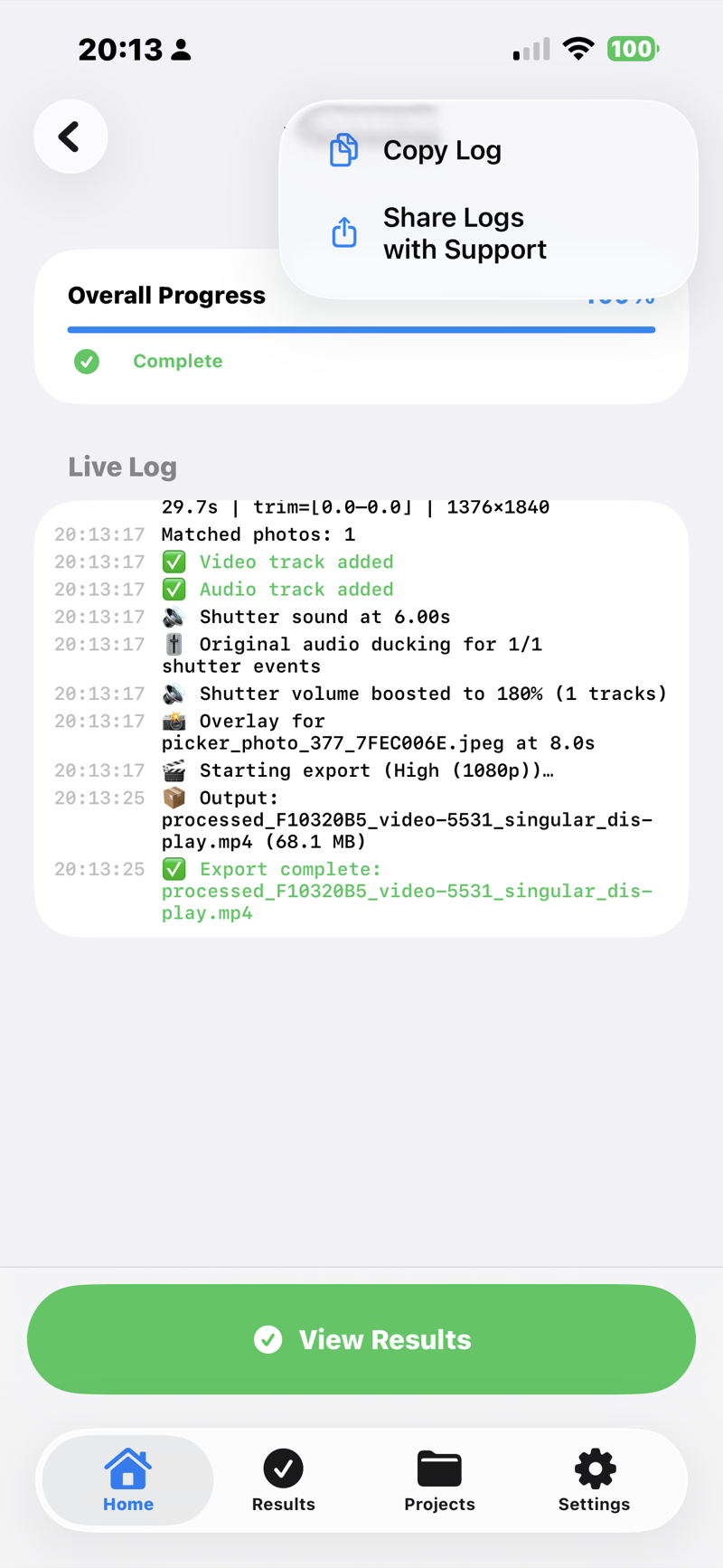
Find the Share Logs option
Logs are available from two places:
- Processing screen — tap the ⋯ (ellipsis) icon top-right while a render is in progress or just after it completes
- Results screen — tap the ⋯ icon top-right after the render has finished and you've navigated to Results
Both menus have Share Logs with Support and Copy Log (for pasting into an email yourself).
Add a short note
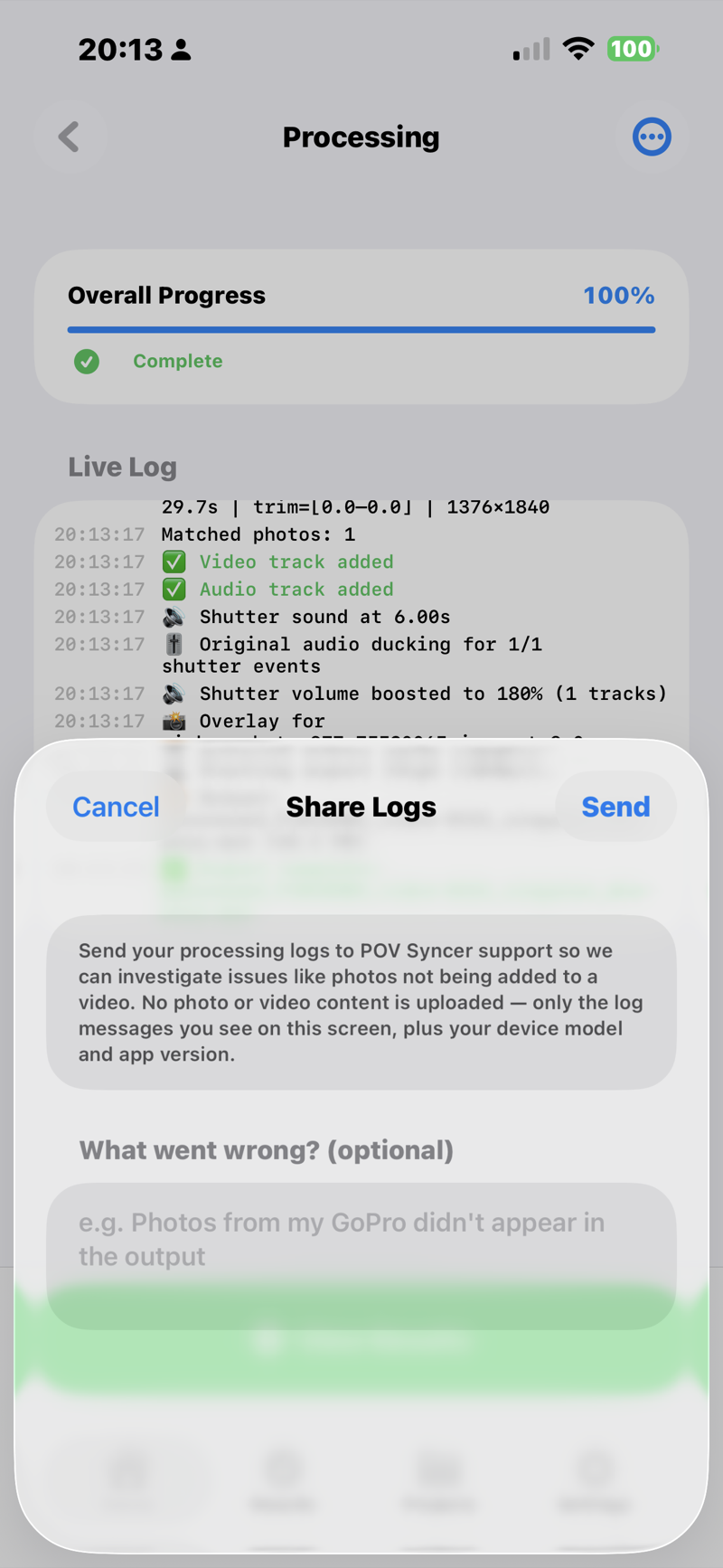
Tap Share Logs with Support. A sheet opens with a text field — add a one-liner describing what you were trying to do ("Importing 26 photos from a Ray-Ban Meta session, only 4 matched"). This makes it dramatically easier for support to find the issue.
Tap Send and copy the reference ID
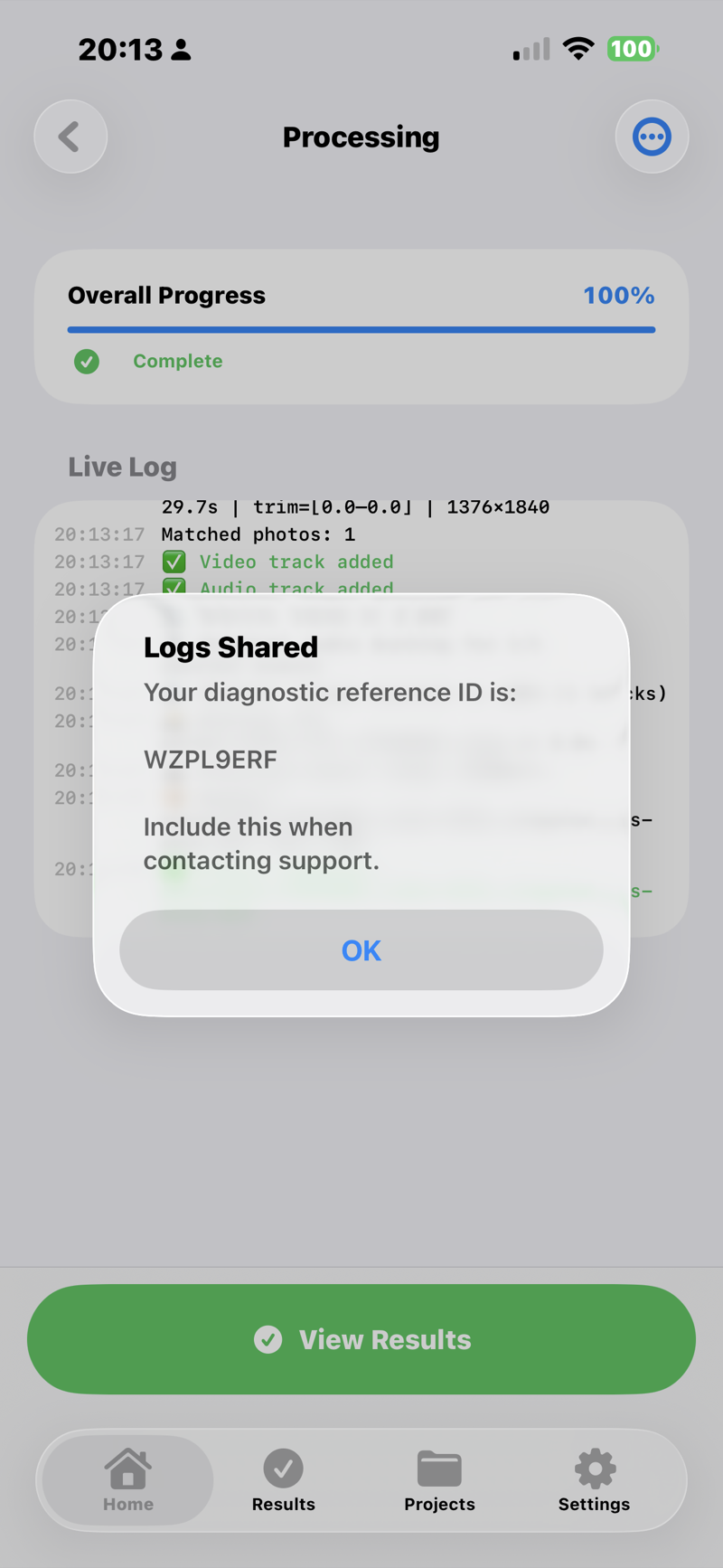
The upload takes a second or two. When it finishes, an alert shows a short reference ID — something like AMQO64OQ. Note it down or screenshot it.
Email support with the reference ID
Go to povsyncer.com/support or email support@povsyncer.com directly. Include the reference ID — we can find your log instantly without any back-and-forth about what device you're on or what version you're running.
What gets uploaded (and what doesn't)
Uploaded:
- The log entries you see on screen — same content as Copy Log
- Your device model (e.g. iPhone 15 Pro Max), iOS version, and POV Syncer version
- The optional note you typed
Not uploaded:
- Your photos or videos
- Your name, email, Apple ID, or any other identifier
- Location data, contacts, or anything else from your phone
Logs are retained for 30 days then auto-deleted.