Automotive photography is one of the most technically demanding niches in commercial photography. The combination of moving subjects, compressed perspectives from telephoto panning, the demands of natural light for location shots, and the logistics of track access and safety requirements creates a context that is fundamentally different from studio or street photography.
It is also one of the niches where behind-the-scenes content performs best with the target audience. Car enthusiasts are deeply interested in process — how do you get a car moving at 100mph sharp in the frame with a perfectly blurred background? How do you set up a rolling shot from a camera car? How do you capture the precise moment a supercar rounds a corner at Goodwood? A POV video that shows those working moments, with the finished automotive images appearing as overlays at the exact moments they were captured, is content that the automotive and photography communities both engage with strongly.
The editing grind has always been the barrier. A full-day automotive shoot — track time, rolling shots, location exteriors — can produce several hours of GoPro footage and hundreds of high-speed burst frames. Manually matching those to the POV timeline in Premiere or DaVinci Resolve was a three-to-four hour task that most automotive photographers simply could not justify for social content. POV Syncer does it automatically in under 60 seconds.
What Are Automotive Photography POV Videos?
An automotive photography POV video is a first-person recording of your shoot day, with your finished car images appearing as overlays at the moments you captured them. The POV camera — mounted on your chest or camera — records your working perspective as you position yourself, track moving cars through your viewfinder, and react to the light and action. Your stills camera produces the automotive images that appear as overlays, giving viewers the payoff of each shooting position.
For automotive photography, this format serves a specific audience of car enthusiasts who are deeply interested in the photographic technique as well as the images. How you set up a panning shot, why you chose 1/60s over 1/80s for the background blur, what the track looks like from the shooting position — all of this context is genuinely valuable to the automotive photography community.
The format works well on YouTube (longer technical breakdowns with narration), Instagram Reels (punchy 60-90 second reveals showing the best images), and within client presentations (a BTS video alongside the final delivery demonstrates the professionalism of the production).
Why Automotive Photographers Need This Content
Automotive photography is a competitive commercial market. Manufacturers, dealers, event organisers, and private collectors shortlist photographers primarily through portfolio, but portfolio similarity is a genuine problem — at a certain level of technical competence, automotive portfolios begin to look alike. Process content breaks this similarity:
- Show the logistics — getting access to a track, coordinating a rolling shot with a camera car, positioning safety barriers for a circuit sequence: the logistics of professional automotive work are genuinely impressive and communicate seriousness to commercial clients
- Demonstrate technique — automotive enthusiasts who watch photography content want to understand the technical approach: the panning technique, the lens choice, the shutter speed decisions
- Build the automotive community audience — car enthusiasts and photography enthusiasts overlap significantly. Content that serves both communities simultaneously compounds engagement
- Client deliverable — many automotive clients value a BTS video alongside the final image delivery as an additional asset for their own social media channels
Get the free POV Photography Cheat Sheet
Camera settings, EXIF tips, and export presets for GoPro Hero 13, DJI Action 5 Pro, and Insta360 — including motion photography settings for automotive and high-speed action work.
Free PDF, no spam. Unsubscribe anytime.
Pick Your POV Rig for Automotive Shoots
Automotive photography involves specific physical constraints: you are often in a fixed shooting position waiting for the car to pass, or you are moving between positions across a large location. Both scenarios suit different POV approaches.
Chest Mount: GoPro Hero 13
The chest-mounted GoPro Hero 13 is the standard choice for automotive work. You have both hands free for the main camera, the wide field of view captures the full context of your shooting position (the road, the track, the landscape behind you), and HyperSmooth 6.0 stabilises the footage even when you are moving quickly between positions or panning to follow a car. The chest mount also naturally shows the car approaching your position — a perspective that is specifically compelling for automotive BTS content because it replicates what the photographer sees just before the image moment.
Settings for GoPro Hero 13 at automotive shoots:
- Resolution: 4K at 60fps — the 60fps gives smooth slow-motion capability for the best car-passing moments
- Field of view: Wide or HyperView for chest mount at locations; Linear for a more naturalistic perspective on tracks
- Stabilisation: HyperSmooth 6.0 on — essential when running between shooting positions
- Protune: On with Flat colour if you plan to grade; off for delivery-ready footage
- Time sync: Sync from Quik app at the start of each shoot day
Hot-Shoe Mount for Static Shooting Positions
An Insta360 GO 3S on the hot shoe of your main camera gives the most precise "this is what the photographer was aimed at" perspective for static shooting positions — corner apex shots, straight-line panning positions, and static car portraiture. For automotive editorial work where you are primarily shooting static cars rather than moving ones, the hot-shoe mount gives the most editorial-appropriate perspective.
360-Camera for Track Coverage
An Insta360 X4 on a chest mount gives maximum reframing flexibility for track-day footage. When a car comes through a corner faster than you expected, or your best panning sequence happened with your body turned 45 degrees from the GoPro's primary direction of view, the 360-degree coverage means no moment is lost. You can reframe every key moment in post to show the car, your hands on the camera, or the wider track environment.
The Gear: What Automotive Photographers Use
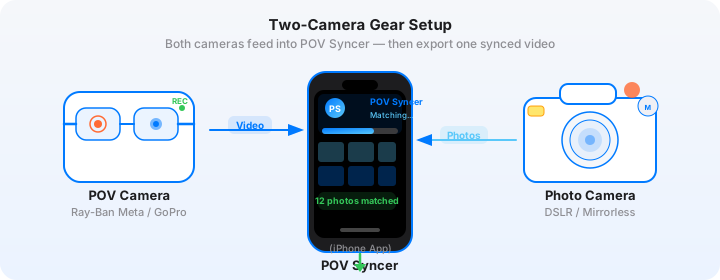
Stills Camera: Canon EOS R6 Mark III
The Canon EOS R6 Mark III is a strong choice for automotive photography. Its IBIS (in-body image stabilisation) is rated at 8 stops when combined with IS-enabled lenses — critical for panning shots at 1/60s where any unwanted vertical camera movement ruins the shot. The R6 III can shoot up to 30fps with the electronic shutter, giving you a wide selection of frames from each car pass. The subject tracking AF handles moving vehicles well, reducing the focus decisions you need to make during the approach phase.
Settings for automotive work with the Canon R6 III:
- Shutter speed: 1/60s to 1/125s for panning shots with background blur; 1/500s to 1/1000s for sharp-everything track shots showing wheel movement
- Aperture: f/5.6 to f/8 for most automotive work where the whole car needs to be sharp; f/2.8 for selective-focus detail shots
- ISO: 100-400 in daylight; Auto ISO with maximum 1600 for variable-light location work
- Lens: 70-200mm f/2.8 IS for panning and action; 24-70mm f/2.8 for environmental contexts; 16-35mm for dramatic low-angle static car portraits
- Drive mode: High-speed burst (20-30fps) for car-pass sequences; single shot for static car portraits
- AF mode: Subject tracking with Vehicle Detection enabled — the R6 III's vehicle detection AF is one of the best in its class
The Hard Part: Manual Automotive Editing
A typical automotive shoot day produces three to five hours of GoPro footage across different locations and shooting positions. Your Canon burst sequences generate hundreds of frames, from which you select the best 40-80 final images. Manually scrubbing through the footage to find each car-pass moment, then placing the selected images at those positions on a Premiere timeline, is three to four hours of additional work after an already physically demanding shoot day.
Most automotive photographers either skip the BTS content entirely, or post raw GoPro footage as YouTube uploads without the still image overlays that would make it genuinely compelling. POV Syncer changes this calculation entirely.
The Fix: EXIF-Precise Automotive Sync
POV Syncer reads the EXIF timestamp from every Canon RAW or JPEG file and matches it to the corresponding moment in the GoPro footage. For automotive work where the shooting window for each car pass is a fraction of a second, the precision of second-level timestamp matching is more than adequate — each burst sequence is placed at the moment it started, with the individual frames clustered together on the timeline.
The four-strategy EXIF cascade (GPS UTC, OffsetTimeOriginal, GPS-corrected timezone, device timezone fallback) handles the sync between the Canon R6 III and GoPro Hero 13. The Canon R6 III embeds OffsetTimeOriginal in its files, giving POV Syncer UTC-corrected timestamps for reliable matching.
Create your first automotive BTS video — free on TestFlightStep-by-Step: Building Your Automotive BTS Video
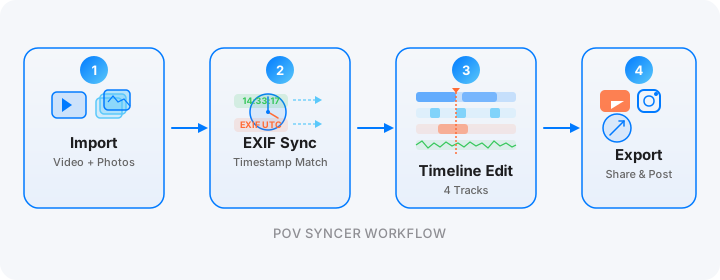
Step 1: Import. Transfer your GoPro Hero 13 footage via the Quik app or USB-C. Transfer your Canon R6 III files via the Canon Camera Connect app or card reader. Create a new POV Syncer project — the app handles up to 2,000 items per project, covering a full shoot day across multiple locations.
Step 2: Review the match preview. POV Syncer shows you the match before processing. For an automotive shoot across three locations, you will see three distinct clusters of images at the active shooting windows — the approach, the apex, the exit for each position. Review the match preview tutorial to confirm the clusters align correctly with the location changes.

Step 3: Process. Tap Process. On-device rendering keeps your automotive images and footage private.

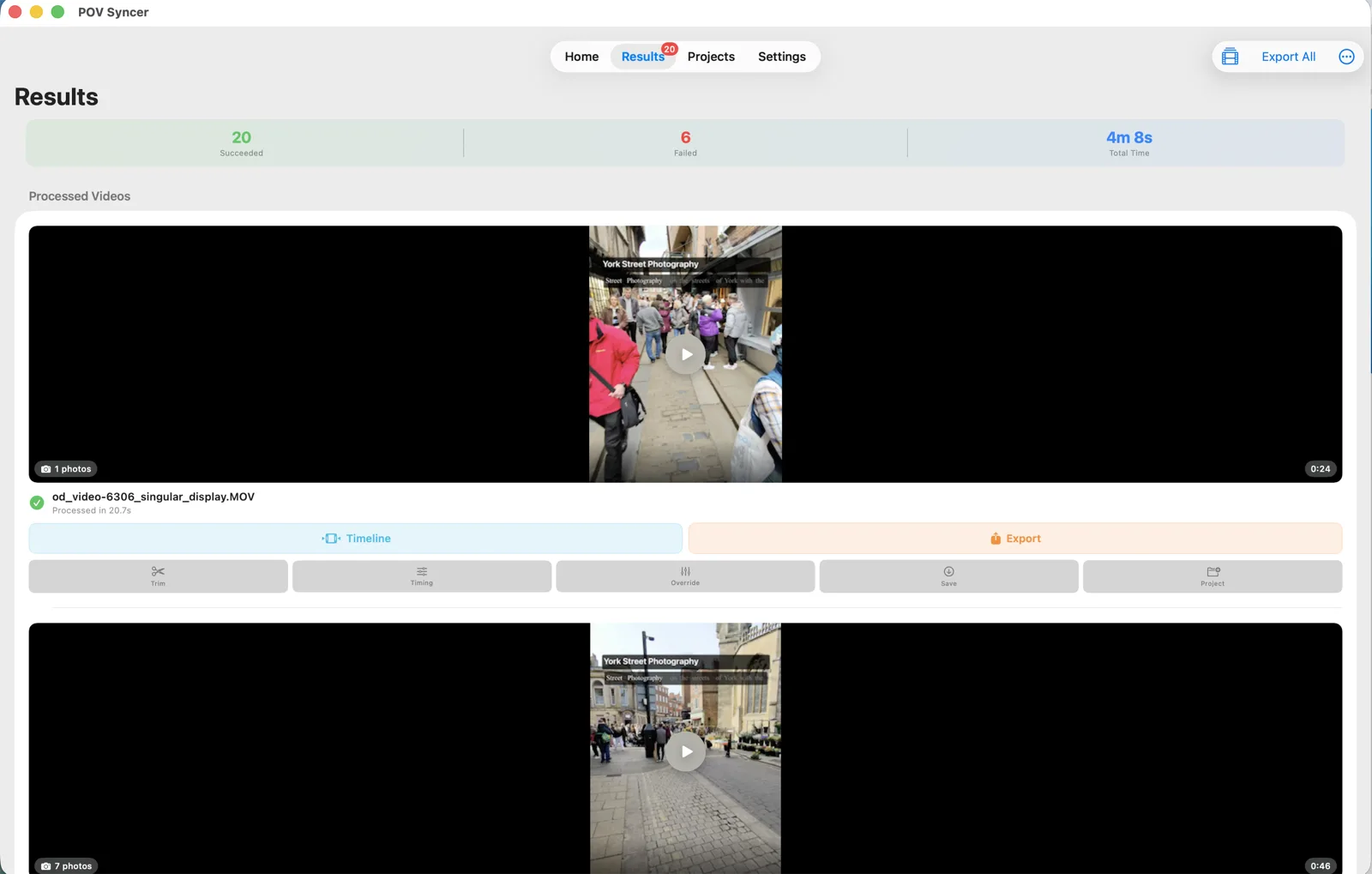
Step 4: Review results and open the timeline. The results view shows your car shots placed at their precise moments in the GoPro footage. For a day with 60 selected images across three locations, you will see 60 overlay moments distributed across the timeline — a clear map of your shoot's most productive periods.


Step 5: Add vehicle titles and technical narration. For automotive content, the titles track is where you add the vehicle specifications, location, and key technical choices. "Aston Martin Vantage GT4 — Silverstone National — 70-200mm at 1/80s f/8 — rolling shutter minimal at these settings" gives the automotive and photography audience both sets of information they want simultaneously. AI narration can expand on the setup choices: why this corner, why this shutter speed, why this lens.
Step 6: Export. YouTube: 8-12 minute full shoot day breakdown with narration and all image reveals. Instagram Reels: 60-90 second cut showing the three best car-pass moments and image reveals. Client delivery: a 3-4 minute condensed BTS for the client's own social media use. All from the same POV Syncer project file.
Works on iPhone, iPad, and Apple Silicon Mac
Automotive photographers shooting in RAW produce large files — Canon R6 III RAW files run to 25-35MB each. The Mac version of POV Syncer handles large import batches efficiently from card readers, and the full-screen timeline editor makes working with long shoot-day footage considerably more practical than on a phone screen.
Under the Hood: EXIF Sync for Automotive Photography
High-speed automotive photography creates a specific EXIF pattern: very rapid timestamp clusters (30fps burst = multiple frames per second) during car-pass moments, separated by long gaps between shooting positions. POV Syncer's matching handles this correctly:
- OffsetTimeOriginal strategy — the Canon R6 III's UTC-aware timestamps give POV Syncer precise matching even for long shoot days where clock drift might otherwise cause problems
- Tight match tolerance for burst sequences — set a 2-3 second tolerance to match burst frames precisely to their car-pass window; this prevents frames from different car passes being incorrectly matched to the wrong window
- 100-photo cap per clip — for high-volume burst sessions, import your culled selects (3-5 images per car pass, totalling 40-80 for a full day) rather than the full burst output. This gives the cleanest timeline presentation and most appropriate overlay frequency for BTS content
- Per-video timing offset — if a specific clip has a clock discrepancy (perhaps the Canon clock drifted after battery change between locations), apply a per-clip offset without affecting the rest of the project
- Save and reload projects — automotive projects with multiple location clips benefit from the save-and-reload capability for multi-day review and editing sessions
Automotive Photography-Specific Tips
Sync Clocks at the Start of Each Day — and After Battery Changes
Canon R6 III battery changes mid-shoot can sometimes cause a clock reset — or the clock may drift if the camera sat unpowered for an extended period. Check both the GoPro and Canon clocks after every battery change. For a multi-location shoot with long travel between sites, recheck at each new location.
Mount the GoPro High on the Chest for Panning Context
Position the GoPro chest mount as high as possible (just below the chin, approximately) to capture both your camera and the approaching car in the same frame. This gives the most compelling automotive BTS perspective: the viewer sees you panning as the car approaches, then the image overlay shows the result of that pan at the exact moment of capture.
Include Approach and Setup Footage
The most engaging automotive BTS content shows the full context of each shooting position — the track walk to find the corner, the positioning decision, the first test shots as the car comes through at pace. Keep the GoPro running from the moment you park at each location, not just during the active shooting windows.
Match Music Tempo to Car Character
For a supercar at a circuit, match the music tempo to the car's pace and character. For a classic car on a scenic location, something more measured and atmospheric. POV Syncer's music library includes tracks suitable for both, and the custom import feature lets you bring in licensed tracks that match specific briefs for commercial client content.
Export a Client Cut Separately
Many automotive clients want a cleaned-up version of the BTS video for their own social media channels. Create a secondary export from the same POV Syncer project — remove any footage that shows the crew, the safety setup, or other elements the client prefers not to include. The project save means you can adjust the timeline and export a new version without starting from scratch.
Start showing your automotive shoot days
Import your GoPro track footage and Canon car shots. Automatic EXIF sync builds the BTS timeline — free during the beta.
Download on App Store — FreeFrequently Asked Questions
Can I use POV Syncer for panning shots where I am tracking a moving car?
Yes — the EXIF timestamp matching works regardless of whether the car is moving or static. For panning sequences, you typically fire several burst frames as the car passes; POV Syncer places all matched frames at their precise moments in the footage, giving you a timeline that shows the full sequence of panning shots clustered at the moment the car was in your frame.
How do I capture POV footage while also shooting with a telephoto lens?
Chest mount is the best option for automotive photography — it gives you both hands free for your main camera while the GoPro records the wider scene. The chest mount perspective naturally shows the car approaching your position, then the image overlay reveals the tight telephoto result from that same moment.
Can POV Syncer handle high-burst-rate automotive photography?
Yes — import your culled selects (the best 3-5 frames from each burst sequence) rather than the full burst output. POV Syncer caps at 100 photos per clip spread evenly, so culling your burst to selects gives the cleanest and most readable timeline presentation for BTS content.
Conclusion: From Track to Timeline in Record Time
Automotive photography is a discipline with a compelling story built in — the access, the logistics, the technical precision of capturing cars at speed in the right light at the right moment. That story deserves to be told in full, not just communicated through the finished images on a portfolio page.
What used to require three to four hours of manual timeline editing now takes under 60 seconds with POV Syncer. Import your GoPro track footage and Canon car shot selects, review the match preview, process, polish with vehicle titles and technical narration, and export. Every shoot day becomes a complete content package: the images for the portfolio, and the BTS video that explains how those images were made.
For more on the broader POV workflow, read the sports photography sync guide for high-speed burst techniques that apply directly to automotive work, and the POV video process overview for the workflow fundamentals.
Ready to document your next automotive shoot?
Download POV Syncer free on TestFlight. Import your GoPro footage and Canon car shots — automatic EXIF sync builds the BTS timeline in under 60 seconds.
Join 1,000+ photographers getting weekly tips. Unsubscribe anytime.