A concert photography POV video shows what actually happens in the pit. The chaos, the anticipation, the burst of shots when the lighting finally favours the subject, the moment the performer turns towards you — and then the photograph, placed at its exact EXIF timestamp in the footage by POV Syncer, showing the image that emerged from all that organised chaos.
For music photographers and photography-adjacent music fans, this content is among the most-watched photography content on Instagram Reels and YouTube Shorts. It demystifies access, demonstrates technique, and shows the reality of concert photography in a way that finished images never can.
What Concert Photography POV Videos Are
Concert photography POV video combines first-person footage from a wearable camera (Ray-Ban Meta glasses, Insta360 GO 3S, or a small GoPro) with the concert stills from your main camera body — placed at their EXIF timestamps in the footage. The viewer experiences the pit from your perspective: the lighting cycles, the performer's movement, the moments you choose to shoot, and then the photographs that resulted from those decisions.
Unlike most photography genres, concert photography has a built-in audience that extends beyond photographers. Music fans who follow the artists you photograph are interested in behind-the-scenes access content for entirely non-photographic reasons. A POV video from the front of the pit at a show they attended — or wish they'd attended — is compelling to them for the proximity and access it demonstrates, not for the technical photography content. This gives concert photography POV videos a broader natural audience than almost any other genre.
Why Concert Photographers Benefit from This Format
Concert photography is a genre with uniquely high barriers to entry (access, equipment cost) and uniquely low barriers to sharing. Most concert photographs are posted on social media within hours of the show. The behind-the-scenes format adds three dimensions to that immediacy:
- Show the access. For aspiring concert photographers, watching pit footage from an established photographer is genuinely instructive. How you position yourself, when you move, how you anticipate the performer's movement — these are skills that can't be taught from finished images alone.
- Engage both audiences. A concert POV video works simultaneously as photography education content and as music fan content. The combination of both audiences produces engagement rates that neither alone would achieve.
- Document your career. A POV video archive of your concert photography work is a unique record of your access history — venues, artists, years — that becomes more valuable as a professional portfolio document over time.
Pick Your Wearable Camera for the Pit
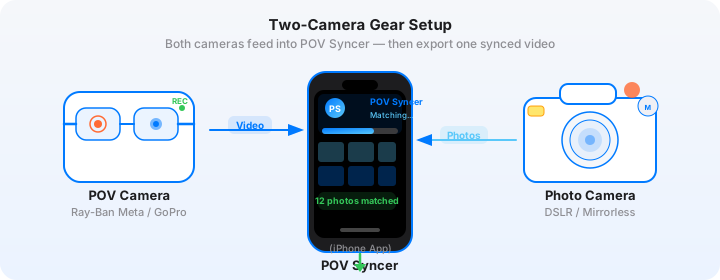
Ray-Ban Meta Gen 2 (Recommended for Pits)
Ray-Ban Meta glasses are the best POV camera for pit photography for one reason: they don't add to your physical footprint. In a crowded pit with other photographers, a chest harness adds width you can't spare. The glasses record 3K/30fps footage from your eye level — roughly the same perspective as your viewfinder — without requiring any additional physical space or attracting attention from security. Many venues don't have policies covering smart glasses because they're not obviously cameras.
Check venue policies before use — regulations vary widely. Ray-Ban Meta is generally treated as eyewear, not photography equipment, by most front-of-house teams.
Insta360 GO 3S Clipped to Jacket Collar
The Insta360 GO 3S at 35 grams is the most unobtrusive body-mounted action camera available. Clipped to a jacket or shirt collar, it records from chin height — slightly above Ray-Ban Meta level but similarly unobtrusive. Its magnetic clip means instant on/off without fumbling with straps. Excellent for concert work.
GoPro Hero 13 Mini (Compact Option)
The GoPro Hero 13 Black Mini is significantly smaller than the standard Hero 13, making it a viable pit camera when clipped to a camera strap or jacket pocket. Its GPS recording activates POV Syncer's most accurate matching strategy.
The Gear: Wearable Cam + Concert Camera Body
Ray-Ban Meta + Canon R6 Mark III with RF 70-200mm f/2.8L IS
The Canon R6 Mark III is the concert photographer's workhorse — 24.2MP full-frame with excellent high-ISO performance (ISO 25600 with good usability), 40fps electronic shutter for catching peak moments in burst, and Canon's best-in-class subject detection AF that tracks performers' faces and eyes through coloured gels and backlighting. The R6 Mark III's in-body IS combined with the RF 70-200mm f/2.8L IS gives you stabilised 200mm reach at arena distances.
Settings for concert photography: RF 70-200mm f/2.8L, aperture priority at f/2.8, shutter minimum 1/200s (1/400s for energetic performers), ISO Auto 400–25600, AI subject tracking with face detection. RAW + JPEG for same-night social posting from JPEGs. Set UTC offset in Camera Settings → Date/Time.
Insta360 GO 3S + Sony A7 IV with FE 24-70mm f/2.8 GM II
For smaller venue gig photography where the pit is close and 70mm reach is sufficient, the Sony A7 IV at 33MP full-frame with the 24-70mm GM II gives you outstanding versatility. The A7 IV's Real-Time tracking AF and eye detection are excellent for low-light subject tracking. Sony EXIF data is comprehensive — connect to Sony Imaging Edge Mobile before the show to sync the clock via GPS.
GoPro Hero 13 Mini + Sony A7C II with FE 85mm f/1.8
For intimate venue gig photography where the lighting is more manageable and the distances shorter, the Sony A7C II's compact full-frame body paired with the 85mm f/1.8 is an excellent combination. The f/1.8 aperture gives you one stop more light gathering than the 70-200mm f/2.8 at equivalent ISO — useful in especially dark indie venues with minimal stage lighting.
The Manual Editing Problem in Concert Photography
Concert photography creates a specific editing challenge: a 15-minute pit session can produce 400 or more stills from burst shooting. Finding each of those 400 frames in 15 minutes of wearable cam footage — even at 30 seconds per photo — is three hours of work. And that's before you've culled to the 20 best, let alone edited and exported them.
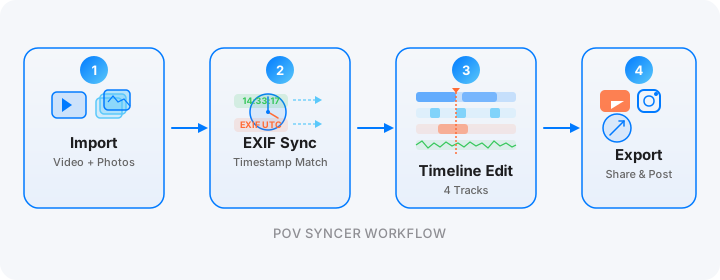
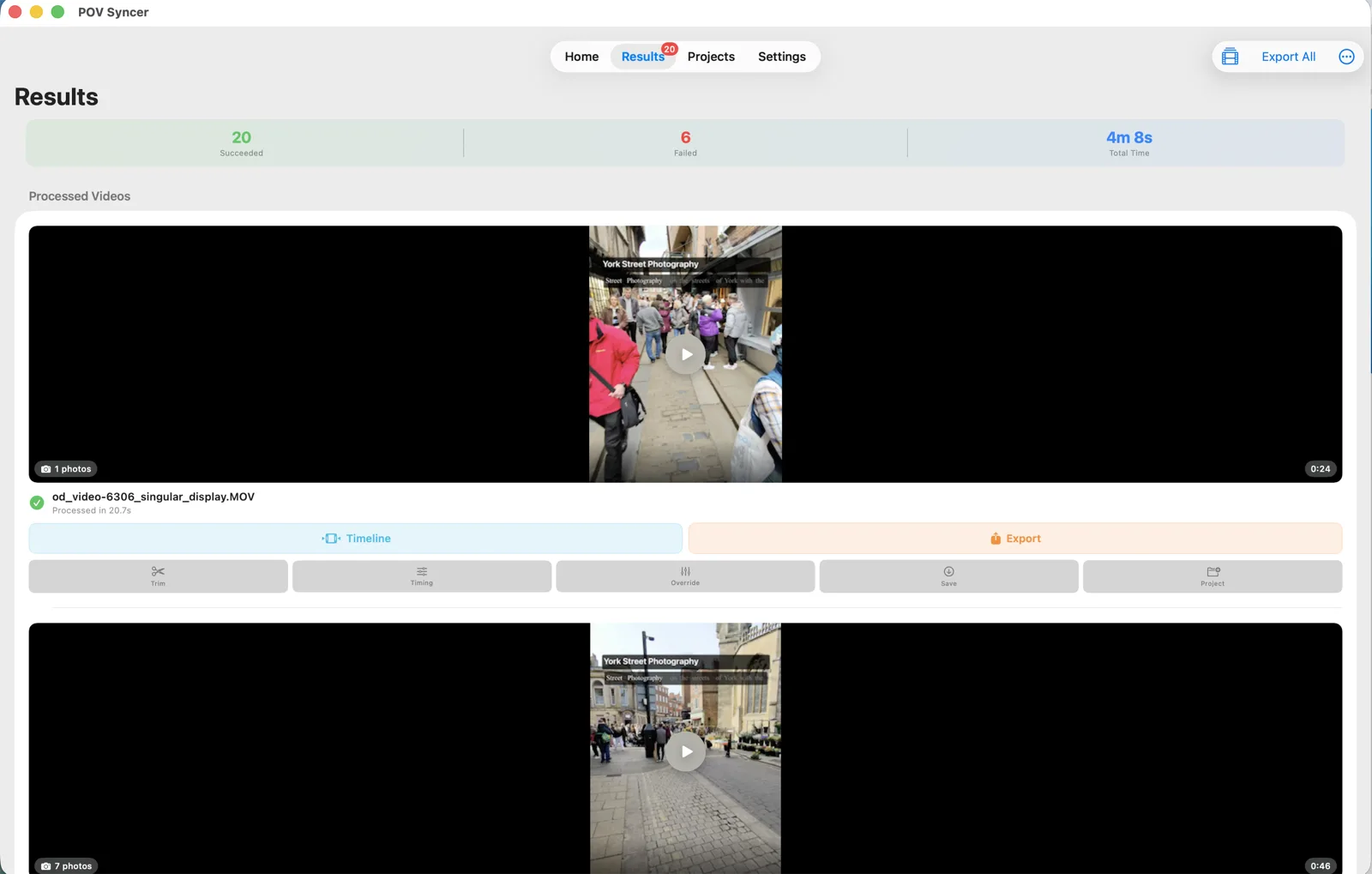
POV Syncer's EXIF matching handles all 400 in a single pass. The matching takes about 5 seconds. The Match Preview review takes 10 to 15 minutes for 400 photographs. Then you remove all but the 15 to 20 best frames for the final BTS video. Total time: 20 minutes, compared to 3 hours of manual scrubbing.
Step-by-Step in POV Syncer
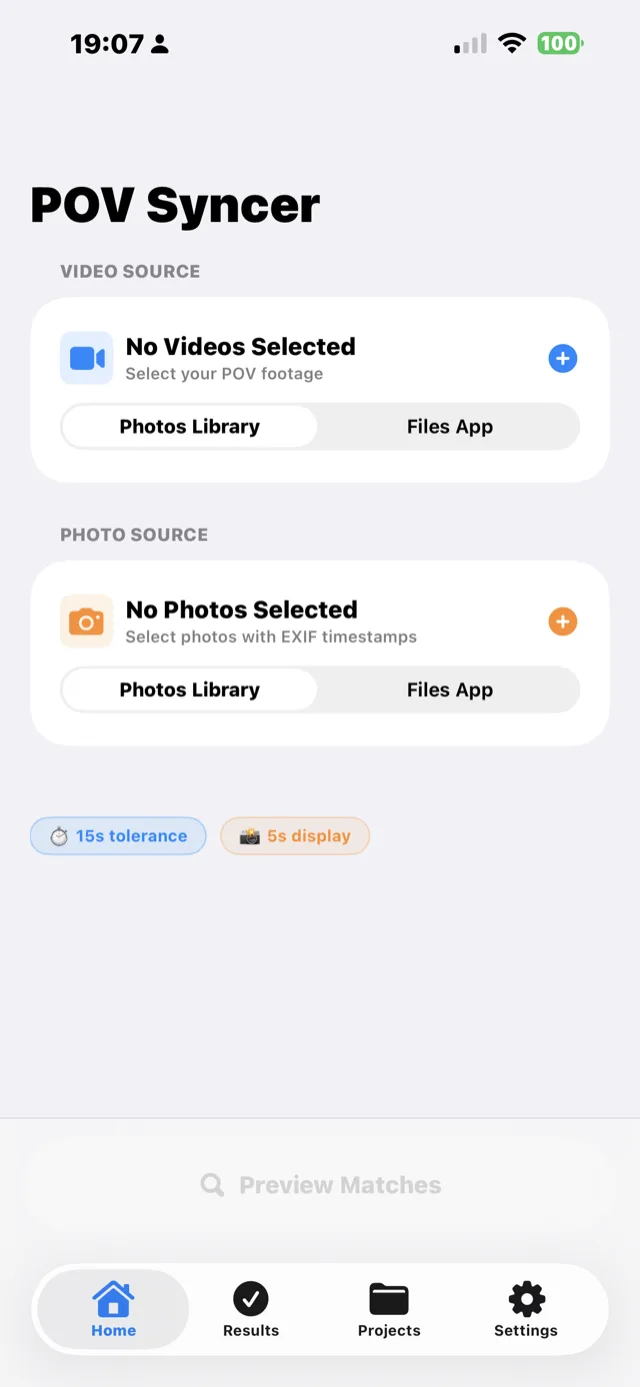


Add the artist name and venue in the title track. Add a brief narration: "First three songs, 70-200mm f/2.8 at ISO 6400. The backlight was the only usable moment — about 4 seconds per song." Export 9:16 for Reels. Same-night posting is entirely practical with this workflow.
Post your concert BTS before the encore ends
POV Syncer is free during beta. Import your wearable cam footage and concert stills. EXIF matching places every photograph at its exact moment — in seconds.
Download POV Syncer FreeWorks on iPhone, iPad, and Mac
For concert photographers who post same-night, the iPhone workflow is the most practical: export Ray-Ban Meta clips from the Meta AI app at the venue, import into POV Syncer, run matching, polish the timeline, and post — all before leaving the building. On Mac at home, batch process multiple shows with Export All to Photos.
Under the Hood: EXIF Matching in Low-Light Concert Conditions
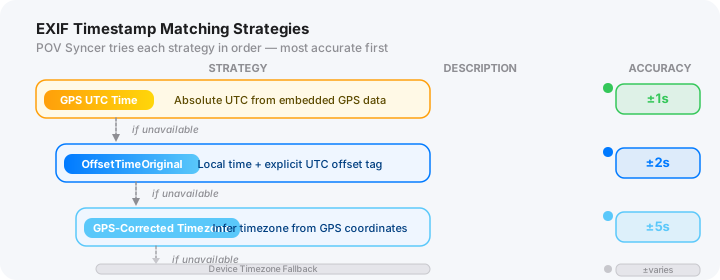
Venues present a specific EXIF challenge: indoor environments often have weak or absent GPS signal. This means GPS UTC matching may not be available for the stills camera. The workflow that works reliably:
- Ray-Ban Meta → iPhone GPS UTC. The Meta AI app syncs glasses time to iPhone time automatically. Your iPhone maintains GPS time even indoors from the last GPS fix. Ray-Ban Meta footage timestamps are reliable.
- Canon R6 / Sony A7 → UTC offset set manually. Before the show, connect to Canon Camera Connect or Sony Imaging Edge Mobile while outdoors, sync the clock to GPS time, then set the UTC offset to match. This gives the OffsetTimeOriginal field accurate UTC alignment for the entire show.
- Adjustable tolerance ±2 seconds — for burst photography where you want the best peak-expression frame, not necessarily the first frame of the burst.
Six Tips for Concert Photography POV Videos
1. Check Venue and Promoter Policies on Wearable Cameras
Always check with the photo desk before bringing any recording device beyond your accredited camera. Most venues are fine with Ray-Ban Meta as eyewear; fewer explicitly permit action cameras in the pit. When in doubt, ask — being transparent about your intentions is always the right approach and protects your accreditation.
2. Record the Full Three-Song Window
Don't start and stop the wearable cam between shots. Record continuously from entering the pit to leaving it. The footage of you moving, repositioning, changing your lens angle, and waiting for the right light is the most instructive content for other concert photographers — more valuable than the shots themselves.
3. Sync Your Clock Before the Doors Open
Sync your concert camera clock outside the venue, before the doors open. GPS signal is stronger outdoors, and the clock sync done at this point stays accurate throughout the show. A 2-second drift in a 15-minute pit session is less damaging than the same drift in a 3-hour landscape session, but it still matters for peak-expression matching.
4. Use the Title Track for Artist and Venue
The title track is your searchability asset. Use it to show "ARTIST NAME — VENUE — DATE" at the start of every concert BTS video. This makes your content findable by anyone searching for footage from that specific show or artist. For music fan audiences, this metadata is more important than it is for photography audiences.
5. Keep the Shutter Sound Audible
If your camera has an audible shutter (many concert photographers disable it to avoid disturbing performers or other photographers), the click in the wearable cam audio gives you a secondary sync reference. For cameras with silent electronic shutters, this obviously doesn't apply — rely on EXIF timestamps exclusively.
6. Export the Same Night
Concert photography social content ages faster than any other genre. A BTS Reel from a show posted the same night as the show reaches the artist's own audience while they're still talking about it. POV Syncer's iPhone workflow makes same-night export entirely practical — 20 minutes from the venue to posting, while the band is still playing the encore.