Documentary and photojournalistic photography has a specific paradox at its heart: the better you are at it, the more invisible you become. Great documentary photographs feel like the photographer was not there — or at least that the subject forgot about them. The Leica M camera, the Fujifilm X-Pro, the compact but powerful bodies that documentary photographers gravitate toward, are chosen partly for their ability to disappear.
A POV behind-the-scenes video inverts this relationship. Instead of the photographer being invisible, the video makes the photographer's presence, movement, and decision-making the central subject. And it turns out that watching a skilled documentary photographer work a festival crowd or a political rally is genuinely fascinating — particularly when the images they produced appear as overlays at the precise moments they were captured.
In 2026, documentary and photojournalism content is performing exceptionally well across YouTube and Instagram. The major photography festivals — Belfast Photo Festival (June 2026), Visa pour l'Image in Perpignan (August-September 2026) — generate enormous online interest, and photographers who document their coverage in process videos reach audiences that extend far beyond the festival itself. The challenge has always been the editing time. POV Syncer's automatic EXIF sync eliminates it.
What Are Documentary Photography POV Videos?
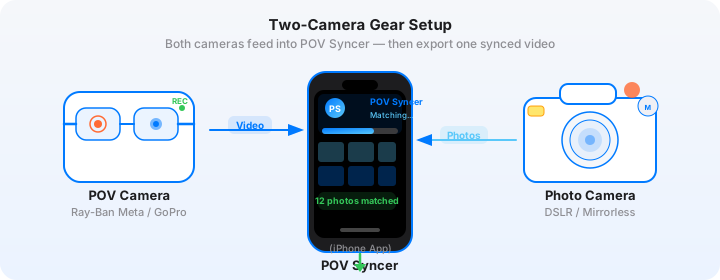
A documentary photography POV video is a first-person recording of your coverage — moving through a festival, a protest, a market, a community event — with your finished documentary images appearing as overlays at the precise moments you captured them. The POV camera records your perspective as you navigate the scene: approaching subjects, reacting to moments, making the quick compositional decisions that documentary photography demands. Your stills camera produces the images that appear as overlays, showing the viewer the decisive moment as it appeared in your viewfinder.
For documentary and festival photography specifically, this format has several unique qualities. The contrast between the wide, ambient POV footage of a festival crowd and the tight, decisive documentary image that emerged from one moment in that crowd is particularly striking. The POV video shows the context — the noise, the movement, the energy — that produced the still image. It answers the question that every good documentary photograph provokes: what was it like to be there?
Why Documentary Photographers Need This Format
The documentary photography community is active across YouTube, Instagram, and photography-specific platforms. But most documentary photographers share only the finished images — and the finished images, however strong, lack the context that makes them most compelling to a general audience.
- Context for the image — the best documentary photographs become more powerful when the viewer understands the conditions under which they were made. A POV video provides that context without the photographer having to explain it in a caption
- Process education — documentary photography technique is genuinely teachable: how you approach a crowd, how you anticipate moments, how you position yourself for the decisive moment. POV process content is the most effective format for this education
- Ethical transparency — documentary photographers are increasingly asked to demonstrate how they work, particularly at sensitive events. A POV video that shows your working method — discreet, respectful, minimally intrusive — builds credibility with editors and commissioning organisations
- Archive and memory — watching a POV replay of a festival or documentary session reveals details about your own working method that are easy to miss when you are fully in the moment. Which positions were most productive? What moments did you anticipate correctly versus react to? The POV video becomes a form of personal debriefing
Get the free POV Photography Cheat Sheet
Camera settings, EXIF tips, and export presets for Ray-Ban Meta Gen 2, GoPro Hero 13, and Insta360 — including documentary-specific settings for event coverage in mixed indoor/outdoor light.
Free PDF, no spam. Unsubscribe anytime.
Pick Your POV Rig for Documentary and Festival Coverage
Documentary and festival photography has specific constraints for POV capture: you need to be highly mobile, the equipment should not impede your ability to work discreetly, and the footage needs to work in the variable and often challenging light of real events.
Smart Glasses: Ray-Ban Meta Gen 2
The Ray-Ban Meta Gen 2 is the strongest choice for documentary and festival work. The glasses are completely unobtrusive — to festival crowds and to documentary subjects alike — and the 1080p video quality is appropriate for social content delivery. The eye-level perspective is the most natural for documentary work: the viewer sees what the photographer saw, with the same field of view and spatial relationship to the subjects.
The recording indicator light on the frame is visible from the front, which provides a degree of ethical transparency — subjects can see the glasses are recording, even if they do not know what is being captured. For festival work where the general expectation is that attendees are being documented, this is acceptable. For more sensitive documentary contexts, a declared chest mount is more transparent.
Ray-Ban Meta settings for festival coverage:
- Resolution: 1080p at 30fps — the maximum available on the Gen 2
- Battery: 30 minutes per charge is the practical limit; carry the charging case for extended festival coverage and recharge during any break
- Storage: 32GB internal; transfer footage to your phone regularly via the Meta View app to avoid filling the storage during a long day
Chest Mount: GoPro Hero 13
For festival and event work where you want higher footage quality and longer battery life, a chest-mounted GoPro Hero 13 is the alternative. The wider field of view captures more of the crowd and stage environment, and the HyperSmooth 6.0 stabilisation handles the movement of pushing through a festival crowd. For outdoor festival stages, the GoPro footage gives good sky exposure — festival stage photography against bright sky is a challenging exposure, and the GoPro's dynamic range handles it better than the Ray-Ban Meta's smaller sensor.
Head Mount for Immersive Crowd Coverage
A head-mounted DJI Action 5 Pro gives a very immersive crowd-level perspective — useful for festival mosh pits, busy market streets, or tightly packed protest coverage where the head-level view communicates the physical experience of the environment. The head mount perspective is slightly more dynamic and disorienting than a chest mount, which suits high-energy festival content.
Insta360 GO 3S for Maximum Discretion
For sensitive documentary work where even a chest mount might affect subject behaviour, the Insta360 GO 3S clipped to a collar or lapel is the most discreet option available. At 35 grams and a form factor smaller than a lighter, it is essentially invisible in use. The footage quality at 2.7K is adequate for social content delivery, and FlowState stabilisation handles the movement of documentary work.
The Gear: What Documentary Photographers Use
Stills Camera: Leica Q3
The Leica Q3 has become a significant camera in documentary and street photography. Its fixed 28mm f/1.7 Summilux lens offers exceptional optical quality — sharp across the frame, with a rendering character that the documentary photography community strongly values. The Q3's full-frame 60-megapixel BSI-CMOS sensor produces files of extraordinary quality, and the camera's GPS capability means it writes UTC-accurate timestamps to EXIF — which is directly relevant for POV Syncer's most precise matching strategy.
The Q3's compact form factor and the Leica brand's historical association with photojournalism also mean it draws less attention in documentary contexts than larger mirrorless systems. A photographer with a compact black camera moves through a festival crowd differently than one with a white-telephoto sports rig.
Settings for the Leica Q3 in documentary and festival work:
- Focal length: 28mm native; use the Q3's in-body crop modes (35mm, 50mm, 75mm equivalents) for tighter framing without optical quality loss — the 60-megapixel sensor supports useful crops
- Aperture: f/1.7 to f/2.8 for low-light festival coverage; f/4 to f/8 for outdoor daylight contexts where deep depth of field is appropriate
- Shutter speed: 1/250s minimum for moving subjects; 1/500s for energetic festival crowds; 1/60s to 1/125s for available-light indoor documentary contexts
- ISO: Auto ISO with maximum ISO 6400 for festival coverage; the Q3's full-frame sensor handles ISO 3200 cleanly
- GPS: Enable GPS for the most precise UTC-based EXIF timestamps — the Q3's GPS data is the foundation for POV Syncer's most accurate matching strategy
Alternative cameras that work equally well for documentary POV work:
- Sony A9 III — global shutter eliminates rolling shutter artefacts at high shutter speeds; 120fps burst rate and blackout-free shooting make it exceptional for capturing decisive moments at events
- Fujifilm X-T5 — 40-megapixel APS-C sensor, compact body, excellent high-ISO performance, and the Fujifilm film simulation modes give documentary images a character that stands apart from more neutral rendering
- Ricoh GR IIIx — the most compact capable documentary camera available, with a 40mm equivalent lens that suits street documentary work
The Hard Part: Manual Documentary Editing
Documentary and festival photography sessions generate large image counts and long, continuous footage runs. A full festival day might produce 800-1,200 images from a fast-reacting documentary photographer, and four to eight hours of continuous Ray-Ban Meta or GoPro footage. Manually matching those images to the footage in any NLE is several hours of additional work after an already exhausting day of physical coverage.
Most documentary photographers give up on the BTS content format entirely, or post raw unedited footage that does not serve the images well. The format potential is enormous — but the editing overhead has made it impractical for solo photographers working without a production team.
The Fix: Under 60 Seconds With EXIF Sync
POV Syncer's four-strategy EXIF cascade handles the specific challenges of documentary photography. The Leica Q3's GPS timestamps give the most precise UTC-based matching available — GPS UTC is the first and most accurate strategy in the cascade. For photographers using cameras without GPS (Sony A9 III, Fujifilm X-T5), the OffsetTimeOriginal strategy provides UTC-corrected timestamps that work reliably for matching.
The result: what took three to four hours of manual timeline work in Premiere or Final Cut happens in under 60 seconds. Your Leica Q3 documentary images appear on the Ray-Ban Meta footage timeline at their exact moments. You then spend time on the creative decisions — which images to feature, how long to hold each one, what the narration says — rather than the mechanical matching work.
Try it with your next event — free on TestFlightStep-by-Step: Building Your Documentary Photography BTS Video
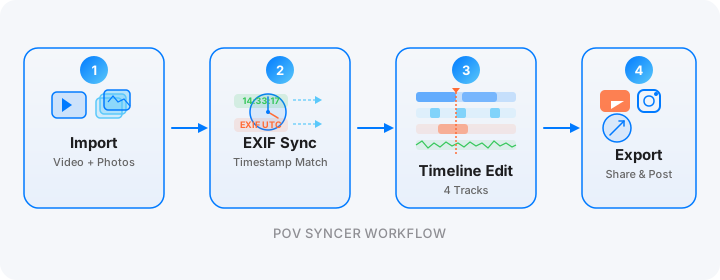
Step 1: Import. Transfer your Ray-Ban Meta footage from the Meta View app or USB, or your GoPro footage from the Quik app. Transfer your Leica Q3 files via SD card reader. Create a new POV Syncer project — the app handles up to 2,000 items, covering a full festival day's footage and culled selects.
Step 2: Review the match preview. For a festival day with the Leica Q3's GPS timestamps, you should see clean, accurate matching — the GPS UTC strategy gives the most reliable sync of any camera combination. The match preview shows your documentary images distributed across the coverage timeline, with natural clusters at the most active shooting moments. Read the match preview tutorial for guidance on interpreting the distribution pattern.

Step 3: Process. Tap Process. On-device processing — your documentary images and subject footage stay private on your device. No cloud upload.

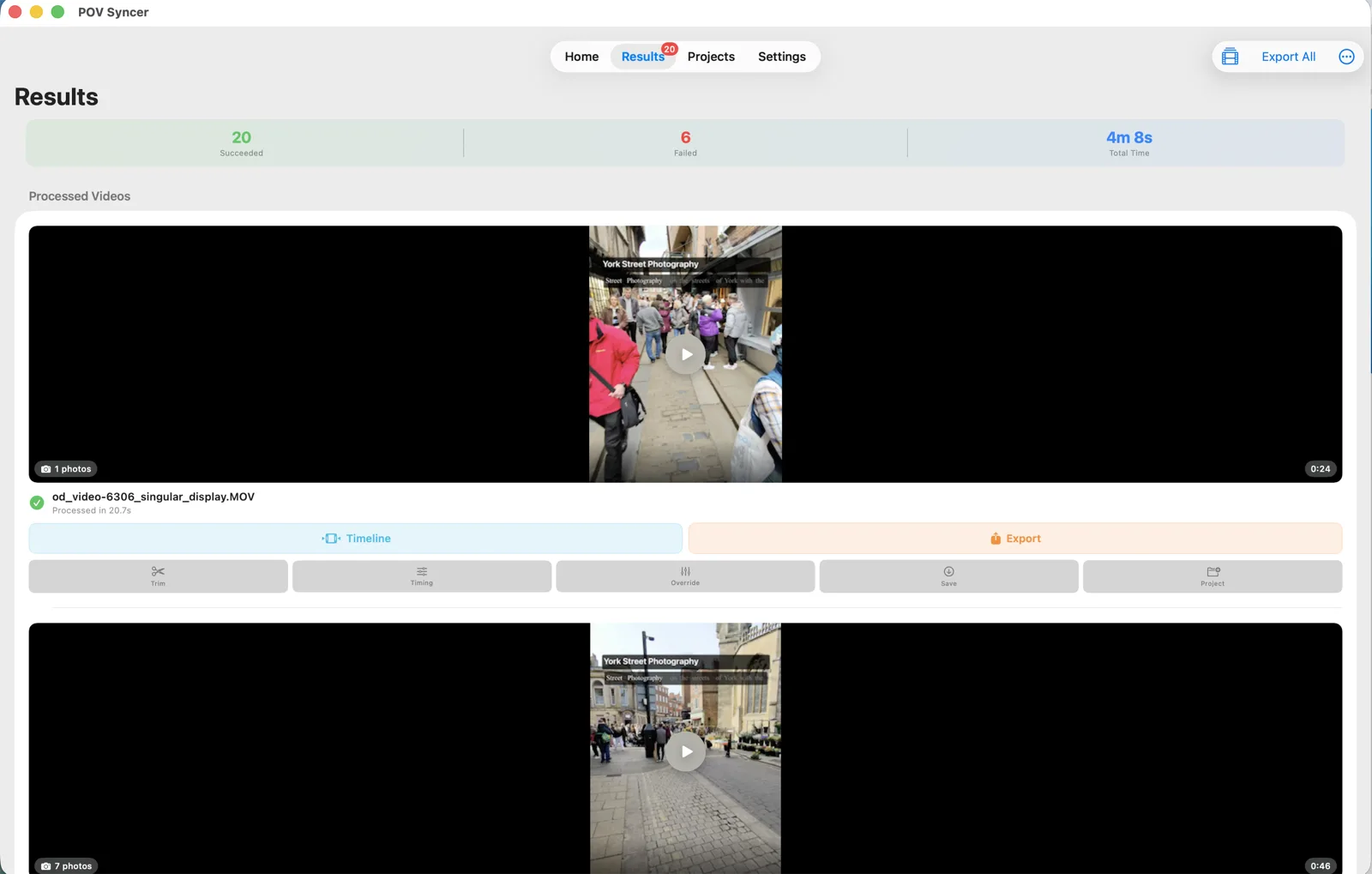
Step 4: Review results and open the timeline. For a full festival day with 80 selected documentary images, you will see 80 overlay moments distributed across the day's footage — a complete map of where and when your most productive shooting moments occurred.


Step 5: Add event context and narration. For documentary and festival photography content, titles should provide context that helps the viewer understand what they are watching. Event name, location, time of day, and the stage or activity visible in the footage — "Belfast Photo Festival — Opening Night — Titanic Quarter — 21:30" gives geographic and temporal context that documentary content specifically benefits from. AI narration can explain the photographic decisions in real time: "I moved to this position because I could see the light from the stage was about to backlight the crowd." Choose from six Azure neural voices for the narration, or record your own voiceover for maximum authenticity.
Step 6: Export for multiple uses. YouTube: 10-12 minute full-day documentary coverage with narration and all image reveals. Instagram Reels: 60-90 second edit showing the three or four most striking image reveals in a fast-cut format. Editorial pitch: a short, high-quality extract for pitching to photo editors or festival organisers who want to understand your coverage approach. All from the same POV Syncer project.
Works on iPhone, iPad, and Apple Silicon Mac
Documentary photographers often work in the field with a phone or iPad as their primary mobile editing tool. The iPhone and iPad versions of POV Syncer give you the full workflow — import from the Meta View app or GoPro Quik, review the match preview, process, and export — without needing to return to a desk. For editorial work with deadlines, the ability to build and export a BTS video directly from your phone is genuinely valuable.
Under the Hood: Why Documentary Photography Sync is Different
Documentary photography sessions have a specific timing pattern: continuous coverage over long periods, with reactive shooting rather than planned shooting windows. The EXIF matching needs to handle a high density of timestamps spread across a long footage duration.
- GPS UTC strategy (Leica Q3 and GPS-equipped cameras) — when the Leica Q3 has GPS lock, it writes the precise UTC time to every image's EXIF. This is the highest-accuracy matching strategy in POV Syncer's four-strategy cascade, and it works regardless of timezone, daylight saving time, or manual clock setting errors
- OffsetTimeOriginal (Sony A9 III, Fujifilm X-T5) — for cameras without GPS, the UTC offset embedded in modern Sony and Fujifilm files gives the same practical accuracy as GPS UTC for POV sync purposes
- Adjustable match tolerance — for documentary work with very dense image clusters, a tight tolerance (2-3 seconds) ensures clean matching; for sparser coverage, a wider tolerance accommodates slight clock differences
- Per-video timing offset — the Ray-Ban Meta Gen 2 syncs its clock from your phone; any discrepancy between the Meta clock and the Leica Q3's GPS time is typically under 5 seconds and handled by the matching tolerance. If you find a systematic offset, apply it per-clip
- 100-photo cap per clip, spread evenly — import your culled selects (50-80 images for a full festival day) for the cleanest timeline. For very dense coverage, consider splitting the day into two or three project clips by time period
- Fully on-device — documentary photographers work with images of real people in real situations. POV Syncer processes everything locally — no images or footage are uploaded to any server
Documentary and Festival Photography-Specific Tips
Enable GPS on Your Camera Before You Leave Home
For Leica Q3 users: enable GPS in the camera menu and allow it to acquire a fix before you begin shooting at the event location. GPS acquisition can take 2-5 minutes outdoors; once acquired, the Q3 maintains the fix throughout the session. With GPS active, every image you take has a UTC-accurate timestamp that gives POV Syncer maximum matching precision.
Keep Ray-Ban Meta Charged Throughout the Day
Ray-Ban Meta Gen 2 gives approximately 30 minutes of video recording per charge. For a full festival day, bring the charging case and plan your coverage in 25-minute recording sessions with short recharging breaks. The Meta View app shows remaining battery life. A full case charge gives approximately four additional charges — enough for a full festival day if managed carefully.
Run Multiple Clips for Different Coverage Zones
For multi-stage festivals, create a separate clip for each stage or coverage zone. This gives you distinct sections in POV Syncer that you can export as separate episodes or combine into a single comprehensive festival coverage video. The per-clip timing offset means any clock variance between stages can be corrected independently.
Narrate the Ethical Context Where Appropriate
For sensitive documentary contexts — protests, community events, intimate moments — use AI narration to briefly acknowledge the ethical framework of your coverage approach. "All subjects in this sequence gave verbal consent for photography" or "This event was designated as publicly documented" gives viewers and potential editors the context they need to evaluate your work responsibly.
Use the Export All for Multi-Event Projects
Documentary photographers covering multiple events in a festival context — a photojournalism festival like Visa pour l'Image might include 20-30 events over two weeks — can import multiple projects and use Export All to Photos to batch-process all of them before leaving the event location. This gives you a complete archive of BTS videos from the full festival coverage without requiring a session of manual export work at the end.
Start documenting your documentary coverage
Import your Ray-Ban Meta or GoPro footage and Leica Q3 or Sony documentary stills. Automatic EXIF sync builds the coverage timeline — free during the beta.
Download on App Store — FreeFrequently Asked Questions
Does wearing Ray-Ban Meta glasses at a documentary event cause any ethical issues?
Ray-Ban Meta Gen 2 glasses have a recording indicator light visible from the front. For festival photography and public event coverage where documentation is expected, this is generally acceptable. For sensitive documentary contexts — protests, private ceremonies, vulnerable communities — use a declared chest-mount GoPro instead. Always follow the ethical guidelines of your press credentials and the event's media policy.
Can POV Syncer handle a full festival day with 1,000+ images?
POV Syncer imports up to 2,000 items per project. For a 1,000+ image festival day, import your culled selects (your best 50-100 images) rather than the full output. The 100-photo cap per clip means you may want to split a very long festival day into separate clips by stage or time period for the most manageable timeline presentation.
Can I use POV Syncer for multi-day documentary projects?
Yes — POV Syncer saves and reloads projects, so you can work on a multi-day documentary project across several editing sessions. Each day's footage and images can be separate clips within the project. Use the per-clip timing offset to fine-tune the sync for each day independently if any clock drift occurred.
Conclusion: Making the Invisible Process Visible
Documentary photography has always been about making visible what would otherwise remain unseen. The conditions under which an image was made — the physical access required, the trust established, the moment anticipated and then captured — are as much a part of the documentary act as the image itself. A POV behind-the-scenes video makes that invisible process visible, and in doing so, it deepens the impact of every image it reveals.
What used to require three to four hours of manual editing is now under 60 seconds with POV Syncer's automatic EXIF sync. Import your Ray-Ban Meta or GoPro festival footage and your Leica Q3 or Sony documentary selects, review the match preview, process, polish with event context and narration, and export. Every coverage day becomes a complete content package.
For more on the workflow, read the street photography POV video process guide and the Ray-Ban Meta street photography POV guide for tips specific to discreet wearable recording in public environments.
Ready to document your next festival or event?
Download POV Syncer free on TestFlight. Import your event footage and documentary stills — automatic EXIF sync builds the coverage timeline in under 60 seconds.
Join 1,000+ photographers getting weekly tips. Unsubscribe anytime.