Fashion and editorial photography is sold twice. Once to the client who commissions it, in the form of the finished images. And once to the next client, via the portfolio, the Instagram presence, the reputation you build through everything they see before they ever pick up the phone. Behind-the-scenes content from your shoots is one of the most effective tools for that second sale — but most fashion photographers either do not produce it, or produce raw, unedited footage that does not show their work in the best light.
A properly produced fashion photography POV BTS video is a different proposition entirely. First-person studio footage that shows the creative direction, the lighting setup, the model direction — with the actual editorial images appearing as overlays at the precise moments the shutter fired. It is the most complete document of a shoot that can be shared publicly, and it performs exceptionally well on Instagram Reels and YouTube.
The manual editing challenge has always been the barrier. A full-day fashion shoot might run six hours, span three locations and five looks, and produce 600 selected frames. Syncing that footage to those images in Premiere or Final Cut is a two-to-four hour editing task on top of an already long shoot day. POV Syncer does it automatically in under 60 seconds, using EXIF timestamps.
What Are Fashion Photography POV BTS Videos?
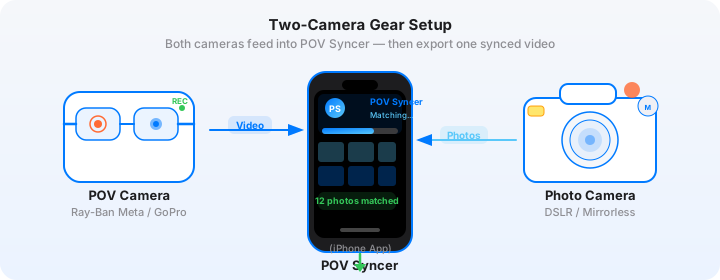
A fashion photography POV BTS video is a first-person recording of your shoot, with your finished editorial images appearing as overlays at the moments you captured them. The POV camera — mounted on your chest, head, or hot shoe — captures your perspective as a photographer: approaching the model, adjusting your position, working the lighting, reacting to the expressions that make a fashion image exceptional. Your stills camera produces the editorial images that pop in as overlays, showing the viewer the payoff of each of those shooting decisions.
For fashion and editorial work specifically, this format serves multiple purposes that differ from other photography genres:
- Client relationship content — fashion clients value seeing the production quality of your shoots; a BTS video demonstrates that your set is professional, well-lit, well-directed, and worth the investment
- Portfolio differentiation — in a market where every fashion photographer's portfolio looks like a version of the same editorial, a BTS video that shows your process and creative approach is genuinely differentiated content
- Social media marketing — fashion BTS content performs consistently well on Instagram Reels and TikTok; the fashion audience is interested in the process as much as the output
- Agency and casting content — some photographers share shoot BTS with agencies and casting directors to demonstrate how they work with talent
Why Fashion Photographers Need to Produce This Content
The Instagram algorithm has fundamentally changed what builds a photography career. A portfolio that only shows finished editorial images competes with every other photographer's portfolio on the same terms — image quality, aesthetic, lighting, model casting. A photographer who also shows their process — who they are on set, how they direct, how they see the light changing and respond — builds a following that is specifically interested in them as a photographer, not just in the images they produce.
This is the content that attracts photographers who want to learn, stylists who want to collaborate, models who want to work with you, and clients who want to understand what hiring you actually looks like in practice. All of that from a format that — with POV Syncer — costs you under 60 seconds of editing time per shoot day.
Get the free POV Photography Cheat Sheet
Camera settings, EXIF tips, and export presets for DJI Action 5 Pro, GoPro, and Insta360 — including studio and strobe-specific settings for fashion shoot BTS.
Free PDF, no spam. Unsubscribe anytime.
Pick Your Rig for Fashion Shoots
Fashion shoots present specific constraints: studio environments, models who need to be comfortable with the setup, clients on set who should not feel like they are being filmed. The right POV capture approach depends on your studio setup and working style.
Chest Mount: DJI Action 5 Pro
The DJI Action 5 Pro chest-mounted is the standard recommendation for studio fashion shoots. Its wide dynamic range handles the challenge of capturing a well-lit studio scene accurately — blown highlights from softboxes or beauty dishes are less likely with the Action 5 Pro's D-Log M mode than with most competing action cameras. RockSteady 3.0 keeps the footage smooth as you move around the set.
Studio settings for DJI Action 5 Pro:
- Resolution: 4K at 30fps — studio fashion content benefits from the higher resolution when delivering to clients who may use footage at larger sizes
- Colour profile: D-Log M if you will do any colour grading; Normal for delivery-ready footage without additional processing
- Shutter speed: 1/60s to avoid banding from studio strobe flash frequency
- Stabilisation: RockSteady 3.0 on — you are moving constantly around a studio set
- Time sync: Sync from DJI Fly app at the start of each shoot day
Hot-Shoe Mount: Insta360 GO 3S
For fashion photographers who want a completely unobtrusive setup, the Insta360 GO 3S on the hot shoe of your main camera gives the most integrated "this is the photographer's perspective" footage. The model sees you holding the camera. They do not notice a separate action camera. The footage shows exactly what the main camera is aimed at, which makes for the most faithful BTS document of where the editorial images came from.
Smart Glasses for Street Fashion
For location fashion shoots — urban environments, public spaces — Ray-Ban Meta Gen 2 smart glasses are the most practical option. You have both hands free for your main camera, the setup is completely discreet, and the footage gives the genuine eye-level perspective of a photographer working on location.
Second Shooter or Assistant Setup
For larger productions, have your assistant wear a GoPro or DJI Action on a chest mount to capture a second perspective of the shoot. Import both footage clips into POV Syncer — the EXIF sync works for any number of video clips against the same set of still images. This gives you two POV perspectives to choose between in the timeline editor.
The Gear: What Fashion Photographers Use
Stills Camera: Sony A7CR
The Sony A7CR — a compact full-frame body with a 61-megapixel sensor — has become popular among fashion and editorial photographers who need both the image resolution of a high-megapixel body and the compact form factor that makes handheld studio work practical. The 61-megapixel files give exceptional detail for editorial delivery and print use, and the camera's Real-Time Eye Tracking AF is reliable enough for fashion portrait work even at wide apertures.
Studio settings for the Sony A7CR in fashion work:
- Lens: Sony FE 85mm f/1.4 G Master for portrait work with strong background separation; 24-70mm f/2.8 G Master for full-length and environmental fashion; 135mm f/1.8 G Master for compression and intimacy
- Shutter speed: 1/200s (or higher) with flash; 1/125s to 1/500s for continuous light setups
- Aperture: f/1.4 to f/2.8 for portrait isolation; f/5.6 to f/8 for group shots or detail work
- ISO: 100-400 for studio work with adequate light; Auto ISO for location shoots
- File format: RAW — the 61 megapixels of the A7CR deliver maximum value in RAW files that retain all detail for editorial retouching
The Hard Part: Manual Fashion BTS Editing
Fashion photographers who try to produce BTS content manually describe a specific and exhausting process: after a long shoot day, they face hours of footage review to find the active shooting moments, then another hour or two of timeline placement in Premiere or DaVinci Resolve. For a six-look shoot with a 90-minute runtime of footage and 80 selected editorial images, this manual editing process takes three to four additional hours.
The result is that most fashion photographers either do not produce BTS content at all, or produce raw, unedited footage uploads that do not present their work well. Neither outcome is satisfactory for a photographer building a brand.
The Fix: POV Syncer's Automatic EXIF Sync
POV Syncer reads the EXIF DateTimeOriginal and OffsetTimeOriginal fields from every Sony RAW or JPEG file and matches each image to its corresponding second in the DJI Action 5 Pro footage. The four-strategy cascade (GPS UTC, OffsetTimeOriginal, GPS-corrected timezone, device timezone fallback) handles the clock sync between the DJI and the Sony robustly — even when the clocks diverge slightly over a long shoot day.
What took three to four hours of manual editorial editing happens in under 60 seconds. Your editorial images are on the timeline at their exact moments. You spend the remaining time on the creative polish — the look-specific title cards, the music choice, the AI narration that explains the creative direction.
Create your first fashion shoot BTS video — free on TestFlightStep-by-Step: Building Your Fashion Shoot BTS Video
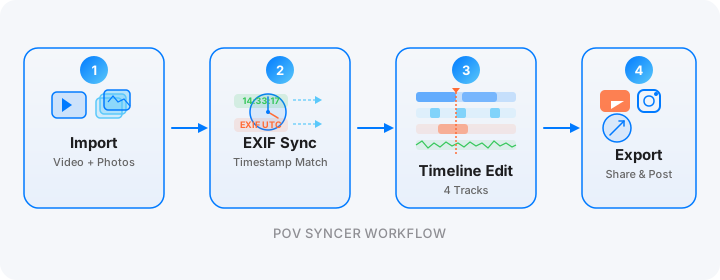
Step 1: Import. Transfer your DJI Action 5 Pro footage to your iPhone via the DJI Fly app or a USB-C card reader. Transfer your Sony A7CR files via the Sony Imaging Edge app or a card reader. Create a new project in POV Syncer. Import up to 2,000 items — a full six-look editorial shoot with footage and selects fits comfortably.
Step 2: Review the match preview. POV Syncer shows you the sync before processing. For a fashion shoot with distinct looks, you will see the editorial images clustered in groups corresponding to each look — a natural visual breakdown of the shoot's structure. Review the match preview tutorial for guidance on identifying any look-transition timestamps that need adjustment.

Step 3: Process. Tap Process. On-device rendering — your editorial images and studio footage stay private on your device.

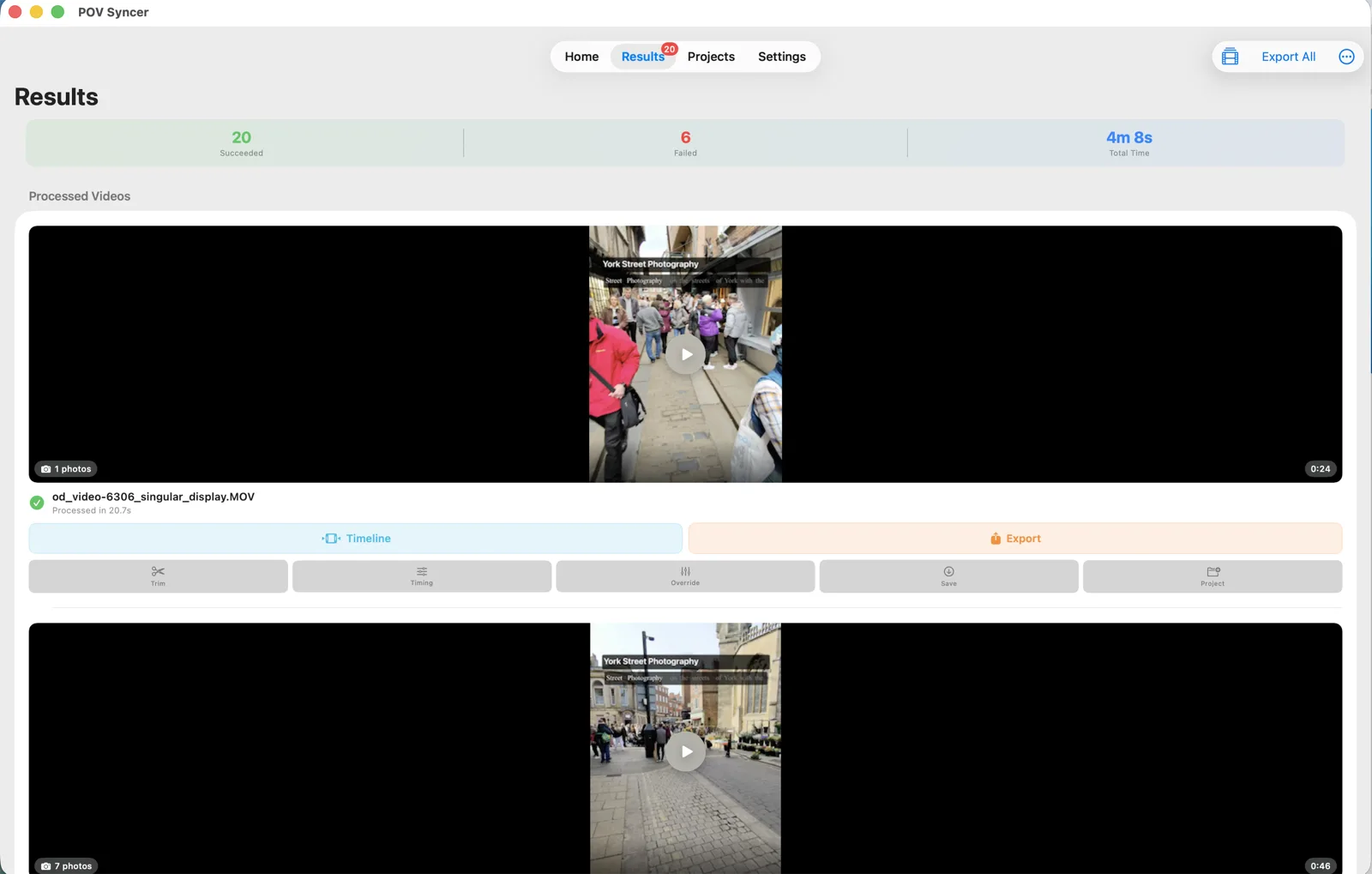
Step 4: Open the timeline. Review results and open the multi-track timeline editor. For a six-look shoot, you will see six distinct clusters of editorial images distributed across the footage timeline — a real-time map of your shoot's structure.


Step 5: Add look titles and creative narration. Fashion BTS content benefits enormously from contextual title cards. "Look 1 — Tailored black — Mayfair studio" at the start of each look cluster tells the viewer how to read what they are seeing. Use AI narration (choose from six Azure neural voices) to describe the lighting setup, the creative direction, the mood reference for each look. This is the educational layer that turns BTS content into genuinely valuable photography instruction.
Step 6: Export for platform. Instagram Reels: 90-second cut showing one hero look, fastest editing pace, most striking images. TikTok: 30-60 second reveal format — begin with the model in position, end with the finished editorial image. YouTube: full 8-10 minute shoot breakdown, look by look, with narration. All three from the same POV Syncer project file.
Works on iPhone, iPad, and Apple Silicon Mac
Fashion photographers who shoot in a studio are often working with a Mac nearby. The POV Syncer Mac app lets you import footage and Sony RAW files directly from card readers without the file transfer step that the iOS workflow requires. The full-screen timeline editor on a large display makes look-by-look title placement and narration work considerably faster than on iPhone.
Under the Hood: EXIF Sync for Fashion Sessions
Fashion shoots have a specific timing pattern: intensive bursts of shooting during peak moments of a look, followed by longer breaks for outfit changes, lighting adjustments, and client review. POV Syncer's matching handles this well:
- OffsetTimeOriginal strategy — the Sony A7CR embeds timezone-aware UTC timestamps in its files, which gives POV Syncer the most accurate matching even for long shoot days where the DJI clock might drift slightly
- Per-video timing offset — for shoots that span multiple clips (look changes often result in new clips), you can apply per-clip offsets if any one clip's clock drifted
- Adjustable tolerance — fashion shoots with high-volume bursts benefit from a tight tolerance (2-3 seconds) to ensure only frames from the actual shooting moments are matched, not frames fired during test shots or lighting checks
- 100-photo cap per clip — import your culled editorial selects (30-60 per look) rather than the full burst session; this keeps the timeline readable and the overlay frequency appropriate for a BTS format
- Save and reload projects — fashion photographers often review and adjust BTS content over several days; project saving means you can pick up exactly where you left off
Fashion Photography-Specific Tips
Sync DJI and Sony Clocks at the Start of Each Day
Long shoot days (8-12 hours for commercial work) can result in clock drift between the DJI Action 5 Pro and the Sony A7CR. Sync both clocks from the same source at the start of the shoot. For the DJI, connect to the DJI Fly app. For the Sony, set manually to match. Recheck at lunch if it is a particularly long day.
Keep the DJI Running Through Outfit Changes
The natural instinct is to stop the action camera during outfit changes to save battery. Resist this instinct — the outfit change footage, the conversation between looks, the lighting adjustments, are often the most humanising and interesting parts of a fashion BTS. Keep the DJI running continuously and let POV Syncer identify the shooting moments within the full footage.
Include Behind-the-Scenes of the Lighting Setup
Fashion clients and photography followers are often genuinely curious about the technical setup that produces the images they see. A brief segment showing the softbox arrangement, reflector position, or beauty dish setup — narrated with POV Syncer's AI voice — adds educational value that distinguishes your BTS from a simple "watch us shoot" video.
Match Music to Editorial Mood
Music choice dramatically affects the perceived quality of fashion BTS content. For a high-fashion editorial, choose something minimal, elegant, and mid-tempo. For commercial work, something upbeat and positive. POV Syncer's built-in music library includes a range of options, and you can import your own licensed tracks for specific brand requirements.
Get Model Consent Before Publishing
Always confirm with talent and their agency before publishing BTS footage that clearly identifies them. This is both legally correct and professionally essential — models and agencies appreciate photographers who handle this proactively. Include a brief consent process in your shoot workflow alongside other production admin.
Start turning your shoot days into content
Import your DJI studio footage and Sony editorial selects. Automatic EXIF sync builds the BTS timeline — free during the beta.
Download on App Store — FreeFrequently Asked Questions
Can I use POV Syncer footage from a studio shoot with strobes?
Yes — the EXIF timestamp matching is not affected by lighting conditions. For studio work with strobes, set your GoPro or DJI Action to 1/60s shutter speed to avoid banding from the strobe flash frequency. The resulting footage may show some ambient exposure variation, which is normal for studio BTS content.
Does POV Syncer handle high-volume fashion sessions?
Yes — POV Syncer imports up to 2,000 photos and videos per project. For high-volume fashion sessions, import your culled editorial selects (30-60 frames per look) rather than the full session, for a timeline that is readable and appropriately paced for social content delivery.
Can clients see the BTS video before the final images are delivered?
Many fashion photographers share the POV Syncer BTS video with clients alongside the final delivery as an added-value element — it demonstrates the professionalism and creative energy of the shoot. Since the BTS video shows your editorial images at the moments they were captured, it is a natural complement to the final image delivery.
Conclusion: Every Shoot Day Becomes Two Assets
A fashion or editorial shoot already produces its primary asset: the editorial images. With POV Syncer, it now produces a second asset simultaneously — a BTS video that shows the process, the creative direction, and the production quality of your studio. The editing overhead is under 60 seconds per shoot. The return is a piece of portfolio content that performs consistently well on the channels that drive new business.
For more on the workflow, read the wedding photography BTS video guide and the AI voice narration guide for tips on using narration to describe creative direction in your fashion videos.
Ready to turn your shoot days into content?
Download POV Syncer free on TestFlight. Import your first fashion shoot footage and editorial selects, and see the automatic sync in action.
Join 1,000+ photographers getting weekly tips. Unsubscribe anytime.