Headshot Photographer POV Video: Content That Gets You Booked
Your studio is set up. The lighting is precise. You have spent years learning how to make people who are nervous in front of a camera look confident, natural, and like the best version of themselves. And the images you produce are genuinely good.
But when you look at your LinkedIn profile — where your ideal clients actually are — you have a grid of beautiful headshots that could belong to any competent photographer in the city. There is nothing that communicates how you work, why clients trust you, or what makes a session with you different from a session with someone who charges half as much.
Headshot photography has a craft problem that stills alone cannot solve. The craft happens in the conversation, the direction, the moments between shots where you say exactly the right thing to help a nervous executive relax. None of that shows up in the final image. A Reel from inside the studio does.
This guide is about using Ray-Ban Meta glasses and a Canon R6 Mark III to capture a studio day — the real work of headshot photography — and combine it into a short video that gets you booked. No talking to camera required. No video production skill needed. Just the footage your glasses were already recording and the EXIF timestamps your Canon already writes.
Why LinkedIn Is the Right Platform for Headshot Photographers
Most headshot photographers focus their social media effort on Instagram. Instagram is where photographers have always posted. But for headshot photography, LinkedIn is dramatically more valuable as a lead generation platform — for a simple reason.
Your clients are not on Instagram looking for photographers. They are on LinkedIn presenting themselves professionally. When they look at their profile photo and think "I need a better headshot," they are already on the platform where your content should be. A LinkedIn video post from a headshot photographer, seen by a professional who has just been thinking about their profile photo, converts at a rate that Instagram cannot match.
LinkedIn's native video format performs exceptionally well in the feed. The platform's algorithm currently rewards video with two to three times the reach of static posts, and video content from professional services businesses — photographers, designers, consultants — is relatively sparse compared to Instagram. The competition for attention is lower; the quality of the audience is higher.
This does not mean abandoning Instagram. The same video that performs on LinkedIn reposts directly to Instagram Reels and TikTok. You produce it once and distribute it to three platforms in under five minutes.
The Camera Setup: Ray-Ban Meta + Canon R6 Mark III
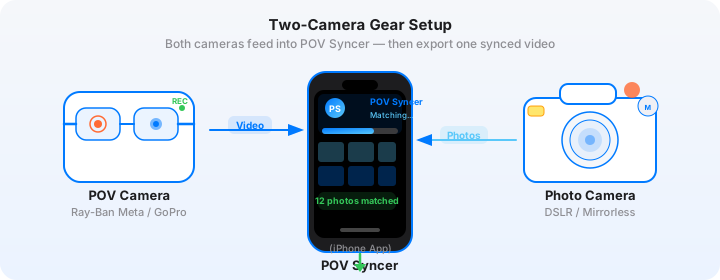
The studio environment has specific requirements for both cameras. Understanding those requirements before your next studio day lets you get usable footage without changing anything about your shooting workflow.
Ray-Ban Meta: Studio Considerations
Studio lighting — strobes, softboxes, continuous LED panels — does not cause problems for the Ray-Ban Meta's 12MP ultrawide sensor in the way it can for video cameras with rolling shutters. The glasses handle most artificial studio light sources without visible banding or flicker. Test your specific lighting setup with a short clip before relying on this for client work.
Set the glasses to 1080p at 30fps. Studio content is contemplative, not dynamic — 30fps is the right frame rate. Record continuously throughout the session. The glasses capture the ambient studio environment, your movement between camera position and client position, and the natural flow of a headshot session in a way that staged footage never replicates.
The Ray-Ban Meta's automatic exposure will handle most studio environments without intervention. If your studio is very bright (heavy continuous lighting), the footage may look slightly flat. This is fine for BTS content — viewers understand they are watching documentation, not a finished cinematic piece.
One important note for client sessions: inform your clients that you are wearing a recording device before the session begins. Most will be enthusiastic about the BTS content, especially if they understand it will not include anything they have not approved. Get verbal confirmation that they are comfortable being in background footage, even if the main subject of the BTS video is your process rather than them.
Canon R6 Mark III: Settings for Headshot Work
The settings you use for headshots are already optimised for your work. The key additions for EXIF sync accuracy are minimal.
GPS time sync: Enable GPS via the Canon R6 Mark III's Location Information settings and set Auto Time Correction to On. This sets the camera's internal clock to atomic accuracy whenever it has a GPS fix, eliminating any clock drift between the Canon and the Ray-Ban Meta glasses (which sync to your iPhone's network-accurate time).
Format: JPEG Large Fine alongside RAW for the BTS video workflow. When you import to POV Syncer, select your JPEG selects — the three to five images that tell the story of the session — rather than the full RAW batch. POV Syncer handles both RAW and JPEG, but JPEG imports are faster on the iPhone and the colour rendering is closer to what clients will see on their own screens.
Typical headshot settings for reference: 85mm or 100mm equivalent, f/2.8 to f/4, 1/160s (sync speed for strobes), ISO 100 to 400 depending on strobe output. These are your settings regardless of the video workflow — nothing changes about the way you shoot.
Get the settings right the first time
Download the free POV Photographer's Cheat Sheet — camera settings, EXIF tips, and export presets for Ray-Ban Meta, GoPro, DJI, and Insta360 on one printable page.
Free PDF, no spam. Unsubscribe anytime.
The Studio Day Video: Structure and Approach
A headshot photographer's studio day video needs to do two things simultaneously: demonstrate technical skill and communicate interpersonal warmth. The best headshot content shows the environment, the process, and — within the limits of client privacy — the interaction that produces natural, confident portraits.
What the Ray-Ban Meta Captures in a Headshot Studio
The glasses record your natural perspective as you move through the session. This includes:
The setup. Your studio environment — the lights, the backdrop, the Canon on the tripod or monopod. Prospective clients who have never been inside a professional studio respond strongly to this footage. It demystifies the experience and makes the booking decision feel less intimidating.
The direction. The footage while you are composing and directing — "Chin slightly forward, relax your shoulders, look just slightly left of the lens." This is the craft that is invisible in the final image. Seeing a photographer confidently and warmly direct a subject communicates professional skill more effectively than any caption.
The camera moment. Raising the Canon R6 Mark III, composing, firing. The EXIF timestamp in the resulting JPEG records this exact moment. In POV Syncer, the corresponding image appears at precisely this frame in the video. The viewer sees your eye-level view and then the photograph that resulted — the same reveal format that works for street photography, adapted to a studio context.
Building the Studio Day Reel in POV Syncer
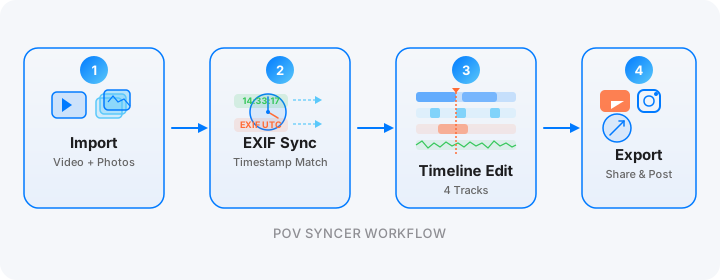
After the session, import the Ray-Ban Meta footage to your iPhone via the Meta View app. Select three to five portrait selects from the Canon session — your strongest images, ideally showing range (different clients or different looks from the same client). Import both into POV Syncer.
POV Syncer reads the DateTimeOriginal field from each Canon JPEG and places it at the corresponding frame in the studio footage. For a 90-minute studio session, you might see five photo markers distributed naturally across the timeline at the moments each shot was fired.
Trim the footage to build a 60-to-90-second studio day narrative. The recommended structure for headshot content:
0–10s: Studio environment — lighting, equipment, space. This is the first-impression section. Keep it clean and confident. A simple text title — "Studio Headshots, [Month] [Year]" or just your studio name — anchors the location.
10–45s: The session in progress. Ray-Ban Meta footage of you working — moving around the subject, adjusting, composing. The Canon R6 Mark III stills appear at their EXIF-matched positions, each held for three to four seconds. The shutter sound in POV Syncer punctuates each image arrival cleanly.
45–90s: The selects. Hold on two or three of your strongest portraits for four to five seconds each. These are the delivered images, presented with the context of how they were made. The transition from behind-the-scenes footage to finished portrait is the moment that converts viewers into enquiries.
Adding AI Narration for LinkedIn
LinkedIn audiences respond well to narrated professional content. A short script works well for studio day videos — something that describes the value of the session rather than the technical process:
"A great headshot is not about the camera or the lights. It is about the twenty minutes we spend working together to find the version of you that you want the world to see."
Keep narration under 30 seconds. Use POV Syncer's AI voice library to select a voice that matches your brand — calm and professional for corporate headshot work, warmer and more conversational for personal brand photography. Preview multiple voices before selecting; the right choice is obvious when you hear your specific words read back by different voices.
Export for LinkedIn and Instagram
For LinkedIn, export at 16:9 (standard landscape) — LinkedIn's feed player handles vertical video, but landscape performs better on desktop where most LinkedIn consumption happens in a professional context. For Instagram Reels and TikTok, export the same project at 9:16 vertical.
This is the one content workflow where two export formats are worth the additional step. LinkedIn is your primary lead generation platform for corporate headshots; Instagram and TikTok serve a secondary personal brand photography audience.
Try POV Syncer free on the App StoreThe LinkedIn Content Strategy for Headshot Photographers
LinkedIn rewards consistency differently from Instagram. One well-produced post per week from a professional services account builds steady, compounding reach. For headshot photographers, this translates to roughly four studio day videos per month — enough to stay visible to your existing network while reaching new profiles through shares and algorithm distribution.
The Corporate Team Booking Angle
The highest-value headshot bookings are team sessions — a law firm, a consultancy, a startup needing consistent headshots across fifteen or twenty people. These bookings come predominantly through LinkedIn, and they come to photographers whose LinkedIn profiles demonstrate professional credibility and a clear studio process.
A portfolio of studio day videos on your LinkedIn profile does this work passively. Someone looking to book team headshots watches two or three of your videos and sees: professional studio environment, organised workflow, strong results, a photographer who communicates warmly and directs confidently. That is the information they need to make a booking decision without a phone call.
Tagging Clients for Organic Reach
When appropriate — with the client's explicit permission — tagging a client in a studio day video where they appear drives significant organic reach. The client's network, which is exactly the demographic you want to reach for future bookings, sees the post through the tag. Professional networks are tight; one visible booking at a well-known company generates more organic reach than months of posting to cold audiences.
Always ask before tagging. Most clients will say yes. The offer — "I am going to share a short studio BTS video on LinkedIn this week; would you be happy for me to tag you?" — is easy to accept and demonstrates the professional value you are providing beyond the images themselves.
What Clients Actually Want to See
The most consistent feedback headshot photographers receive from clients who found them through video content is a variation on the same theme: "I could see how comfortable you made people feel, and that was what made me book."
This is not about technical credentials. It is not about gear. It is about the interpersonal quality of the session — the ability to help a nervous person look confident in front of a camera. That quality is invisible in the finished images and completely visible in studio day footage.
The Ray-Ban Meta captures it effortlessly because you are wearing the camera rather than positioning it. Your natural movement, your body language during direction, the genuine smile that appears when a subject relaxes — all of it is in the footage, recorded without anyone performing for a camera. That authenticity is what converts.
Getting Started
If you already have a Canon R6 Mark III, you need the Ray-Ban Meta glasses ($299) and POV Syncer (free to download) to start producing studio day content immediately.
Run the workflow on your next studio day before spending anything on Pro. The free tier gives you one full project — footage import, EXIF sync, timeline edit, export. One studio day video, complete, to evaluate the format before committing.
The most important thing is to start. One studio day video posted to LinkedIn this week begins the process of building the video presence that differentiates you from every other headshot photographer posting only static images. The content compounds. The audience builds. The enquiries follow.
Show your studio craft — and get booked for it
Download POV Syncer free. Import your Ray-Ban Meta studio footage and Canon portrait selects. Post your first studio day video to LinkedIn before your next session.
Download POV Syncer Free