Sports Photography POV Video: Turn Action Shots into Viral Reels
You shot a triathlon last Saturday. The Sony A7C II fired at 20fps through the swim exit, the transition, the bike leg, and the finish chute. You came home with 4,200 frames, culled to 340 selects, delivered 80 to the athlete client, and posted three to Instagram.
Three photos. From an eight-hour event. And your reach is down 60% compared to six months ago because the algorithm is burying static posts.
Here is the thing: you were already creating the raw material for genuinely compelling video content. The chaos of an athlete coming out of the water, the precision of your positioning on the bike course, the moment you commit to a burst and nail peak action — that footage, captured from a GoPro mounted on your monopod or chest rig, is exactly what sports audiences want to watch. You just need a way to connect it to your best stills without spending the evening in a video editor.
That connection is what POV Syncer makes automatic. This guide walks you through the GoPro Hero 13 and Sony A7C II combination, the same-day posting workflow, and how to use the post-event engagement window before it closes.
Why Sports Photography Behind the Scenes Performs on Social
Sports audiences on Instagram and TikTok are not just passive consumers of great images. They are athletes, coaches, and fans who understand what goes into capturing peak action. When they see a photographer working — repositioning mid-race, tracking a cyclist through a bend at 1/2000s — they engage with that content at a level that portfolio posts cannot match.
The BTS format also serves a commercial function. Race directors, event organisers, and sports brands looking for photographers search social media before they look anywhere else. A Reel showing your setup, your positioning, and the resulting images is a live portfolio that demonstrates technical capability in context — far more persuasive than a static gallery link.
The challenge has always been turnaround time. Sports events have a narrow post-event engagement window: athletes are sharing, tagging, and engaging with content for about 24 to 48 hours after the race. If your social content is not live within that window, you miss most of the organic reach. Manual video editing has made that deadline impossible for most photographers. Automatic EXIF sync changes the math entirely.
The Camera Setup: GoPro Hero 13 + Sony A7C II
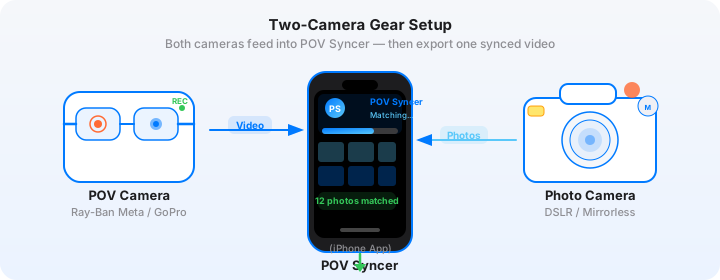
This combination covers two completely different perspectives on the same event. The GoPro captures the environment and your movement through it. The Sony captures the decisive moments. Together, they tell a story neither camera can tell alone.
GoPro Hero 13: Settings for Sports Events
The GoPro Hero 13 has the widest field of view of any recent GoPro body, and its HyperSmooth 6.0 stabilisation handles the kind of movement that happens when you are sprinting to a new position mid-race. These are the settings that work best for sports BTS content:
Video mode: 1080p at 60fps. The higher frame rate gives you smooth footage even when you are moving fast, and it opens the option to slow down key moments to 50% for impact. 4K is available but the file sizes slow down your same-day workflow significantly on a phone-based edit.
Field of view: Wide (not SuperView). SuperView distorts the edges noticeably and looks artificial in BTS content where the environment matters. Wide gives you excellent coverage without warping the scene.
HyperSmooth: On, set to Boost. Sports events involve a lot of incidental movement — running, crouching, pivoting — and Boost stabilisation absorbs all of it. The footage looks intentionally shot, not accidentally captured.
GPS: On. The GoPro's GPS timestamps provide an additional layer of EXIF accuracy that POV Syncer can use to cross-reference against your Sony's clock. Turn it on before you leave the car; it takes 30 to 60 seconds to acquire a fix.
Mounting: For most sports events, a chest mount is the cleanest option. It records your natural body movements and keeps your hands free for the Sony. A monopod mount is better for events where you need to hold the GoPro above crowds — start corrals at running races, compressed finish areas at cycling events.
Sony A7C II: Settings for Peak Action and EXIF Accuracy
The Sony A7C II is a 33MP full-frame camera with real-time tracking autofocus and up to 20fps continuous shooting with the electronic shutter. For sports photography, these are the key settings:
AF mode: Real-time Tracking, subject recognition set to Human. The A7C II's tracking locks to a specific athlete and holds it through the frame even when other subjects cross the path.
Drive mode: Hi+ (20fps electronic shutter). For peak action like finish line moments, swim exits, and jumps, burst at full speed. You will cull heavily, but the keeper rate at 20fps is significantly higher than at 10fps for unpredictable moments.
Shutter speed: Minimum 1/1000s for runners, 1/2000s for cyclists, 1/3200s for anything with fast rotation (track cycling, velodrome). Motion blur in a sports image communicates artistic intent; unintentional blur from a shutter speed that was one stop too slow just looks like a miss.
Date/Time: Sync the A7C II clock to GPS time via the camera's Location Information settings. This sets the internal clock to atomic accuracy and is the single most important step for EXIF sync precision. Without an accurate clock, your photos can land off by several seconds in the video.
Get the settings right the first time
Download the free POV Photographer's Cheat Sheet — camera settings, EXIF tips, and export presets for Ray-Ban Meta, GoPro, DJI, and Insta360 on one printable page.
Free PDF, no spam. Unsubscribe anytime.
The Same-Day Turnaround Workflow
The goal is to post to Instagram, TikTok, and YouTube Shorts within four hours of the event ending. Here is how that works in practice.
During the Event: Shoot Selectively with the GoPro
You do not need the GoPro recording for eight hours. Record during your key positions — the swim exit, the finish line, a good bike section. Three or four 10-minute clips from strategic positions gives you more than enough raw material for a 60-second Reel. Conserve battery; the Hero 13 gives you about 90 minutes per charge at 1080p/60fps.
On the Way Home: Quick Cull on the Sony
While a passenger, or during any break, use the Sony's native rating system to flag your best 20 to 30 frames on the camera body. You are not editing; you are flagging. A yellow star takes one button press. Mark your best peak action frames and your best environmental shots — the positioning shots that show you at work.
Step 1: Import to POV Syncer
Import the Sony's flagged selects via your card reader or Sony Imaging Edge Mobile app. Import the GoPro clip that covers the same time period. Open POV Syncer, create a new project, and add both.
POV Syncer reads the GPS UTC timestamp from the GoPro video and the DateTimeOriginal field from each Sony JPEG. The four-strategy EXIF matching system cross-references these timestamps and places each photo at its exact moment in the GoPro footage. On a 20-photo import against a 10-minute clip, the sync takes about 15 seconds.
Step 2: Structure the 60-Second Reel
For sports BTS content, the most effective structure is: Setup (0–10s) > Peak action sequence (10–45s) > Best image reveal (45–60s).
The setup section is the GoPro footage from your first position — you walking into place, the athletes preparing. The peak action sequence cuts through three or four key moments from the event, each with the corresponding Sony still appearing at the precise frame. The image reveal at the end holds on your single best shot for three to four seconds — long enough for the viewer to actually look at it.
Use POV Syncer's trim handles to build this structure. The photo markers on the timeline show you exactly where each still lands, so you can trim the video to start and end at the moments that matter.
Step 3: Add Sport-Appropriate Titles
Keep text minimal. The event name and date at the open — "Ironman 70.3 Barcelona, March 2026" — and a single caption on the best image. Choose a bold sans-serif from POV Syncer's font library for sports content; it reads better at speed on a small screen than an editorial serif.
Step 4: Export and Post
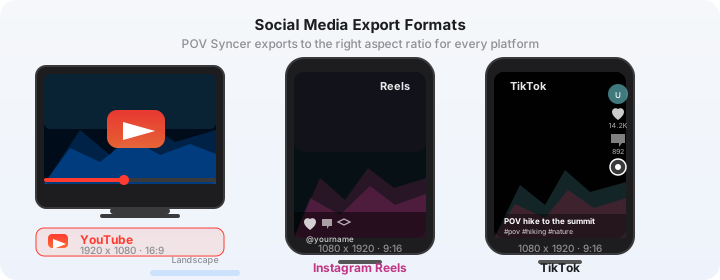
Export at 9:16 for Reels and TikTok. The same file posts to YouTube Shorts without re-encoding. Write your caption before you export so you can post immediately when the render finishes. Tag the event, tag relevant athletes if they follow you, and use four to six targeted hashtags rather than thirty generic ones.
Try POV Syncer free on the App StoreThe Post-Event Engagement Window
Sports social media has a biology. Immediately after an event, athletes are checking their phones, sharing results, tagging photographers who caught them. The window of peak engagement runs from about 30 minutes post-finish to 24 hours later — after that, the audience has moved on to the next thing.
If your BTS Reel is live within that window, you are visible exactly when your target audience is most active. Athletes who see themselves in your video share it to their own Stories. Their followers discover your account. The algorithm reads the early engagement as a signal to push the content further.
If your video goes live three days later, none of that happens. The organic reach window has closed. The post performs like any other piece of content — modestly, without the event-driven amplification.
The four-hour same-day workflow is not just convenient. It is the difference between content that reaches a few hundred people and content that reaches tens of thousands.
Content That Converts Into Commissions
The highest-value sports photography BTS content does three things: it shows your technical capability, it demonstrates your knowledge of the sport, and it provides something useful to the athlete audience — not just entertainment.
The "How I Got the Shot" Format
This is the most-engaged format in sports photography BTS. The GoPro footage shows your physical positioning — crouching at the finish line barrier, sprinting to a new angle, lying on the ground for a low perspective shot — and then the Sony still appears at the exact moment it was taken. The viewer sees the decision and the result simultaneously.
This format works because it is generous. You are sharing craft knowledge, not guarding it. Athletes and photography enthusiasts feel educated by the content, which builds a stronger relationship than pure portfolio posts.
Event Organisers as the Real Audience
Race directors and event organisers watch sports photography BTS content closely. They are looking for photographers who can cover their events professionally, who understand race logistics, and who produce content that promotes the event to future participants.
A consistent library of event BTS content — 10 events, 10 Reels, each showing professional positioning and sharp results — is a more effective pitch document than a PDF portfolio. Organisers can watch you work without you being in the room. That trust-building is what converts to paid commissions.
Scaling the Workflow Across Multiple Events
If you shoot 30 to 40 events per year, the POV Syncer workflow compounds significantly. You are not creating one piece of BTS content that performs once. You are building a library of event-specific content, each piece performing at its event's peak engagement window, each piece contributing to an archive that new followers discover when they land on your profile.
The key is consistency over perfection. A competent 60-second Reel posted on the day of the event will always outperform a polished three-minute video posted three weeks later. POV Syncer is designed for the former — fast, focused, accurate, ready to post before you have finished your post-race coffee.
Getting Started
POV Syncer is free to download. Use the free tier to run the complete workflow on your next event — GoPro footage, Sony selects, sync, trim, export — before spending anything. If the output quality meets your standard (it will), Pro unlocks unlimited projects, all 15 fonts, AI narration, 10 background styles at $9.99 per month or $99.99 per year.
The GoPro Hero 13 is $399. If one additional commission comes from your BTS content in the first month, it is paid for. The time you save on manual editing — conservatively two hours per event at 40 events — is 80 hours a year returned to shooting, culling, or whatever you would rather be doing.
Post your first sports BTS Reel same-day
Download POV Syncer free and have your GoPro footage synced with Sony action shots before the post-event engagement window closes.
Download POV Syncer Free