Ray-Ban Meta vs GoPro for Street Photography POV: Which Should You Buy?
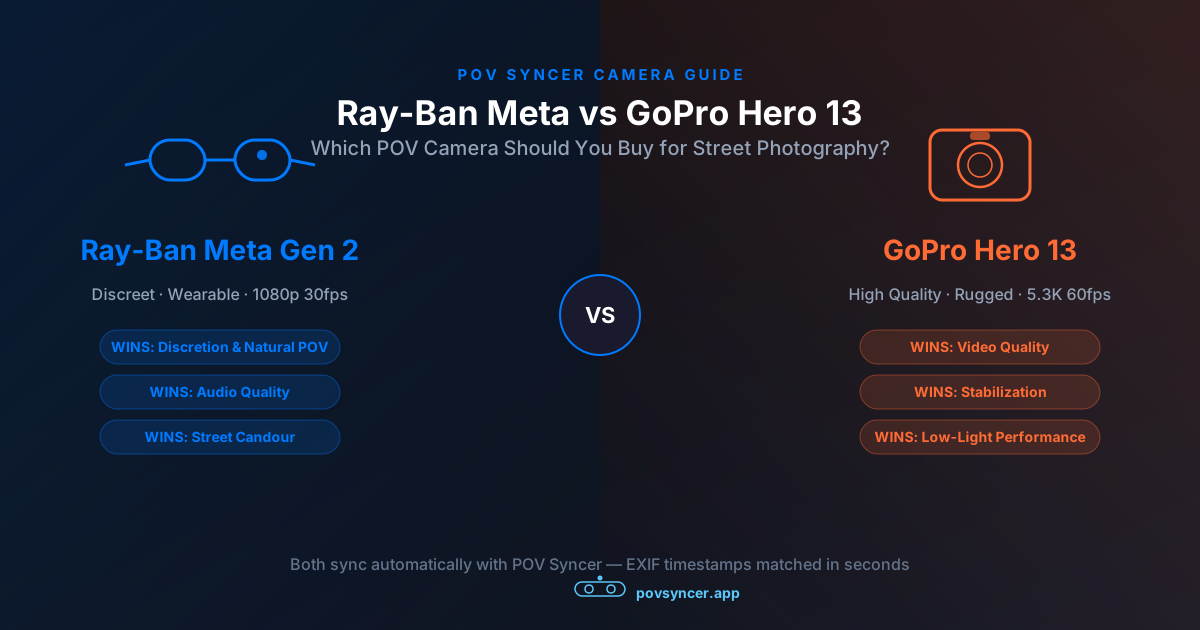
You have done the research. You know you want to add a POV camera to your street photography kit — something to document the process, show your audience the moment before the shot, turn a static portfolio into video content that actually performs on Instagram and YouTube. Two names keep coming up: Ray-Ban Meta Gen 2 and GoPro Hero 13.
They are both excellent cameras. They are also almost completely different tools built for completely different use cases, and the photography content online treats them as interchangeable because most reviews are written by action sports people, not street photographers. I have shot with both extensively — on busy city streets, in covered markets, at golden hour — paired with everything from a Fujifilm X100VI to a Leica Q3. The right answer depends entirely on how you shoot.
This is the comparison I wish I had before I bought the wrong camera first.
Why Street Photography Needs a Different POV Buying Criteria
Most POV camera reviews rank cameras on waterproofing, extreme stabilization for skateboarding, and fish-eye field of view. None of that matters for street photography. What matters on the street is:
- Discretion. Does it change how people behave around you? A camera that signals "this person is filming" kills candid photography dead.
- Natural field of view. Ultra-wide fish-eye looks wrong for street content. You want something close to how you actually see.
- Audio quality. The ambient soundtrack of the city — footsteps, traffic, the quiet click of a shutter — is free documentary value. Don't throw it away with bad microphones.
- Battery life for a full session. Street photography sessions run two to three hours. A camera that dies at 45 minutes destroys documentary continuity.
- Compatibility with your existing workflow. Specifically: how easily does it sync with the EXIF timestamps on your stills?
Score both cameras on those criteria and the comparison looks nothing like a standard action camera review. Let's go through it properly.
Get the free POV Photography Cheat Sheet
Optimal settings for Ray-Ban Meta Gen 2 and GoPro Hero 13 — plus 18 more camera combos — on one printable page. Free for subscribers. Join 1,000+ photographers getting weekly tips.
Free PDF, no spam. Unsubscribe anytime.
The Contenders: Quick Overview
The Ray-Ban Meta Gen 2 is a pair of smart glasses with a 12MP camera embedded in the right temple. It records 1080p video. It looks like eyewear because it is eyewear. Nobody on the street knows you are recording.
The GoPro Hero 13 is a purpose-built action camera with a 1/1.9-inch sensor, 5.3K video capability, and HyperSmooth 6.0 electronic stabilization. It is clearly a piece of video hardware, worn on a chest mount, hat clip, or bag strap.
Price: Ray-Ban Meta Gen 2 at $299. GoPro Hero 13 at $399. Both are compatible with POV Syncer's automatic EXIF timestamp sync.
Full Specification Comparison
| Specification | Ray-Ban Meta Gen 2 | GoPro Hero 13 |
|---|---|---|
| Price | $299 | $399 |
| Max Video Resolution | 1080p at 30 or 60fps | 5.3K at 60fps; 4K at 120fps |
| Sensor Size | Small (undisclosed, compact module) | 1/1.9-inch with GP2 processor |
| Field of View | ~89 degrees (~23mm equiv.) — natural | 155 degrees default; Linear ~16mm equiv. |
| Stabilization | Electronic — walking smooth, not jogging | HyperSmooth 6.0 — industry leading |
| Low-Light Performance | Acceptable to ~ISO 800 equiv. | Excellent; Auto Low Light mode available |
| Audio | 5-microphone array with beamforming — excellent ambient capture | 3-microphone with wind reduction — good but less ambient |
| Battery Life | ~60 min; case extends to ~4 hrs total | 80–90 min at 4K30 (Enduro); swappable |
| Discretion on Street | Invisible — looks like eyewear | Visible — clearly video hardware |
| Mounting | Worn as glasses — true eye-level POV | Chest / hat / bag strap mount required |
| Color Profile | Auto only — warm Meta color science | Auto or GoPro LOG flat profile |
| Waterproofing | IP4 splash resistant only | 10m waterproof without housing |
| POV Syncer Compatible | Yes — automatic EXIF sync | Yes — automatic EXIF sync |
| Best For | Candid street, documentary, intimate content | Cinematic street, travel, mixed conditions |
Category 1: Discretion — Ray-Ban Meta Wins by a Mile
This is the most important category for street photography and the one where the two cameras are furthest apart. The Ray-Ban Meta Gen 2 looks like a regular pair of glasses. The small camera module is embedded in the right temple and most people assume it is a design element. You can walk into a market, sit at a café, approach a scene without anyone on the street knowing you are recording.
Street photography runs on natural behaviour. The moment a subject notices a camera pointed at them, you have lost the shot — or gained a very different one. The glasses do not signal themselves. People do not adjust their posture, look away, or ask you to stop. The footage they generate has an intimacy and authenticity that no chest-mounted action camera can replicate.
The GoPro Hero 13, by contrast, is unmistakably a piece of video equipment. Mounted on a chest rig, it sits at the centre of your torso and catches attention from across a street. Mounted on a hat clip, it reads as even more conspicuous. Subjects notice. Some perform for it. Some avoid it. Some ask what you are doing. The presence of visible hardware changes the social contract of street photography in ways that are consistently disruptive to the work.
If your street photography depends on candid, unposed moments — which is the overwhelming majority of street photography — the discretion advantage of the Meta glasses is the entire ballgame. No amount of video quality makes up for footage where everyone is looking at the camera.
Category 2: Video Quality — GoPro Wins Clearly
On pure technical merit, the GoPro Hero 13 produces noticeably better video. The 1/1.9-inch sensor and GP2 processor capture more detail, handle dynamic range more capably, and perform significantly better in low light than the smaller sensor in the Meta glasses. At 4K resolution with HyperSmooth 6.0 stabilization engaged, the Hero 13 footage is genuinely cinematic — smooth, detailed, and suitable for full-screen YouTube playback without looking amateurish.
The GoPro LOG flat color profile is also a real advantage for photographers pairing the POV footage with stills from a Leica Q3, Sony A7C II, or Fujifilm X-T5. When your primary camera produces carefully exposed, beautifully graded JPEGs, you want your POV footage to be correctable to match them tonally. GoPro LOG gives you the headroom to do that. The Meta glasses' fixed warm color science does not.
The Ray-Ban Meta footage is perfectly watchable — at 1080p30 it holds up well on phone screens and in Instagram Reels — but it will not impress anyone on a 4K monitor. For photographers whose primary output is short-form social content (Reels, TikTok, YouTube Shorts), this is an acceptable trade. For anyone producing YouTube long-form at 4K, the Meta glasses will be the visual weak link in the finished piece.
Category 3: Audio Quality — Ray-Ban Meta Wins
This one surprises most people: the Ray-Ban Meta Gen 2 has genuinely excellent audio. The five-microphone array with beamforming captures ambient street sound — city noise, footsteps, the quiet mechanical click of a Fujifilm shutter, snatches of passing conversation — with a clarity and spaciousness that the GoPro's three-microphone system cannot match in the same circumstances.
For street photography process videos, ambient audio is a meaningful part of the storytelling. The sound of a busy street, the hush of a shaded alley, the clatter of a market — these audio textures are free documentary content that you get simply by being present. The Meta glasses' microphone placement, close to your ears and distributed across the frame, captures binaurally in a way that no camera-body microphone can replicate.
The GoPro's audio is good — substantially better than older action cameras — but its three-microphone system is optimised for wind noise reduction and clarity in louder environments rather than for the subtle ambient capture that gives street footage its sense of place. On a calm day in a quiet street, the difference is audible immediately.
One caveat: in genuinely windy conditions, neither camera is great, but the Meta glasses are measurably worse. The microphone placement around the frame of the glasses catches wind in ways that the Hero 13's forward-facing array handles more gracefully. If you regularly shoot on exposed seafronts, rooftops, or in coastal towns on breezy days, the Meta glasses' audio will often be unusable.
Download POV Syncer Free — Works with Both CamerasCategory 4: Battery Life — It's More Complex Than the Numbers
The raw numbers favour the GoPro: 80-90 minutes at 4K30 with the Enduro battery, versus roughly 60 minutes for the Meta glasses at 1080p30. But the practical story is more nuanced.
The GoPro battery is swappable mid-session. If you are going out for a three-hour walk, you can carry two spare Enduro batteries (small, cheap) and never run out of power. The Meta glasses' charging case gives you around four hours of total battery across multiple charges, but it requires you to return the glasses to the case for 10-15 minutes to recharge — breaking the documentary continuity of your footage.
For a single 60-75 minute focused session, the Meta glasses cover you comfortably. For longer multi-hour walks where you want continuous or near-continuous coverage, the GoPro's swappable battery system is more practical. The Hero 13 battery swap takes about 30 seconds and produces a natural chapter break in the footage that you can edit around.
Where this matters most is location-based shooting. A dedicated 90-minute session in a specific neighbourhood — a covered market, a particular street, a festival — fits entirely within the Meta glasses' battery window. A full-day travel shoot, or the kind of slow methodical walk through a large city that produces the best street photography, benefits from the GoPro's flexibility.
Category 5: EXIF Sync and the Editing Workflow
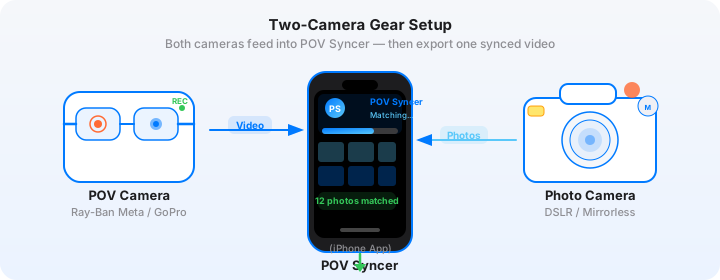
Here is where both cameras converge, and where POV Syncer matters. Whether you are shooting with the Meta glasses or the Hero 13, the problem of syncing your POV footage with your street photography stills is identical: the video records continuously, the stills have EXIF timestamps that say exactly when each one was taken, and you need to match them up frame-accurately.
Done manually — importing to Premiere or Final Cut, scrubbing through footage, dragging stills one by one onto the timeline, matching audio — this takes two to four hours for a single street session video. That grind is why most photographers who try POV video stop doing it. The editing process is simply too painful to maintain as a regular practice.
How POV Syncer Handles Both Cameras
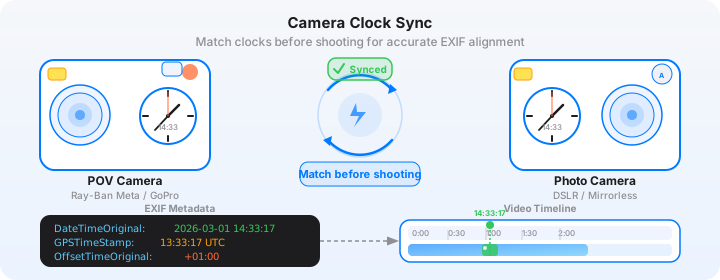
POV Syncer uses EXIF timestamps to do the matching automatically, in under 60 seconds. Import your footage and your stills. The app reads the DateTimeOriginal, OffsetTimeOriginal, and GPS timestamp fields from your photos, compares them to the video's start time and frame rate, and calculates exactly where each still belongs on the timeline. The result is a precisely matched edit where each photo appears at the exact moment you pressed the shutter.
This works identically with Ray-Ban Meta footage and GoPro Hero 13 footage. Both cameras write standard video containers with accurate start timestamps that POV Syncer can parse. Both are compatible with stills from any major camera system — Fujifilm, Leica, Sony, Ricoh, Nikon, Canon, or iPhone. What took 2-4 hours of manual editing in Premiere happens in seconds with one-tap photo matching.
The one important step: before each session, set your camera's clock to match your iPhone exactly. The Meta glasses sync automatically via the Meta View app. For the GoPro, confirm the time in the camera settings before you start recording. POV Syncer's four-strategy EXIF matching handles timezone offsets and GPS UTC corrections automatically, but it cannot correct for a clock that was set wrong at the source.
The Practical Edit Comparison
With Meta glasses footage: the 89-degree field of view matches naturally with 35mm-equivalent stills from an X100VI or GR IIIx. When a photo appears at its matched moment, the relationship between what the glasses saw and what the street camera captured is immediately readable. The narrower field of view is a feature, not a limitation — it shows what you were actually looking at.
With GoPro footage: in Linear mode, the corrected field of view still tends to be wider than your stills' perspective. A shot from a Fujifilm X100VI at 35mm equivalent will show significantly less of the scene than the GoPro's roughly 16mm equivalent linear mode. This is manageable in editing — cropping the video or using the footage as establishing context — but it requires a small amount of deliberate framing consideration that the Meta glasses do not.
Want settings cheat sheets for 20+ camera combos?
Get the free POV Photography Cheat Sheet — Ray-Ban Meta, GoPro Hero 13, and 18 more POV and street camera combinations, all on one printable page.
Free PDF, no spam. Unsubscribe anytime.
Which Street Camera Pairs Best with Each POV Camera?
Your existing street camera body should influence which POV camera you choose, because the combination determines how well the finished video holds together visually and how well the EXIF timestamps align.
Ray-Ban Meta Gen 2 — Best Pairings
The Meta glasses excel alongside compact, discreet street cameras. The combination of invisible eyewear and a quiet, small primary camera is the least intrusive street kit available — subjects do not notice either device.
- Fujifilm X100VI / X100V — The natural partner. The 35mm equivalent focal length aligns well with the glasses' field of view, and the Classic Chrome and Eterna Cinema film simulations produce stills that complement the glasses' warm color science naturally.
- Ricoh GR IIIx / GR III — Another ideal pairing for ultracompact street work. The GR's 28mm and 40mm equivalents sit within the range where the relationship between POV footage and stills is immediately readable.
- Leica Q3 / Q2 — For documentary street work where the quality of the stills matters as much as the process. The Q3's 28mm f/1.7 lens at typical street distances produces stills that fit naturally inside the Meta glasses' field of view.
- iPhone 16 Pro — The minimal kit. Both devices are imperceptible to subjects, and the iPhone's EXIF timestamps are as precise as any dedicated camera.
GoPro Hero 13 — Best Pairings
The Hero 13's video quality justifies pairing it with higher-resolution primary cameras where the stills can hold up against 4K POV footage on large screens. It also suits situations where you are moving quickly enough that HyperSmooth 6.0 is a meaningful advantage.
- Leica Q3 / M11 — The stills from both Leicas can fill a 4K screen without detail loss, making the quality gap between GoPro footage and primary camera output minimal. GoPro LOG colour graded to match the Q3's neutral rendering looks exceptional.
- Sony A7C II / A7CR — Sony's full-frame sensors produce files that scale to any output size, and the A7C II's in-body image stabilization for stills pairs well with the Hero 13's video stabilization for a consistently smooth visual aesthetic throughout.
- Fujifilm X-T5 — The X-T5's 40MP sensor and strong dynamic range produces stills that hold their own against 4K GoPro footage. The GoPro LOG can be graded to approximate Fujifilm's film simulations with reasonable success.
- Canon R6 III / R7 — Canon shooters getting into POV video will find the Hero 13 the most capable partner for the high-frame-rate burst capabilities these cameras offer.
Recommended Settings for Street Photography
Ray-Ban Meta Gen 2 — Street Settings
- Resolution: 1080p at 30fps. The 30fps gives the footage a slightly documentary quality; 60fps can feel too "smooth" and produced for street content.
- Recording mode: Continuous via the Meta View app toggle, or tap-to-record using the physical button on the right temple for session-based shooting.
- Clock sync: Automatic via Meta View app connected to your iPhone. No manual clock-setting required — the most convenient sync setup of any POV camera.
- Charging: Start each session with a full case charge. The glasses charge from the case in approximately 10 minutes, so a quick top-up between locations is practical.
GoPro Hero 13 — Street Settings
- Resolution: 4K at 30fps in Linear mode for documentary street content. Use HyperSmooth set to "Standard" rather than "Boost" to preserve a little natural camera motion.
- Field of view: Linear, not Wide or Max SuperView. The fish-eye distortion on Wide mode looks wrong for street photography content.
- Color profile: GoPro LOG if you plan to colour grade to match your stills. Natural if you want a usable file out of camera without post-processing.
- Clock sync: Confirm via the GoPro Quik app before each session. The Hero 13 syncs to your phone's time automatically when connected to Quik, but verify — do not assume.
- Mounting: Chest mount at sternum height produces the most natural-feeling footage for street. Hat clip is also usable but tends to catch more sky in open environments.
The Honest Recommendation
After shooting with both extensively, here is where I actually land:
Buy the Ray-Ban Meta Gen 2 if: you shoot primarily candid street photography where subject behaviour matters more than technical video quality. You prioritise the intimate, documentary quality of invisible eye-level footage over resolution and stabilization. Your primary output is short-form social content on Instagram or TikTok. You regularly shoot with a compact camera like the X100VI, GR IIIx, or Leica Q. You want the simplest possible carry — no mounting hardware, no extra equipment.
Buy the GoPro Hero 13 if: you produce YouTube long-form content where 4K resolution and cinematic footage quality are important. You regularly shoot in low light and need the sensor performance advantage. You travel or shoot in mixed conditions where waterproofing is occasionally necessary. Your primary camera is a full-frame body whose stills deserve equally high-quality POV video. You are comfortable with visible hardware and the social adjustments that brings on the street.
Consider both if: you have the budget and shoot across multiple contexts. The Meta glasses for intimate candid city work; the Hero 13 for travel, markets, and situations where you are moving faster and the higher video quality makes a visible difference to the finished content. Both sync to POV Syncer's automatic EXIF workflow — you can swap between them based on the session without changing anything in the editing process.
The Editing Reality: Hours vs Seconds
Whichever camera you choose, you will face the same problem after the session: a folder of video files and a card full of stills that need to become a coherent video. In Premiere or Final Cut, that process takes two to four hours. Scrubbing through footage to find the moment each shot was taken. Dragging stills onto the timeline manually. Adjusting timing by hand. Adding titles. It is tedious timeline placement at its most soul-draining, and it is the reason the majority of street photographers who start doing POV video stop doing it within a few months.
POV Syncer eliminates that grind. Import your footage and your stills. The app reads the EXIF timestamps from every photo and matches them to the video timeline automatically — in under 60 seconds. Add titles from 15 premium fonts. Add AI-powered narration in one tap. Export to 9:16 for Reels or 16:9 for YouTube. What took hours of manual editing in a desktop NLE now takes a few minutes on your phone.
That speed difference is what makes POV video a sustainable practice rather than an occasional ambitious project. With automatic EXIF sync, a street session video goes from footage to finished in the time it takes to drink a coffee after the shoot.
Ready to create your first POV street video?
Download POV Syncer free and sync your Ray-Ban Meta or GoPro footage with your street photography stills automatically — in under 60 seconds. Create your first POV video today.