TikTok POV Videos: The Camera Setup That Gets Views
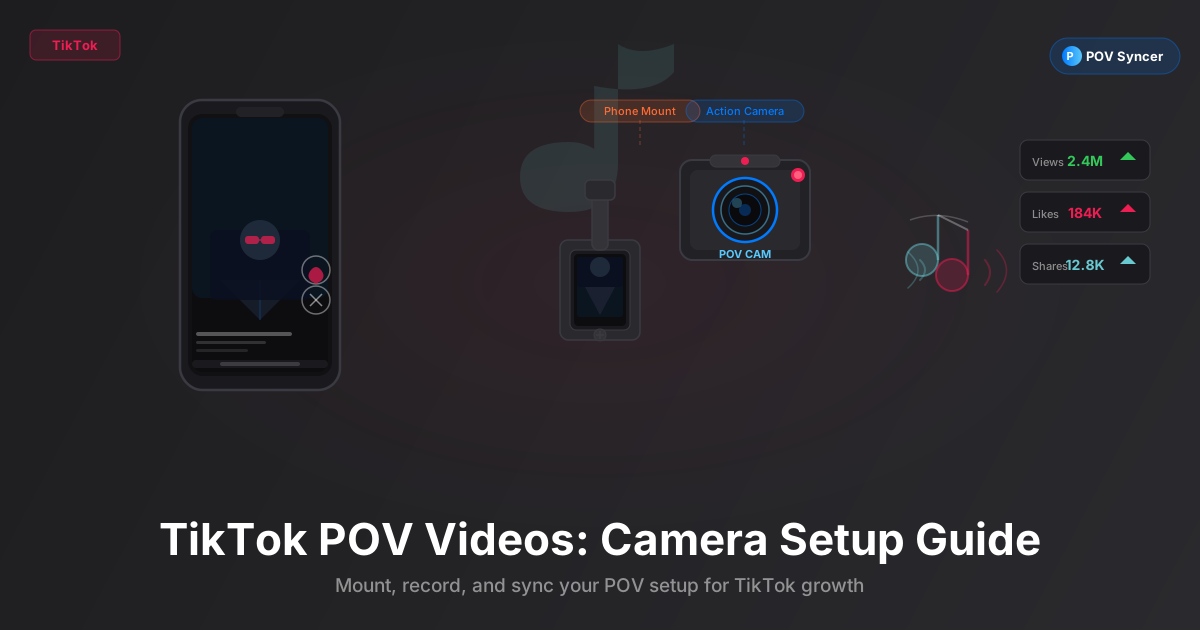
POV is one of TikTok's most durable native formats — and it works because it puts the viewer inside your experience. Here is how to choose the right camera for your POV TikTok setup, structure your videos for maximum watch time, and use photo cut-ins to keep people watching to the end.
Why POV Is a Native TikTok Format
TikTok did not invent the POV label, but it turned it into a genre. A video tagged #POV on TikTok signals to viewers that they are about to experience something through someone else's eyes — the perspective of a chef, a surgeon, a midnight trail runner, a street photographer. The first-person framing creates immediate emotional identification that traditional talking-head content cannot match.
The format converts because it is genuinely immersive. When the camera is mounted at eye level or on a pair of glasses, the viewer's brain processes the footage as if they were there. That sense of presence drives the two metrics that matter most for TikTok distribution: watch time and shares. People watch POV videos twice. They share them because the experience is transferable in a way a polished brand video is not.
The challenge is choosing the right camera for your specific POV content — and then editing it in a way that compounds the immersive effect rather than breaking it. Photo cut-ins, when timed well, do something remarkable: they pause the action at the exact moment of peak interest, show you what the photographer saw, and then drop you back into the experience. It is a format within a format, and it performs.
Get the settings right the first time
Download the free POV Photographer's Cheat Sheet — camera settings, EXIF tips, and export presets for Ray-Ban Meta, GoPro, DJI, and Insta360 on one printable page.
Free PDF, no spam. Unsubscribe anytime.
Choosing Your Camera: Three Setups for Three Types of POV TikTok Content
Ray-Ban Meta: Everyday Life POV
The Ray-Ban Meta smart glasses are the most invisible camera you can wear. They look exactly like sunglasses. Nobody on the street knows you are recording. That authenticity is their greatest asset on TikTok, where audiences have finely tuned radar for content that feels staged.
Ray-Ban Meta records at up to 1080p at 60fps and 12MP photos. The lens sits at true eye level. When you turn your head, the viewer turns their head. There is no visible camera housing in frame, no stabilisation artefacts, no shake that says "action camera." The footage is naturally intimate — the exact quality TikTok's algorithm rewards with organic distribution.
Best for: street walks, day-in-the-life content, coffee shop work sessions, farmers markets, city exploration, any POV content where the subject is everyday human experience. Ray-Ban Meta POV is the format that makes people feel like they spent a Saturday morning in a city they have never visited.
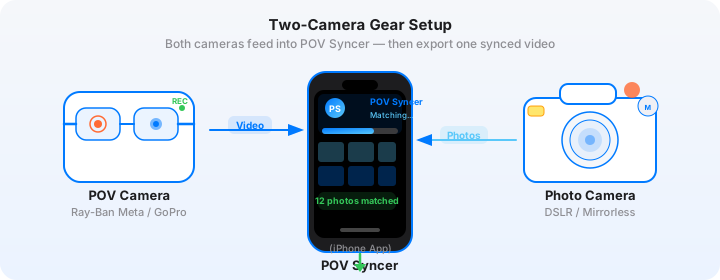
The EXIF timestamps in Ray-Ban Meta photos are highly accurate and sync cleanly with the glasses' video files — both use the same internal clock. If you use POV Syncer to match your glasses' video to photos you took with your iPhone or another camera during the same walk, the sync is automatic and precise.
GoPro Hero 13: Action and Adventure POV
For anything that involves speed, altitude, water, or impact — the GoPro Hero 13 is the obvious choice. It shoots up to 5.3K at 60fps, has Horizon Lock for smooth footage through rough terrain, and is waterproof to 10 metres without a case. The wide-angle HyperView field of view at 156 degrees puts everything in frame, which on TikTok reads as high-energy and genuine.
GoPro's HyperSmooth 6.0 stabilisation means that even chest-mount footage through a mountain bike trail looks composed rather than chaotic. That composure matters because TikTok's mobile player compresses video, and shaky footage loses detail under compression in ways that smooth footage does not.
Best for: surf, snowboard, mountain bike, skate, hiking, rock climbing, kayaking — any action sport POV. GoPro content on TikTok performs best when it shows skill or risk, ideally both. The key is pairing the action footage with still photos that show what the scene actually looked like from a composed photography perspective. The contrast between the wide, immersive GoPro shot and the considered still photo creates a visual rhythm that is genuinely addictive to watch.
Insta360 X4: Immersive and Reframeable POV
The Insta360 X4 shoots 360-degree video at 8K, which you then reframe in post to create the specific angle you want. This "invisible selfie stick" trick — where the camera is on a pole but because it is shooting 360 degrees, the pole disappears from the reframed footage — is a TikTok staple that still generates genuine surprise when it is executed well.
For POV TikTok content specifically, the Insta360 X4's reframing capability means you can shoot once and create multiple different POV perspectives from the same footage. Point forward for a classic POV shot. Tilt down to show your feet walking. Pull back to show yourself in context. All from one clip.
Best for: travel vlogging where you want to show both the environment and yourself, adventure content where you want the dramatic "look back" reveal, any content where multiple perspectives from a single shoot make sense. The 360-degree EXIF photos the X4 captures also work beautifully as cut-ins — the equirectangular format converts cleanly to standard JPEG for import into POV Syncer.
TikTok POV Hook Structure: The First Three Seconds
On TikTok, your first three seconds determine whether you get 100 views or 100,000. The algorithm serves your video to a small initial audience and measures their scroll rate. If enough of them watch past the three-second mark, the video gets pushed to a wider audience. If they scroll past, it dies.
For POV content, the most effective hook structure is a mid-action open. Do not start with you picking up your camera. Do not start with a title card. Start at the most visually interesting or kinetic moment in your video — the moment you reach the summit, the moment the wave breaks, the moment the bird lands two feet from your glasses. Then cut back in time if you need to provide context.
The 15-Second Format: Emotion, Not Explanation
TikTok's 15-second format is built for emotional impact, not narrative explanation. In 15 seconds you can establish a mood, deliver one visual surprise, and leave the viewer wanting more. This is ideal for photo cut-in content: open with 5 seconds of POV video that establishes the scene, cut to 4 seconds of your strongest still photo with a caption that adds context or emotion, then return to 6 seconds of video that resolves the moment.
Fifteen seconds is tight enough that every frame must earn its place. Select one photo — your best one — rather than trying to fit three or four. The single photo cut-in at the right moment creates more impact than a rapid-fire slideshow.
The 60-Second Format: Story Arc
At 60 seconds, you have room for a proper narrative arc: setup, development, payoff. This is where multiple photo cut-ins work well. Structure your video so that each photo appears at a moment of peak interest — the photo functions as a pause and a revelation before the video continues. Think of it as punctuation: the video is the sentence, the photo is the full stop that makes you register what just happened.
For a 60-second POV TikTok with photo cut-ins, a pacing of one photo every 12 to 15 seconds works well. That is 4 to 5 photos in a minute — enough to create rhythm without overwhelming the video with stills.
Sync Your POV Videos FreePhoto Cut-Ins That Drive Watch Time
Why Photo Cut-Ins Work on TikTok
TikTok's algorithm measures average watch time and video completion rate as its primary ranking signals. Photo cut-ins improve both metrics in a specific and measurable way: they create a natural "hold" in the viewer's attention.
When a still image appears in a video, the viewer's brain switches from tracking movement to reading composition and detail. They slow their mental pace. They read the caption. They look at the corners of the frame. This pause lasts a second or two longer than watching equivalent video footage, and those extra seconds show up as higher average watch time in your analytics.
The result is that a 45-second POV video with 3 photo cut-ins consistently outperforms a 45-second POV video without them, holding all other variables constant. The photos are not decoration — they are a watch-time mechanism.
Using POV Syncer to Place Photos at the Right Moment
The craft is in the timing. A photo cut-in that appears at the wrong moment — a static landscape shot dropped into the middle of fast action — breaks the immersion rather than enhancing it. The photo needs to appear at a moment when the action naturally pauses: when you reach a high point and survey the view, when you arrive somewhere new, when the light changes.
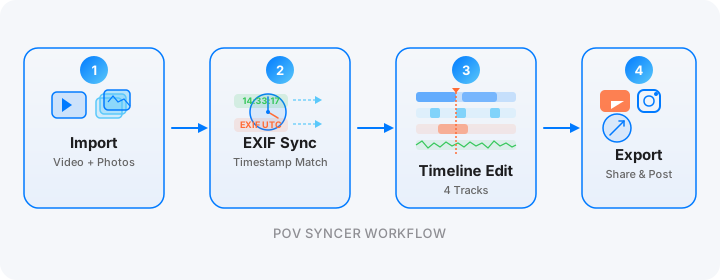
POV Syncer's EXIF-based automatic syncing places each photo at the exact second it was taken. This is a better guide to timing than human intuition: the moment you took the photo is almost certainly the moment the action peaked or the scene was most interesting. You were there. You pressed the shutter at the best moment. Let the timestamp honour that decision.
After the automatic placement, use the timeline editor to fine-tune. You can extend a photo's display duration to give the viewer more time with a complex composition, or shorten it if the following video action needs to come in quickly. The 4-track timeline keeps your photo timing, caption text, audio, and effects all in sync as you adjust.
TikTok Algorithm and POV Content in 2026
What the Algorithm Actually Rewards
TikTok's recommendation algorithm in 2026 weights six signals in its distribution decision: completion rate, rewatch rate, share rate, comment rate, save rate, and follow rate. POV content with photo cut-ins performs well on the first three: completion rate rises because photos create natural hold points, rewatch rate rises because viewers go back to look at the photos more closely, and share rate rises because the experience is transferable ("you have to see this view").
The algorithm also factors in creator consistency. Posting POV content regularly — ideally 3 to 4 times per week — signals to TikTok that you are a reliable producer of a specific type of content. The platform then builds a defined audience for you and serves your videos to that audience first, which improves all six metrics over time.
Trending Sounds for POV Content
POV videos on TikTok use audio in a specific way. Trending audio for action POV content leans towards ambient electronic or post-rock instrumentals — music that creates emotional tension without distracting from the visual. Trending audio for everyday-life POV content tends to be more conversational: spoken word clips, lo-fi, ambient coffee shop sounds.
For photo cut-in moments specifically, a brief drop in audio energy — a quieter bar, a transition — lines up well with the still photo's slower visual pace. Many POV Syncer users add a custom audio track in the app (available with a Pro subscription) and carefully align the track's quieter moments with their photo overlays. This synchronisation of audio and visual rhythm is what separates edited content from dumped footage.
Timing Your Posts for Maximum Distribution
TikTok's initial distribution window opens immediately after you post. The first 30 to 60 minutes determines whether your video enters the broader recommendation feed. Post when your target audience is actively scrolling: for action and adventure content, this tends to be early morning (6am to 9am) and early evening (5pm to 8pm) in your audience's primary timezone. For everyday-life and street photography POV, weekend mornings have consistently strong engagement.
The Complete TikTok POV Setup: What You Need
Camera
- Ray-Ban Meta glasses — for authentic everyday POV. Charge fully before each session (up to 4 hours video per charge). Set to 1080p 60fps for smoothest footage.
- GoPro Hero 13 — for action POV. HyperSmooth 6.0 on, Horizon Lock on for chest-mount. 2.7K 60fps for Reels-quality output.
- Insta360 X4 — for reframeable POV. Shoot in 8K 360 for maximum reframing flexibility. Use the AI reframing tool in Insta360 Studio before importing to POV Syncer.
Second Camera for Photos
Any camera with EXIF timestamps works as your photo companion. iPhone 15 Pro is the most convenient option — it is always in your pocket, shoots RAW with precise GPS timestamps, and transfers to POV Syncer via Photos library instantly. Sony RX100 VII adds a dedicated 1-inch sensor with serious optical quality if you want to shoot more intentional stills during your POV sessions.
POV Syncer on iPhone
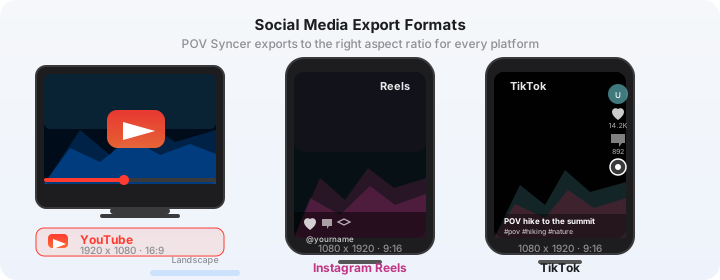
Import your POV camera footage and photos into POV Syncer, let the EXIF matching handle placement, then edit your timeline for TikTok's vertical format. Export with the TikTok preset (1080 x 1920, high quality H.264) and share directly. The free tier handles one project — enough to test the workflow on your first POV video before upgrading to Pro for unlimited projects and AI narration.
Ready to build your TikTok POV setup?
Download POV Syncer free and create your first photo-synced POV video today.
Download on App Store — Free