How I Shot This: Tokyo Fish Market at 5AM with GoPro Hero 13 + X100VI
My alarm went off at 4:15 in the morning in a business hotel near Higashi-Ginza Station. The room was the size of a wardrobe, which I did not mind, because in forty-five minutes I would be standing outside in the dark on a concrete loading dock at Tsukiji outer market, GoPro Hero 13 Black mounted on my chest, Fujifilm X100VI hanging from my wrist, watching men in rubber aprons do things with knives and fish that are incomprehensible in scale. By 5:30, the first tuna would be on the block. The light — lanterns, headlamps, the greenish glow of overhead fluorescents spilling onto wet concrete — would be everything I had come for.
What I used to come home with was the problem: ninety minutes of 4K GoPro footage, sixty-odd JPEG files from the X100VI, and the knowledge that matching them in Premiere Pro would cost me a full evening. Scrubbing through footage frame by frame, reading EXIF timestamps, dragging stills onto a second track, adjusting the sync by a few frames because I guessed wrong. Three hours minimum for a ten-minute video. I have gone on enough early-morning sessions in Tokyo to know exactly how many of them never became videos because I could not face that editing grind.
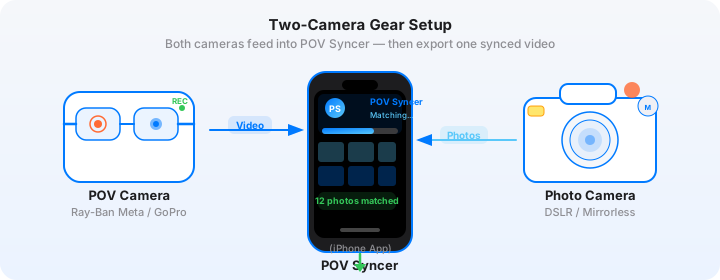
Now I do the whole thing in POV Syncer on my iPhone on the train back to Shibuya. Automatic EXIF sync reads the timestamps from every X100VI JPEG, matches each one to the exact frame in the GoPro footage, and drops it on the timeline in seconds. This is the full walkthrough of that fish market session — the gear, the settings, the light, the process, and the workflow that makes it publishable the same morning it was shot.
Get the free POV Photography Cheat Sheet
GoPro Hero 13 low-light settings, Fujifilm X100VI film simulation picks for pre-dawn markets, and the complete EXIF sync checklist for Tokyo — on one printable page.
Free PDF, no spam. Unsubscribe anytime.
The Setup: Why GoPro Hero 13 + Fujifilm X100VI at a Fish Market
Tsukiji outer market — the cluster of stalls, restaurants, and wholesale shops that survived the 2018 relocation of the inner market to Toyosu — opens before dawn. By 5:00 AM the knife-sharpeners are at work, the tamagoyaki pans are on the heat, and the fishmongers are arranging product under the orange glow of hanging lanterns. It is one of the most visually rich environments in Tokyo, and it is chaotic, tight, and dimly lit in a way that destroys certain cameras and rewards others.
The GoPro Hero 13 Black is an interesting choice for market work because of what it does not do rather than what it does. It does not announce itself. Mounted flat against my chest on a simple clip mount, it reads as sports gear to the handful of people who notice it at all — not as a cinema camera pointed at someone's workspace. The wide 155-degree field of view on the Hero 13's HyperView setting captures an entire stall and the movement around it in a single shot. And for the specific lighting challenge of a pre-dawn Tokyo market, the Hero 13 performs meaningfully better than its predecessors in genuinely dark conditions.
GoPro Hero 13 Low-Light Settings for the Market
The Hero 13 Black is the first GoPro to include a front-facing screen and expanded low-light processing in the AutoBoost ISO mode. For a market environment where the light sources are a mix of warm lanterns, cold fluorescents, and the occasional phone screen, here are the settings I used throughout the session.
- Resolution and frame rate: 4K at 30fps. At 4K 60fps the Hero 13 has to limit its sensor sensitivity, which was not worth it in this light. At 4K 30fps the AutoBoost algorithm has more processing time per frame and the footage in low ambient light is noticeably cleaner.
- ISO range: Auto, 100–6400 maximum. The Hero 13 handles 6400 with acceptable noise for social content — it reads as a textured grain rather than chroma mud, which suits the pre-dawn aesthetic. I capped at 6400 rather than the full 6400+ AutoBoost range because I wanted consistent colour rather than the Hero 13's more aggressive noise-reduction smearing that appears at the extreme ceiling.
- Shutter speed: I let AutoExposure manage this. At 30fps the maximum shutter for standard footage is 1/60s, which is enough to capture the purposeful movement of the market — people walking, hands working, fish being lifted — without needing motion-freeze speed. Blur at 1/60s at 30fps is natural and reads as documentary.
- White balance: Auto. The mixed light at Tsukiji makes manual white balance impractical — one stall's lantern casts 2800K warmth, the next stall's fluorescent tube is 5500K daylight. Auto white balance adapts frame by frame, which is exactly what you want when the light changes every two meters.
- Color profile: Natural. The Hero 13's Flat profile is excellent for grading later, but the Natural profile out of camera produces footage that works on Instagram without any colour correction — particularly important for a session where I want to post the same morning.
- Stabilization: HyperSmooth Max. I was wearing the GoPro on a chest mount and walking across wet concrete around people carrying crates. HyperSmooth Max removed every footstep vibration and produced footage that reads as deliberately smooth documentary rather than shaky handheld.
The Fujifilm X100VI at Pre-Dawn Markets
The Fujifilm X100VI has a fixed 23mm f/2 Fujinon lens — 35mm equivalent — which is my default choice for confined, busy spaces. At 35mm equivalent you can frame a vendor and their product without needing to step back into someone else's work, and you include enough environmental context that the image communicates place rather than just subject. The IBIS in the X100VI IV generation is genuinely useful at dawn — I was shooting at 1/30s and 1/60s handheld in the darkest stalls, and the in-body stabilisation kept those shots sharp.
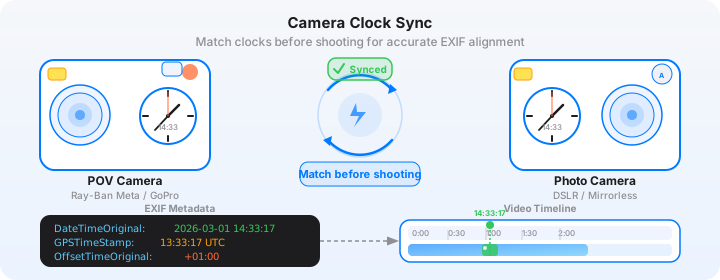
Before I left the hotel, I synced the X100VI's clock precisely to my iPhone time — opening the Clock app, waiting for the seconds tick, then setting the camera's Date/Time to match to the second. This is the five-second setup step that makes the whole EXIF sync workflow possible. The X100VI does not have GPS or network time sync, so its clock is only as accurate as the last time you set it manually. Get this right before you leave.
The Session: 5:00 AM to 7:30 AM at Tsukiji
I arrived at the outer market perimeter at 4:58 AM. The stalls that face the main street — the tamagoyaki shops, the fishcake vendors, the knife stores — were already lit and busy. I started the GoPro recording the moment I turned off the main road into the first covered lane. From that moment on, the Hero 13 ran continuously except for two brief pauses to swap the chest mount between my front-facing and side-mounted positions. Total recording time across two clips: one hour and twenty-two minutes of 4K footage.
The First Hour: Inside the Covered Lanes
The covered shopping streets of the outer market are the most photogenic section at dawn. The light here is almost entirely artificial — warm lanterns every three meters, cold overhead fluorescents illuminating the wet concrete underfoot, the occasional LED strip under a display case throwing blue light upward onto a vendor's face. The contrast between these light sources is extreme, and that contrast is the visual material.
I worked the X100VI on manual exposure for the first thirty minutes, dialling in settings as I moved between stalls. The settings that held for most of the covered section:
- Aperture: f/2, wide open. Depth of field at 35mm equivalent and f/2 is shallow enough to separate a vendor from their background while keeping the front-to-back content of a stall legible.
- Shutter speed: 1/60s minimum. Lower than this and the hands of people working quickly become smeared. At 1/60s I could freeze a decisive gesture — a knife on a cutting board, a hand lifting a fish — without freezing the ambient motion entirely.
- ISO: Auto, ceiling at 12800. The X100VI's sensor at ISO 6400 is clean enough for print; at ISO 12800 the grain is visible but adds atmosphere in market conditions. I was consistently in the ISO 3200–8000 range in the darkest stalls.
- Film simulation: ETERNA Cinema. I normally shoot Classic Chrome for street work, but ETERNA's muted tones and compressed highlights handle the extreme light mix of a market better — it does not blow the fluorescent whites the way Classic Chrome can in very mixed light. The footage looks slightly desaturated and cinematic straight out of camera.
- Format: JPEG Fine + RAF. The JPEG is what goes directly into POV Syncer. The RAF is the archival file.
Shooting in the covered lanes, I fired roughly forty frames in the first hour. Not all of them were useful — low light with moving subjects at f/2 and 1/60s produces a higher miss rate than bright-day street work. The frames that held were the ones where I pre-focused at a specific depth and waited for the scene to come to me rather than chasing it.
5:45 AM: The Tuna Section
The outer market's fish stalls — the ones handling whole tuna, large flatfish, and the morning's catch — occupy a section closer to the old inner market site. By 5:45 AM the wholesale buying is essentially finished and the retail day is beginning. The ice is freshly laid, the fish is arranged for display, and the light on the ice creates reflections that are genuinely beautiful in pre-dawn conditions: the orange lantern warmth picking out the blue-silver of the fish skin, the cold LED display lights cutting across from the sides.
I switched the X100VI to Auto ISO at this point and let the camera manage exposure, focusing on composition instead. The 23mm f/2 at this distance covers a full tuna comfortably. I was shooting at approximately 1.5 meters, which gives enough environmental context — the ice, the neighboring catch, a vendor's rubber gloves — without stepping back so far that the subject loses weight in the frame.
Download POV Syncer Free
Import your GoPro Hero 13 footage and Fujifilm X100VI JPEGs. Automatic EXIF sync places every photo at its exact frame in the video — in under 60 seconds, no manual scrubbing required.
Create your first POV video in 60 seconds6:30 AM: The Knife Sharpeners
There are several professional knife sharpeners who set up at the outer market in the early morning hours — craftsmen who sharpen the long yanagiba and deba blades used by sushi chefs and fishmongers throughout the city. They work at small grinding wheels, the sparks and the sound of steel on wet stone completely incongruous with the surrounding food market bustle.
This was the most challenging section for both cameras. The light was extremely low — a single work lamp per station, everything else in shadow. I opened the X100VI to f/2, dropped the shutter to 1/30s, and let ISO climb to whatever the meter called for (consistently 8000–12800). At these settings the IBIS earns its place — I had one hand resting on a nearby ledge for stability and fired in bursts of three to four frames, keeping the better-held shots and discarding the rest.
The GoPro footage here is genuinely dark — the AutoBoost ISO system was at its ceiling and the footage shows it. But that is the honest representation of the environment, and in the finished video it works because the X100VI images — which the Hero 13 footage transitions into at the exact moment of capture — are properly exposed single frames. The contrast between the dark, atmospheric video and the technically correct still photograph is part of what makes this format interesting.
What Manual Editing Used to Look Like — and Why I Stopped
Before I walk through the POV Syncer workflow, I want to describe honestly what this session would have cost me in editing time before I started using it. One hour and twenty-two minutes of GoPro 4K footage plus sixty-three X100VI JPEGs from a pre-dawn market shoot, edited manually in Premiere Pro.
The process went like this. Import both sets of files. Drop the GoPro clips on the video track. Open the first JPEG in Bridge, read the EXIF timestamp — say 05:23:41. Calculate the offset from the start of Clip 1 (which started recording at 04:58:17). That is 25 minutes and 24 seconds into the footage. Scrub to approximately that point in the timeline. Find the exact frame. Drag the JPEG onto a second track at that position. Play back the ten seconds around it to check the sync feels right. Adjust by a couple of frames if needed. Repeat sixty-three times.
That process, for sixty-three images across two GoPro clips, took me approximately two hours and forty minutes the first time I shot a session like this one. I came home from a 5 AM market session, spent the rest of the morning and most of the afternoon in front of a laptop. The video came out well and got good engagement. But I shot exactly one more session in the following six months because the editing grind was that discouraging. The footage sat on hard drives. The sessions that could have been published were not.
The POV Syncer Workflow: From Raw Footage to Finished Video
I took the Hibiya line from Tsukiji-shijo Station back toward my hotel at around 7:45 AM. I was on the train for nineteen minutes. The POV Syncer import, EXIF match, and rough timeline assembly was done before I reached my stop.
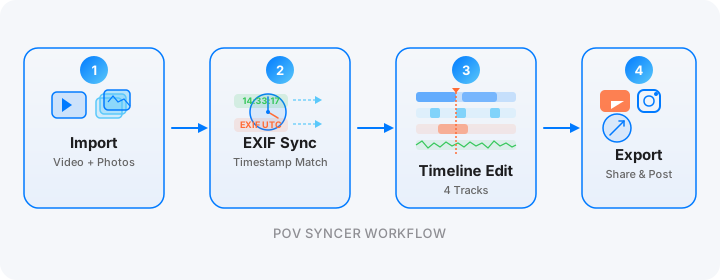
Step 1: Import GoPro Footage and Fujifilm JPEGs
The GoPro Hero 13 transfers footage to my iPhone via the GoPro Quik app over Wi-Fi — this happened automatically while I was walking back through the market toward the station. Both 4K clips (46 minutes and 36 minutes respectively) were in my Photos library before I boarded the train. The X100VI JPEGs transferred via Fujifilm's XApp over Wi-Fi at the same time. POV Syncer works directly from the Photos library, so there is no separate import step beyond what these apps handle automatically.
Step 2: Automatic EXIF Matching
In POV Syncer, I selected both GoPro clips as the video sources and added the X100VI JPEG batch as the photo library for the session. POV Syncer's four-strategy EXIF matching engine read the DateTimeOriginal field from all sixty-three JPEGs, compared each timestamp against the video clips' start times and frame rates, and calculated the precise frame in the GoPro footage where each shutter fired. For the X100VI's EXIF format, the engine uses OffsetTimeOriginal to apply the correct JST (+09:00) offset, which eliminates any timezone correction guesswork.
Total matching time: approximately four seconds for sixty-three images across two clips. What took hours of tedious timeline placement and manual scrubbing now happened automatically before I could put my phone back in my pocket.
Tokyo timezone note: Japan does not observe daylight saving time. The X100VI's EXIF will read OffsetTimeOriginal: +09:00 year-round. POV Syncer reads this field and applies the correct UTC offset automatically — no manual timezone adjustment required regardless of when in the year you shoot.
Step 3: Timeline Editing in POV Syncer
The four-track timeline in POV Syncer showed both GoPro clips on track one, with sixty-three X100VI photo markers already placed at their correct positions on track two. My first pass was culling: I trimmed the transitional sections of GoPro footage — the walking-between-stalls sections that lacked visual interest — and reduced the two full clips to a seventeen-minute master timeline. From there I built two exports simultaneously: a ninety-second Instagram Reels cut and the full seventeen-minute YouTube version.
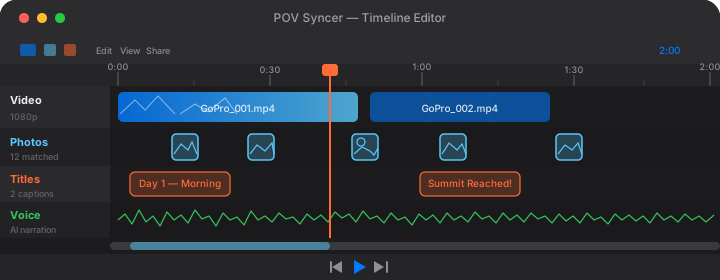
For titles I used a clean, light-weight sans-serif from POV Syncer Pro's 15 premium font options — white text on a transparent dark overlay — with three location/time cards: "Tsukiji Outer Market, 5:00 AM" at the open, "The Knife Sharpeners, 6:30 AM" at the midpoint, and "First Light, 7:20 AM" as the closing sequence as dawn finally became daylight. Minimal text, but each card gives the viewer an anchor that makes the video feel structured rather than meandering.
Step 4: AI Narration and Export
I wrote approximately seventy words of narration for this video — a brief explanation of what the outer market is, why pre-dawn is the time to shoot it, and what I was looking for with the X100VI in that light. I chose a measured, slightly reflective AI voice from POV Syncer's voice library and set the narration to sit under the ambient market audio rather than over it. The ambient sound from the GoPro Hero 13's microphones — knife steel on stone, the hiss of a gas burner, the compressed bustle of people working in a tight space — is half of what makes this video work. The narration fills the opening ninety seconds and then steps back.
Total time from opening POV Syncer on the train to having a draft timeline with all photos placed, titles added, and narration rendered: fourteen minutes. The exports — one for Instagram, one for YouTube — took another three minutes once I was back at the hotel and on Wi-Fi. Compare that to the two and a half hours of editing grind the same session would have required in Premiere. The difference is not marginal. It is the difference between content that gets made and content that stays on a hard drive.
Want settings cheat sheets for 20+ camera combos?
Join 1,000+ photographers getting weekly tips — including specific cheat sheets for GoPro Hero 13, Fujifilm X100VI, Ray-Ban Meta Gen 2, DJI Action 5 Pro, and more.
Free, weekly, unsubscribe anytime.
Tips and Results: What Worked, What Did Not
What Worked Exceptionally Well
The GoPro Hero 13's HyperSmooth Max stabilization on a chest mount in a crowded market environment was better than I expected. The footage reads as deliberately composed rather than handheld, which gives it a documentary quality that suits the subject. At no point watching the footage back does the viewer feel like they are about to get seasick from camera movement, which is the failure mode of most chest-mounted market footage I have seen.
The ETERNA Cinema film simulation on the X100VI was the right call for mixed-light market conditions. The compressed highlights handled the fluorescent-to-lantern light transitions cleanly, and the muted palette meant the JPEG frames cut into the GoPro footage without any colour clash. When you go from warm, contrasty GoPro Natural profile footage to an X100VI JPEG, you want the two images to look like they belong to the same session. ETERNA Cinema bridged that gap in a way Classic Chrome would not have.
Shooting at f/2 with the X100VI in low light and pre-focusing to a set distance — typically 1.5 meters in the covered lane, 2 meters at the fish display — meant I was not losing shots to autofocus hunting in bad light. The hit rate was lower than in good light, but the frames that held were sharp and decisive. That is the pre-dawn market tradeoff, and it is worth making.
What I Would Do Differently
The GoPro Hero 13's chest mount position — center of the chest, roughly sternum height — is slightly lower than eye level. In the confined stall spaces at Tsukiji, this produced footage where the counters and displays dominated the upper portion of the frame and my own arms and hands were sometimes visible at the bottom edge. A higher mount, at collarbone height, would have produced a more natural first-person perspective. I have since adjusted to a shoulder-clip mount that sits closer to eye level for market sessions.
I also underestimated how quickly the Hero 13 battery depletes in 4K 60fps — which I had incorrectly set for the first twelve minutes of the session before switching to 4K 30fps. At 4K 60fps, battery life is approximately forty-five minutes. At 4K 30fps it extends to approximately seventy minutes. For a session starting at 5 AM with no convenient charging spot, the battery choice matters. Bring the GoPro fully charged and on 4K 30fps from the first moment.
The Finished Video: How It Performs
The Instagram Reels cut — ninety seconds, 9:16 vertical crop, the covered lane sequence into the tuna display section — performed well on a photography-focused account. The combination of the GoPro's first-person immersive wide angle and the X100VI's carefully composed individual frames gives the Reels format a visual rhythm that holds attention through the full ninety seconds. The ambient market audio, carrying through from the GoPro microphones, provides atmosphere that music tracks cannot replicate for this type of content.
The YouTube version, at seventeen minutes with the full narration and chapter markers, performed exactly as food and market content tends to perform on YouTube — steadily, over weeks, rather than in a spike. Viewers who find a market video at 5 AM in Tokyo tend to watch it in full and leave detailed comments. The long-form process content format works for this audience in a way that portfolio posting never does.
See the full POV Syncer feature set and the pricing page for what unlocks at the Pro tier — AI narration, 15 premium fonts are all in Pro, while the free tier lets you start immediately and covers your first complete session.
Tips for Your Own Early-Morning Market Session
A few specific things I would emphasise for anyone planning a Tsukiji outer market session — or any pre-dawn market shoot anywhere in the world.
- Arrive before 5 AM. The best light — lanterns still dominant, dawn not yet competing — exists in a window between roughly 4:45 and 6:00 AM. By 6:30, daylight is filling in and the distinctively moody quality of the pre-dawn market light is gone. The earlier discomfort is worth it.
- Sync your clocks the night before, not the morning of. At 4:30 AM, with coffee not yet fully active, the five-second clock-sync step becomes the kind of thing you skip. Do it the night before. The X100VI clock is stable enough to hold to the second overnight.
- Use a chest mount, not a head mount, for the GoPro. A head-mounted GoPro in a busy market creates footage that swings dramatically with every head turn and reads as disorienting rather than immersive. A chest mount stabilises the gaze and lets HyperSmooth handle the residual motion.
- Shoot the workers, not just the fish. The fish is the subject people come for, but the faces, the hands, the tools — the human element of the market — are what creates emotional connection in the finished video. The X100VI's 35mm equivalent at f/2 is perfect for this: close enough to be intimate, wide enough to include context.
- Let the ambient audio carry the video. The sound of a morning fish market is genuinely compelling. Do not cover it with a music track. The GoPro's microphones capture it well at 1080p and 4K alike. Let that sound environment do the work it deserves to do.
Conclusion: Pre-Dawn Tokyo in Seconds, Not Hours
A 5 AM start for a fish market session is a genuine commitment. You are tired, the light is difficult, the environment is demanding, and you are operating both a GoPro Hero 13 and a Fujifilm X100VI in conditions where neither performs at its easiest. The reward is footage and photographs that are genuinely unlike anything shot at a convenient hour in a comfortable location — the quality of that pre-dawn market light, the texture of the activity, the intimacy of a working place at the moment of maximum intensity.
What POV Syncer does is ensure that commitment translates into something publishable without a second commitment of equal size in front of an editing timeline. What took hours of manual editing — scrubbing through footage, tedious timeline placement, matching EXIF timestamps by hand — is now automatic EXIF sync in record time. The train ride home is long enough to have a draft video ready. That is the session-to-publish pipeline that makes early mornings worth the alarm.
Turn your next early-morning session into a finished video
Download POV Syncer free and create your first POV video in 60 seconds. Automatic EXIF sync works with GoPro Hero 13, Fujifilm X100VI, and every major camera brand.
Free PDF, no spam. Unsubscribe anytime.