London Street Photography POV: From Brick Lane to Soho
It is eight in the morning and I am stepping off the Overground at Shoreditch High Street. The Leica Q3 is hanging from a Black Rapid strap across my chest. On my face: Ray-Ban Meta Gen 2. The glasses look like glasses — no one glances twice. Within twenty metres of the station exit I have already passed a mural taking up an entire Victorian warehouse wall, a market vendor stacking crates of mangoes and ackee under a tarpaulin, and a woman in paint-covered overalls smoking a cigarette while reading her phone. Brick Lane has not warmed up. It simply started without me.
I shoot for three hours. I cover Brick Lane from the Truman Brewery down to Whitechapel, cut across to Spitalfields, then take the Central line west to Soho for the afternoon session around Berwick Street Market and Carnaby. I come home with 290 frames on the Q3 and 68 minutes of 1080p footage from the glasses. In the old workflow — manual editing in Premiere Pro, scrubbing through footage, placing each JPEG by hand on a timeline — that is a four-hour evening minimum before I have touched a title or a colour grade. A session like this used to mean a week-long backlog.
Now I open POV Syncer on my iPhone while I am still on the Central line heading east. By the time I reach Mile End, the edit is done. Automatic EXIF sync matched all 290 frames to the exact moment in the video footage. What took hours now happens in under 60 seconds. That is the London street photography POV workflow I want to show you in this post.
Why London Is Exceptional for POV Street Photography
Every city photographs differently. London's character is layered history, compressed contrast, and the collision of cultures occupying the same few square miles without apparent contradiction. Brick Lane is the textbook example: a Victorian street that was at various points a Huguenot silk-weaving district, a Jewish tailoring quarter, and now the centre of London's Bangladeshi community — with every layer still visible in the architecture, the signage, the businesses, and the people. Walking it, you are walking through time.
For POV video, that layering is invaluable material. The glasses footage shows your audience the context around each photograph: the market stall you passed before raising the Q3, the narrow alley that led to a courtyard full of vintage clothing sellers, the queue outside the Beigel Bake at seven in the morning stretching past a shuttered nightclub. A photograph of a figure in a doorway is stronger when the video shows what you walked through to find it. London provides an endless walk.
Soho adds a different register. Where Brick Lane is raw and vertical and layered, Soho is compressed and horizontal — Georgian terraces, low shopfronts, flat-fronted pubs with hand-lettered signs, the tight grid of streets that have barely changed layout since the 18th century. The light is different too: Berwick Street Market faces south and gets direct afternoon light that falls hard and angular between the buildings, creating strong shadow geometry that suits the Q3's full-frame sensor.
The Gear: Ray-Ban Meta Gen 2 and Leica Q3
Why Ray-Ban Meta Gen 2 Works in London
London is a photogenic city with a complicated relationship with being photographed. People on the street are generally comfortable with street photography as a practice, but pointing a large camera or obvious recording device at someone provokes exactly the kind of self-conscious reaction that kills a candid moment. The Ray-Ban Meta Gen 2 sidesteps this entirely. They look exactly like a pair of Wayfarer-style glasses. Nobody on Brick Lane, Soho, or anywhere else in London gives them a second look.
The Ray-Ban Meta Gen 2 records at up to 1080p with built-in stereo microphones that capture spatial audio. In London, that ambient audio is a significant part of what makes the finished video work: the sound of Berwick Street Market — vendors calling out prices, the rumble of a delivery truck, fragments of Oasis from a record stall — creates an atmosphere that music would flatten. The microphones pick up everything within a natural radius, which is exactly what you want.
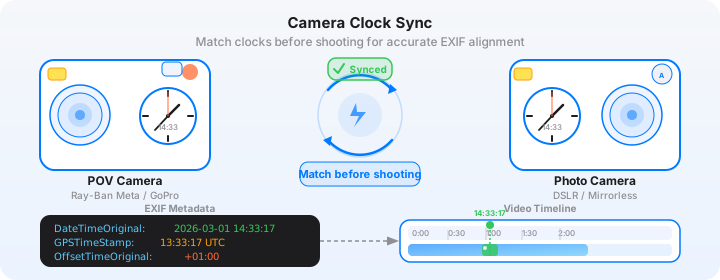
One practical point about London: the UK observes GMT in winter (UTC+0) and BST in summer (UTC+1). Before every London session, confirm your glasses are set to the correct time via the Meta View app, and confirm which offset is currently in force. This matters for EXIF sync — POV Syncer reads the OffsetTimeOriginal field from your Q3 files and resolves the timestamp automatically, but both devices need to agree on the current time first.
Why Leica Q3 Is the Right London Street Camera
The Leica Q3 has a 60-megapixel full-frame sensor behind a fixed 28mm f/1.7 Summilux lens. The 28mm field of view is wider than the classic street focal length — wider than the Fujifilm X100VI's 35mm equivalent — which suits London's architecture. The city has a strong horizontal vocabulary: Georgian terraces, Victorian warehouses, the wide shopfronts of Oxford Street. A 28mm lens captures the building alongside the person, and the relationship between them is often where the London street photograph lives.
The Q3's sensor renders detail at ISO 6400 that most cameras struggle to produce at ISO 3200. In London's famous overcast light — which you will have for roughly nine months of the year — this matters enormously. Diffused grey light is actually beautiful for street photography: it wraps subjects without the harsh shadows of direct sun, and the Q3's colour science handles London's muted palette (red brick, grey stone, the green of old cast iron) with particular accuracy. Shooting JPEG with the Q3's built-in contrast and colour presets gives you files that barely need touching.
Get the free POV Photography Cheat Sheet
Optimal Ray-Ban Meta Gen 2 and Leica Q3 settings for London — including Brick Lane, Soho, and low-light tips. EXIF sync guide and export presets for Instagram and YouTube. One printable page, free.
Free PDF, no spam. Unsubscribe anytime.
Camera Settings for a London Shoot
Ray-Ban Meta Gen 2: Settings for the Street
For a London street photography session, set the glasses to 1080p at 30fps. The 30fps frame rate gives the footage a documentary quality that suits the genre — 60fps looks too clean and clinical for this kind of walking photography. At 1080p30, you get approximately 60 minutes of continuous recording per charge. For a half-day session covering two distinct neighbourhoods (Brick Lane and Soho), pack the charging case and top up between locations on the tube journey west.
London's light changes constantly, even within a single hour. The glasses' automatic exposure handles this well — when you step from a bright Brick Lane street into the shadow under the Truman Brewery arches, the exposure adjusts without any input from you. This is one of the genuine advantages over manual camera setups for POV recording: you cannot ride the exposure while simultaneously shooting the Q3. The glasses do their job silently while you concentrate on making photographs.
Leave the Meta View app on its default white balance setting for London. The overcast, slightly blue-grey light that characterises most London days is exactly what the automatic white balance was trained on. The result is footage that feels recognisably English — cool, flat, slightly milky — which makes a good visual contrast to the warmer, more saturated tones of the Q3's JPEG output.
Leica Q3: Settings for London
Here are the specific settings I run on the Q3 for London street sessions. They are tuned for the city's conditions: overcast light with occasional direct sun, high visual contrast between old and new architecture, and subjects that require fast, decisive shooting.
| Setting | Value | Why |
|---|---|---|
| Aperture | f/5.6 (street) / f/1.7 (selective) | f/5.6 zone-focused at 28mm gives depth of field from roughly 2.5m to infinity — raise and shoot without AF hunting |
| ISO | Auto ISO 100–6400 | Q3's sensor at ISO 6400 is exceptional; lets the camera handle London's rapid light transitions |
| Minimum shutter | 1/250s | Freezes pedestrian movement in Soho and market crowds on Brick Lane |
| Format | JPEG + DNG | JPEG imports directly to POV Syncer; DNG is your archival file for post-processing |
| AF Mode | Zone or Manual (MF with AFL) | Pre-focus to 3m at f/5.6 — decisive shooting without waiting for autofocus confirmation |
| JPEG Profile | High Contrast / Standard | London's brick, stone, and iron palette renders best with slightly elevated contrast; avoid saturation boosts |
| Image Stabilisation | On | Essential for handheld at the slower shutter speeds you'll use in the arches and side streets |
The single most important setup step for this entire workflow is synchronising the Q3's clock precisely before every session. The Leica Q3 has no GPS time sync and no NFC clock update — you set it manually via the camera's menu. Open the Clock app on your iPhone, note the exact seconds, and go to the Q3's menu to match it precisely. For a camera that costs as much as the Q3, this is the only genuinely awkward part of the workflow. Do it once at the start and the EXIF sync in POV Syncer handles everything else automatically.
London timezone tip: The UK switches between GMT (UTC+0) in winter and BST (UTC+1) from late March to late October. POV Syncer reads the OffsetTimeOriginal EXIF field from your Q3 files and resolves the correct offset automatically — but only if the Q3's clock was set correctly in the first place. Check the offset setting on the camera when the clocks change.
The Manual Editing Pain — and Why It Stops Photographers Sharing Their Work
I want to be direct about what manual editing actually costs before I describe what POV Syncer does instead. Because the time cost is why most photographers who have the gear never produce the video.
Imagine getting home from a three-hour Brick Lane and Soho session with 290 JPEG files and 68 minutes of glasses footage. In Premiere Pro or Final Cut Pro, you import both. Now you start scrubbing through the footage looking for the exact frame each Q3 shot was taken. The EXIF metadata on the JPEG shows you a timestamp — say 10:14:37 — and you need to find that moment in 68 minutes of continuous video. You drag a playhead, check the timecode, drag again, check. For each of 290 frames. That is hours of manual editing, of the editing grind, just to place stills on a timeline. You have not yet added a single title card, touched the colour, written a line of narration, or selected music.
For a three-hour London walk, realistically expect three to four hours of editing minimum. The return on time is genuinely poor unless you are already a full-time video creator. Most photographers do it once, produce something they are mildly proud of, post it, and never do it again because the process was too painful. The content stops. The audience stops growing. The extraordinary material from those London streets stays locked on a hard drive.
Tedious timeline placement and scrubbing through footage is the reason POV process videos are rare despite the gear being everywhere. The editing is the bottleneck. POV Syncer removes it entirely.
The POV Syncer Workflow: London in Under 60 Seconds
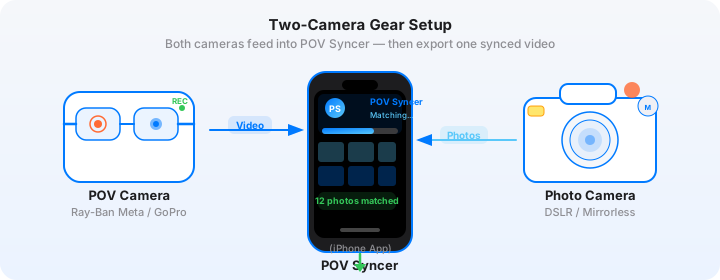
Here is exactly how the workflow runs after a London session. I am on the Central line heading home from Soho. The edit happens before I reach Bethnal Green.
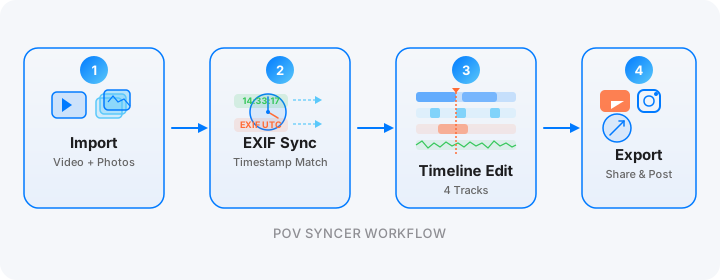
Step 1: Import Video and Photos
The Meta View app syncs your glasses footage to your iPhone's Camera Roll automatically over Wi-Fi — usually within a minute or two of opening the app after a session. The Q3's files transfer either via USB-C cable directly to the iPhone, or wirelessly through Leica's FOTOS app. Both methods work. POV Syncer operates directly from your Photos library, so there is no additional transfer step after the files land on the phone.
Step 2: Automatic EXIF Matching
Select your glasses footage in POV Syncer, then add the JPEG folder from the shoot. POV Syncer's four-strategy EXIF matching engine reads the DateTimeOriginal and OffsetTimeOriginal fields from every JPEG, calculates the offset from the video's start timestamp, and places each photo at the exact frame it was captured. For a 290-frame London session, this takes two to three seconds. What took hours of manual editing now happens automatically in record time.
The configurable matching tolerance is worth understanding for London shoots. I use a two-second window for street work: it accommodates any small residual clock drift between devices while still producing clean, accurate sync. Photos that fall outside the video's recorded time range — shots taken before you started recording, or after you stopped — are flagged for review rather than silently dropped. With the Q3 shooting continuously and the glasses recording the full walk, this rarely happens unless you explicitly stop one device.
Download POV Syncer Free — Create Your First London POV VideoStep 3: Timeline and Titles
POV Syncer's 4-track timeline editor gives you video, photos, titles, and narration on separate tracks. For a London photo walk covering two distinct neighbourhoods, I use the title track to anchor the viewer: a simple location card at the start — "Brick Lane, E1, 08:45" — then a second card when the walk shifts to Soho — "Berwick Street, W1, 13:30." These cards do a significant amount of editorial work: they create chapters, establish geography, and give the video a sense of journeying through the city.
POV Syncer Pro includes 15 premium fonts. For London, I favour clean, slightly condensed sans-serif faces — something that reads as contemporary without competing with the visual richness of the city. The title placement matters too: keep text away from the architectural details in the footage background. A title card over a Georgian terrace should not obscure the cornice line.
Step 4: AI Narration
Narration is where a London photo walk video earns its audience. The city rewards specificity: telling viewers that you are walking the southern section of Brick Lane, where the Sunday market spills onto the pavement and you are looking for the geometry of market stalls against Victorian warehouse facades, is far more engaging than "I went to East London." Write 70-90 words — three or four direct sentences — and choose one of POV Syncer's measured AI voices. The narration renders in seconds and sits under the ambient street audio rather than replacing it.
London's ambient sound is extraordinary material: the sibilant rush of a bus accelerating away, the fragment of conversation from a pub doorway, the echo of footsteps in a covered market passage. AI-powered narration layered quietly beneath that audio creates a meditative, documentary quality that the best photography YouTube channels spend considerable effort trying to replicate. With POV Syncer you get it automatically from the footage itself.
Location Tips: Brick Lane, Soho, and Beyond
Brick Lane: Geometry, Layers, and Market Timing
Brick Lane is best before 11am on a Sunday, when the street market is running but has not yet become purely a tourist destination. The southern end near Whitechapel is more workaday — the Bangladeshi restaurants, the fabric shops, the discount hardware stores — and this is where the most visually complex material is. Look for the geometry of stacked goods against painted brick, the collision of old neon signs and new hand-lettered boards, the light from market stall lamps in the relative shadow under the arches.
For the Q3 at this end of Brick Lane, I shoot at f/5.6 zone-focused to 3m. The depth of field at 28mm and f/5.6 is generous enough to capture a full market aisle sharply. When something closer appears — a vendor's hands, a face turning briefly — I drop to f/2 and let the Q3's autofocus find it. The one-tap photo matching in POV Syncer means the switch between modes does not affect sync accuracy: every frame is timestamped by the EXIF data regardless of how you shot it.
Spitalfields: Architecture as Subject
Two minutes east of Brick Lane, Spitalfields Market and the surrounding streets give you the strongest architectural material in this part of London. Nicholas Hawksmoor's Christ Church, completed in 1729, rises above the market as a study in English Baroque — enormous, pale stone, geometrically severe. The contrast between the church and the glass-and-steel office towers of the City rising behind it is a defining London photograph: every era of the city competing for the same sky.
For the POV footage in Spitalfields, the glasses capture a genuine first-person experience that a static camera cannot replicate: the approach through the market, past the food stalls and the antique dealers, and the sudden reveal of the church facade at the street's end. When the Q3 photograph appears in the video at the exact moment you stopped and raised it, the connection between walking and looking is immediate for the viewer.
Soho: Afternoon Light and the Berwick Street Market
Soho in the afternoon is a different experience entirely from Brick Lane in the morning. The streets are narrower and more compressed, the light falls more directionally, and the social mix — office workers, food vendors, tourists, the remnants of the media industry that used to fill these streets — creates a density of material that rewards patience as much as movement.
Berwick Street Market is the visual centrepiece. The south-facing stalls get direct afternoon light in a gap between the terraces, and the Q3's 28mm lens is perfectly sized for the street width — you can include a full stall and its vendor and still have the terrace behind for context. At f/8 and 1/500s in direct afternoon sun, ISO stays around 100-200 on the Q3, which means the files have maximum tonal latitude for any editing you want to do afterward.
Want settings cheat sheets for 20+ camera combos?
Join 1,000+ photographers getting weekly tips — including location-specific settings guides for London, Tokyo, New York, Paris, and beyond. Free, direct to your inbox.
No spam. Unsubscribe anytime.
Exporting Your London Photo Walk for Instagram and YouTube
Instagram Reels: One Neighbourhood, 90 Seconds
For Instagram Reels, export at 9:16 (1080x1920). The vertical crop works well for London's architectural verticals — the height of the Hawksmoor church above the market, the full-height shopfronts of Carnaby Street, the compressed canyon feel of Soho's narrower streets. Set a 90-second maximum duration for algorithmic reach, and build the Reel around a single location rather than trying to compress the full Brick Lane-to-Soho walk. A 90-second Brick Lane Sunday morning edit — opening on the Overground exit, two or three Q3 stills placed at EXIF-matched moments, closing on a wide of the Truman Brewery — is a complete piece of content that stands on its own.
Use two to three stills maximum in a 90-second Reel. Let each one hold for two to three seconds before returning to the walking footage. The automatic EXIF sync in POV Syncer means the timing between footage and each still is already accurate at the frame level — you are selecting which moments to include, not hunting for when they happened.
YouTube: The Full London Photo Walk
YouTube supports the long form. A ten-to-fifteen-minute London photo walk video — Brick Lane to Soho with narration, matched stills, and title cards — is a legitimate piece of photography content for the platform's substantial documentary photography audience. Export at 16:9 for YouTube's native aspect ratio. Structure the video as a journey: opening title with date and starting location, walking footage, first significant photograph, brief narration about the neighbourhood, more footage, the shift to a new location marked by a title card, and so on.
Add chapter timestamps in the YouTube description: "0:00 Brick Lane / 5:30 Spitalfields / 9:45 Soho / 13:00 Berwick Street Market." These improve watch time by letting viewers jump to the section they are interested in, and YouTube's algorithm weights watch time heavily for this type of content. A well-structured London photo walk video that holds its audience for ten minutes will consistently outperform a two-minute montage in long-term viewership.
The Finished Video: What It Actually Looks Like
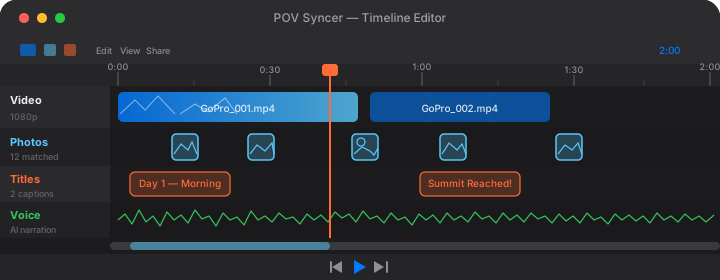
A finished London POV street photography video made with this workflow is genuinely different from most photography content. The glasses footage gives your audience something they cannot get from a photograph or a vlog to camera: the actual experience of walking these streets, seeing what you see, moving through the same material you made photographs from. When the Q3 still appears in the video at the precise moment of capture, the gap between intention and result collapses. The viewer understands what you were looking at and why.
For photographers building an audience, this format works harder than portfolio posting. It demonstrates your editorial eye, your knowledge of the location, your technical fluency with the equipment, and the decision-making process that produces a strong photograph — all at once, in a single piece of content. The London street photography audience on Instagram and YouTube is large and genuinely engaged, and process content that shows a specific real session in a specific real neighbourhood consistently outperforms generic technique posts.
POV Syncer Pro unlocks AI narration, 15 premium fonts, 10 background styles for $9.99 per month or $99.99 per year. The free tier gets you started immediately — your first London video takes about 10 minutes from import to export, not the three to four hours of the old manual editing workflow. See the full pricing comparison or explore the complete feature set before you download.
The Gear List, Summarised
- POV camera: Ray-Ban Meta Gen 2 — 1080p 30fps, built-in stereo audio, charge case for all-day sessions
- Street camera: Leica Q3 — 60MP full-frame, fixed 28mm f/1.7 Summilux, Q3 body weather sealing for London rain
- Editing app: POV Syncer on iPhone — automatic EXIF sync, 4-track timeline, AI narration, available on the App Store
- Transfer: Meta View app (glasses to iPhone), Leica FOTOS app or USB-C (Q3 to iPhone)
- Export: 9:16 1080p for Instagram Reels; 16:9 1080p for YouTube
The entire kit fits in a small shoulder bag and a jacket pocket. For a London session that covers significant ground on foot — Shoreditch to the City to Soho is well over 10,000 steps — the lighter you carry, the better you move and the more you see. The Q3 is not a light camera, but its size is justified by what the full-frame sensor and that Summilux lens produce in London's challenging mixed light. The glasses add nothing meaningful to the carrying burden.
Conclusion: London in Seconds, Not Hours
London is one of the world's great cities for street photography, and with Ray-Ban Meta Gen 2 and Leica Q3 you have a setup that matches what the city demands: precision, subtlety, full-frame quality in any light, and the ability to move and shoot without either device drawing attention. A morning in Brick Lane and an afternoon in Soho produces raw material that other photographers want to see — the walk, the context, the decisions, the resulting frames.
What POV Syncer does is remove the only obstacle between that raw material and a finished video worth sharing. Automatic EXIF sync eliminates hours of manual editing in record time. The 4-track timeline, 15 fonts, and AI-powered narration give you production tools that match the quality of what the Q3 produced. And the whole workflow runs on your iPhone while you are still on the tube home.
Shoot more. Edit less. Show people what London looks like through your eyes.
Create your first POV video in 60 seconds
Download POV Syncer free and turn your London street footage into a finished video before you reach your station.
Or get the settings cheat sheet for 20+ camera combos delivered to your inbox:
Free PDF, no spam. Unsubscribe anytime.