Pet photography is physical work. You are down on the dog's level, you are moving constantly, and you are reacting to an unpredictable subject with its own agenda. The portraits you deliver are beautiful, often funny, sometimes genuinely moving. But the process that produces them — the rapport-building, the treat-bribing, the rapid-fire burst shooting as a Spaniel finally looks straight at the lens — is invisible to everyone who sees the finished images.
Behind-the-scenes content from pet photography sessions performs exceptionally well across Instagram Reels, TikTok, and YouTube. Dogs doing anything are broadly beloved. Cats doing anything even more so. A first-person video that shows you working a session, with your best portraits appearing as overlays at the exact moments you captured them, is genuinely compelling viewing — and it builds the kind of client trust that drives bookings.
The problem has always been the editing. Manually scrubbing through GoPro footage, identifying the moments your shutter fired, dragging photo clips onto a Premiere timeline, matching the audio — it easily adds two to three hours to every session. POV Syncer eliminates that entirely by using EXIF timestamps to place every photo at the exact second it was taken in your footage, automatically.
What Are Pet Photography POV Videos?
A pet photography POV video is a first-person behind-the-scenes recording of your session, with your finished photographs appearing as overlays at the moments they were taken. The POV camera — mounted on your chest, head, or hot shoe — captures your perspective as you work the session: moving around the subject, adjusting your position, reacting to the animal's behaviour. Your stills camera produces the photographs that pop in at the exact right moments.
The result is a video that tells two stories simultaneously: the kinetic, reactive story of a photographer at work, and the editorial story of the images that emerged from that work. For pet photography specifically, this format is particularly effective because the connection between the work — getting down to the animal's level, building trust, waiting for the right expression — and the resulting portrait is so visible and relatable.
These videos work equally well as Instagram Reels (60-90 second edits showing your best three or four portraits), TikTok (punchy 30-second versions with music), and YouTube (5-10 minute full-session breakdowns with narration). The same POV Syncer project can produce all three formats from a single source file.
Why Pet Photographers Need This Format
The pet photography market is growing. More pet owners than ever are booking professional sessions, and they research photographers primarily through social media. The portfolio matters, but the process content matters almost as much — it answers the question "what will it be like to work with this person?" before a potential client ever sends an enquiry.
POV session videos do several things simultaneously that static portfolio posts cannot:
- Demonstrate your approach — clients want to see how you interact with animals, how patient you are, how you handle the unpredictability of a dog or cat who has their own ideas about the session
- Showcase your technique — getting down to ground level, using treats strategically, working in bursts — this builds confidence in your process before anyone books
- Relive the session yourself — watching a 10-minute walkthrough of your own shoot reveals positioning choices and reactive decisions you did not consciously register while making them
- Teach other photographers — process content that shows real-world pet photography technique attracts a photography audience as well as a pet-owner audience, doubling your potential reach
Get the free POV Photography Cheat Sheet
Camera settings, EXIF sync tips, and export presets for GoPro, Ray-Ban Meta, DJI Action, and Insta360 on one printable page. Perfect for pet photography sessions.
Free PDF, no spam. Unsubscribe anytime.
Pick Your Rig for Pet Photography
The right POV camera mount for pet photography depends on your shooting style. Each option has genuine strengths — here is how each maps to the realities of shooting dogs and cats.
Chest Mount
A chest-mounted GoPro Hero 13 or DJI Action 5 Pro is the most practical option for most pet photography sessions. You have both hands free for your main camera, the perspective is close to the animal's eye-level when you crouch, and the stabilisation on both cameras is good enough to handle the movement of working a lively session. GoPro's HyperSmooth 6.0 and DJI's RockSteady 3.0 both produce footage that is smooth enough for social content without additional stabilisation gear.
The chest mount perspective is particularly effective for dog sessions — when you get down on the floor, a chest-mounted camera is at the dog's face height. For cat sessions at elevated surfaces (cats on tables or window ledges), this perspective looks naturally engaging rather than distorted.
Head Mount / Smart Glasses
Ray-Ban Meta Gen 2 smart glasses are worth considering for pet sessions where you want the most natural, eye-level perspective without any visible equipment. The glasses record at 1080p with a surprisingly good video quality for a wearable, and they are completely invisible from the subject's perspective — important when working with nervous or camera-shy animals. Dogs and cats are frequently distracted or unsettled by cameras and recording equipment; Ray-Ban Meta removes that variable.
Hot-Shoe Mount
A small action camera on your stills camera's hot shoe gives you a perspective that tracks exactly what your main camera is looking at — useful for showing the relationship between your viewfinder framing and the finished image. Insta360 GO 3S is ideal for this mount thanks to its tiny form factor.
360-Camera Reframe
The Insta360 X4 on a chest mount or extended pole gives you maximum flexibility in post — you can reframe the footage after the fact to show whatever angle is most interesting for each moment. For indoor studio pet sessions where you are moving quickly through different positions, this can be the most versatile option.
The Gear: What Pet Photographers Actually Use
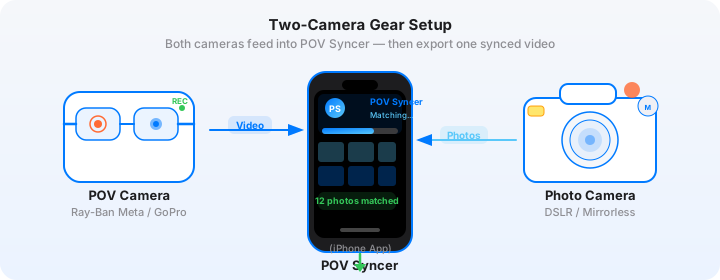
POV Camera: GoPro Hero 13
The GoPro Hero 13 is the standard recommendation for pet photography POV work. Its HyperSmooth 6.0 stabilisation handles the constant movement of a floor-level dog session without needing a gimbal, and the 11 field-of-view options include a Linear mode that removes the GoPro's characteristic wide-angle barrel distortion for a more natural-looking perspective.
Recommended settings for pet photography sessions:
- Resolution: 4K at 30fps for general use; 1080p at 60fps for indoor low-light sessions
- Field of view: Wide or HyperView for the animal's eye-level perspective; Linear for hot-shoe mount where you want natural proportions
- Stabilisation: HyperSmooth 6.0 on at all times — essential when you are getting up and down from the floor repeatedly
- Protune: Off for delivery-ready footage; On with Flat colour profile if you plan to grade
- Time sync: Connect to the GoPro Quik app before every session to ensure the clock is current
Stills Camera: Canon EOS R6 Mark III
The Canon EOS R6 Mark III has become the go-to body for professional pet photographers who need a combination of animal-detection autofocus, high-speed burst shooting, and excellent high-ISO performance for variable indoor light. Canon's animal eye-detection AF tracks dogs and cats even when they move quickly or partially leave the frame — the exact situation you encounter in a live pet session.
Recommended settings for pet portrait sessions:
- AF mode: Animal Eye AF (subject tracking) — let the camera find and hold the eyes
- Drive mode: High-speed burst (up to 30fps electronic) for action moments; Single shot for static portraits
- Shutter speed: 1/500s minimum for dogs in motion; 1/250s for cats and less active subjects
- Aperture: f/2.8 to f/4 for background separation; f/5.6 for multi-animal shots where you need depth
- ISO: Auto ISO with maximum ISO 6400 — the R6 III is clean up to ISO 3200 in most conditions
- Lens: 70-200mm f/2.8 IS for outdoor sessions with working distance; 85mm f/1.8 for intimate indoor portraits
The Hard Part: Manual Pet Photography Editing
Before POV Syncer, creating a pet photography BTS video meant a manual editing grind that looked something like this: import GoPro footage into Premiere Pro, import your 300-shot burst session from the Canon, scrub through the GoPro timeline to find the moments you were shooting, manually place each selected portrait as a still clip at the corresponding position, adjust durations, add audio. For a one-hour dog session with 40 selected images, this process regularly took two to three hours — a significant chunk of time that most photographers simply cannot justify for social content.
Most pet photographers either skip the BTS content entirely, or post raw GoPro footage without the portrait overlays that make the format genuinely compelling. Neither option is satisfactory when you have great session footage and great images from the same shoot.
The Fix: POV Syncer's Automatic EXIF Sync
POV Syncer reads the EXIF timestamp embedded in every Canon RAW or JPEG file and matches it to the corresponding second in your GoPro footage. The matching uses a four-strategy cascade: it starts with GPS UTC timestamps where available, then OffsetTimeOriginal, then GPS-corrected timezone, then falls back to the device timezone. In practice, this means the sync works correctly even when your Canon's clock is a few seconds off from your GoPro's.
What took two to three hours of manual editing in Premiere or Final Cut happens in under 60 seconds. You get a fully populated timeline with every selected portrait placed at its exact moment. You then spend time on the creative polish — adjusting hold durations, adding music, choosing a voice — rather than on the mechanical placement work.
Create your first pet photography POV video — free on TestFlightStep-by-Step: Building Your Pet Photography BTS Video
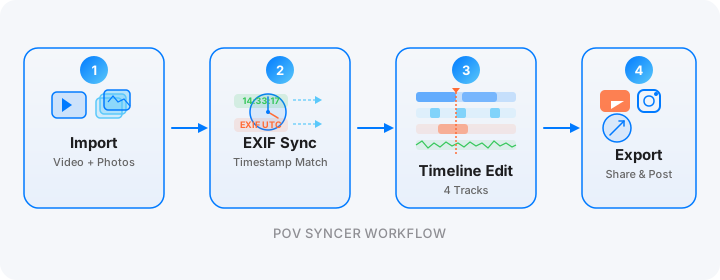
Step 1: Import. Transfer your GoPro Hero 13 footage to your iPhone via the GoPro Quik app or a USB-C card reader. Transfer your Canon R6 III files via the Canon Camera Connect app or a card reader. Create a new project in POV Syncer and import both. POV Syncer accepts up to 2,000 photos and videos per project — useful for high-volume pet sessions.
Step 2: Review the match preview. Before processing, POV Syncer shows you a match preview — a visual representation of which photos matched to which moments in your footage. Review this for obvious mismatches. If your GoPro clock and Canon clock are well-synced, you should see clean one-to-one matches throughout. Read more about interpreting the match preview here.

Step 3: Process. Tap Process. POV Syncer builds the synced video on-device — all the processing happens locally on your iPhone, iPad, or Apple Silicon Mac, with no footage uploaded to any server.

Step 4: See the results. POV Syncer shows you the matched results — a preview of the synced video with all portraits placed at their timestamps. For a one-hour pet session with 40 selected portraits, you will see a timeline populated with 40 overlay moments, each one at the precise second the shutter fired.

Step 5: Polish on the timeline. Open the multi-track timeline editor to adjust photo hold durations (2-3 seconds works well for portrait moments; 1 second for quick reaction shots), add a title card with the dog's name and breed, add shutter sound effects at each photo overlay, and choose a background music track from the built-in library or import your own.

For AI narration, choose from six Azure neural voices including Sonia and Ryan (UK English), Jenny and Guy (US English), and Natasha and William (Australian English). A brief voice introduction — "Today's session: Duke, a three-year-old Labrador in Richmond Park" — adds a professional polish that sets your content apart from raw GoPro uploads. Your recorded scripts are saved in a reusable Voice Library for future sessions.
Step 6: Export. Export your finished video — 16:9 at 1080p for YouTube, 9:16 for Instagram Reels and TikTok. Use the Export All to Photos feature for batch processing if you have multiple session clips. The shutter click sound effect, added automatically at each photo overlay moment, gives the viewer an audio cue for each portrait reveal.
Works on iPhone, iPad, and Mac
POV Syncer runs natively on iPhone, iPad, and Apple Silicon Mac. The workflow is identical across all three — import media, review the match preview, process, polish, export. On iPad and Mac you get the larger screen real estate for timeline editing, which is particularly useful when fine-tuning photo hold durations on a session with 50+ portrait matches.
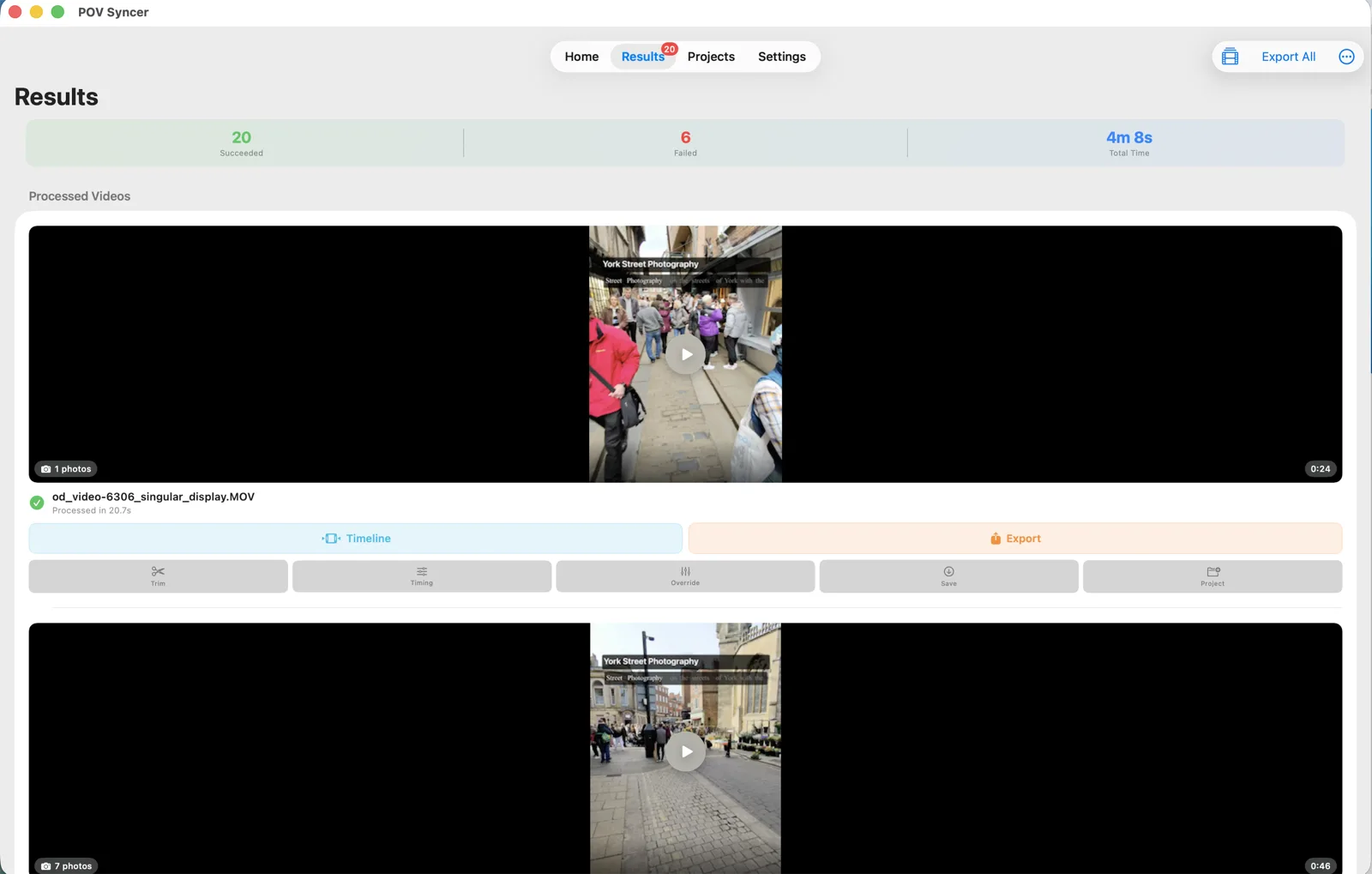
For iPad, the same app runs at full resolution with the timeline editor taking advantage of the larger display. Many pet photographers find the iPad workflow particularly natural — you can prop the iPad on a stand while reviewing results and timeline-editing after the session, without needing to move to a desktop computer.
Under the Hood: How POV Syncer Gets the Timing Right
Pet photography sessions present a specific timing challenge: you are shooting in bursts, with multiple frames per second during the best moments, and then long pauses between. The EXIF timestamp matching needs to be precise enough to distinguish individual frames within a burst, while also handling the large gaps between shooting moments.
POV Syncer's four-strategy cascade addresses this precisely:
- GPS UTC timestamp — the most precise strategy, used when your camera embeds GPS time data in EXIF (common on cameras with GPS, and when GPS data is present in GoPro footage)
- OffsetTimeOriginal — uses the UTC offset embedded by modern cameras like the Canon R6 III to correct for timezone discrepancies
- GPS-corrected timezone — cross-references GPS location data with timezone databases to infer the correct UTC offset
- Device timezone fallback — uses your iPhone's timezone setting as a final fallback when no other data is available
Additional precision controls:
- Adjustable match tolerance — set how precisely a photo timestamp must match the video timeline. A tighter tolerance prevents false matches; a looser tolerance catches photos where the clocks are slightly out of sync
- Per-video timing offset — if one of your clips has a clock that is consistently 15 seconds ahead, you can apply a global offset to that clip without re-importing everything
- 100-photo cap per clip, spread evenly — prevents overloaded timelines on high-volume burst sessions. For a 60-minute session with 800 burst frames, import your culled selects (typically 30-60 images) rather than the full burst
- Batch process + Export All — process multiple session clips and export everything to Photos in one operation. Useful when a day's shoot spans multiple locations
- Fully on-device — all matching, processing, and rendering happens on your iPhone, iPad, or Mac. Only AI voice synthesis uses the internet
Pet Photography-Specific Tips for Better POV Videos
Sync Your Clocks Before Every Session
Set your GoPro's clock via the GoPro Quik app and your Canon's clock manually to match — both from the same phone time reference — at the start of every session. A 10-second discrepancy is manageable; a 60-second discrepancy will produce obvious mismatches that need manual correction in the timeline editor.
Shoot Vertically for Instagram-First Editing
If your primary distribution channel is Instagram Reels or TikTok, mount your GoPro in a way that gives you a roughly vertical perspective — either use portrait mode (the Hero 13 shoots native 9:16) or plan to crop the landscape footage to 9:16. Your portrait stills are already vertical. A native portrait POV video with vertical portrait overlays performs significantly better on Instagram than a letterboxed landscape video.
Let the Animal Fill the Frame
Pet photography portraits work best when the animal is large in the frame. At 85mm or 70-200mm, get close enough that the dog or cat's face fills 60-70% of the frame. Small-in-frame pet portraits look weak as overlays in a POV video — the portrait needs to be readable at the small display size of a phone screen.
Use Shutter Sound as a Story Beat
POV Syncer can add a camera shutter sound at each photo overlay moment. For pet photography content, this audio cue is especially effective — it marks each portrait reveal with a satisfying click, creating a rhythm that works well with music. Set the photo hold duration to 1.5-2 seconds to give each portrait just enough screen time before the POV footage resumes.
Add an Intro Title Card With the Subject's Details
The auto intro feature in POV Syncer lets you add a branded title card at the start of each video. For pet photography, include the animal's name, breed, age, and location. "Bella — 2-year-old Golden Retriever — Brighton Beach" is the kind of context that makes a viewer stop scrolling. Choose from 15 premium fonts to match your brand aesthetic.
Record a Short Voiceover for the Technical Edit
For YouTube content where you have a photography audience as well as a pet-loving audience, a brief record-your-own voiceover explaining your approach — "I switched to the 85mm here because I wanted more background separation" — adds educational value that earns subscribers. POV Syncer supports recording your own voiceover alongside the AI narration options.
Try it with your next pet session
Import your GoPro footage and Canon (or Sony, Nikon, Fujifilm) portraits. POV Syncer matches them automatically — free during the beta.
Download on App Store — FreeFrequently Asked Questions
What POV camera works best for pet photography sessions?
The GoPro Hero 13 and Insta360 GO 3S are both excellent choices. The GoPro is ideal for chest or head mounting during outdoor dog sessions; the GO 3S is so compact you can clip it to your collar or harness for a genuinely low perspective. Ray-Ban Meta Gen 2 glasses are worth considering for nervous animals that are distracted by visible camera equipment.
How do I get the clocks to sync between my camera and GoPro?
Set both clocks from the same phone time source before your session. Connect your GoPro to the Quik app to sync its clock automatically, then set your Canon's clock manually to match. POV Syncer's four-strategy EXIF matching handles small discrepancies automatically — but keeping them within 10 seconds gives the cleanest results.
Can I use POV Syncer for indoor pet sessions with artificial lighting?
Absolutely. The EXIF sync is timestamp-based, not image-analysis-based — lighting conditions make no difference to the matching. For indoor footage on the GoPro, set 1080p 60fps with the Wide lens mode and engage HyperSmooth to handle the closer working distances of an indoor studio session.
How many photos can POV Syncer place per clip?
POV Syncer caps photo overlays at 100 photos per clip, spread evenly across the footage duration. For most pet sessions this is more than enough. You can import up to 2,000 photos and videos per project — bring in your culled selects rather than the full burst to get the cleanest timeline.
Conclusion: From Session to Published Content in Under 60 Seconds
Pet photography is demanding, reactive, and often brilliant. The portraits you produce deserve an audience beyond a static Instagram grid. A POV behind-the-scenes video shows the work that made those portraits possible — the floor-level patience, the treat-timed reaction shots, the relationship between photographer and animal that produces a great image.
What used to take two to three hours of manual timeline editing now takes under 60 seconds with POV Syncer's automatic EXIF sync. Import your GoPro footage and Canon portraits, review the match preview, process, polish, export. Every session becomes content. Every portrait gets the context it deserves.
For more on the POV video workflow, read our street photography POV video process guide and the sports photography sync guide for high-volume burst shooting techniques that apply equally well to pet photography.
Ready to turn your pet sessions into content?
Download POV Syncer free on TestFlight. Import your first pet photography session and see the automatic EXIF sync in action.
Join 1,000+ photographers getting weekly tips. Unsubscribe anytime.