The #1 Reason Street Photographers Don't Share POV Videos
There is a question I have been asked at almost every photo walk I have joined in the last two years. Someone will be shooting with Ray-Ban Meta glasses, or a GoPro Hero 13 clipped to their bag strap, or a DJI Action 5 Pro mounted to their chest — and another photographer will spot the setup and ask: "Do you post the POV footage?" Nine times out of ten, the answer is some version of "I keep meaning to, but I never get around to editing it."
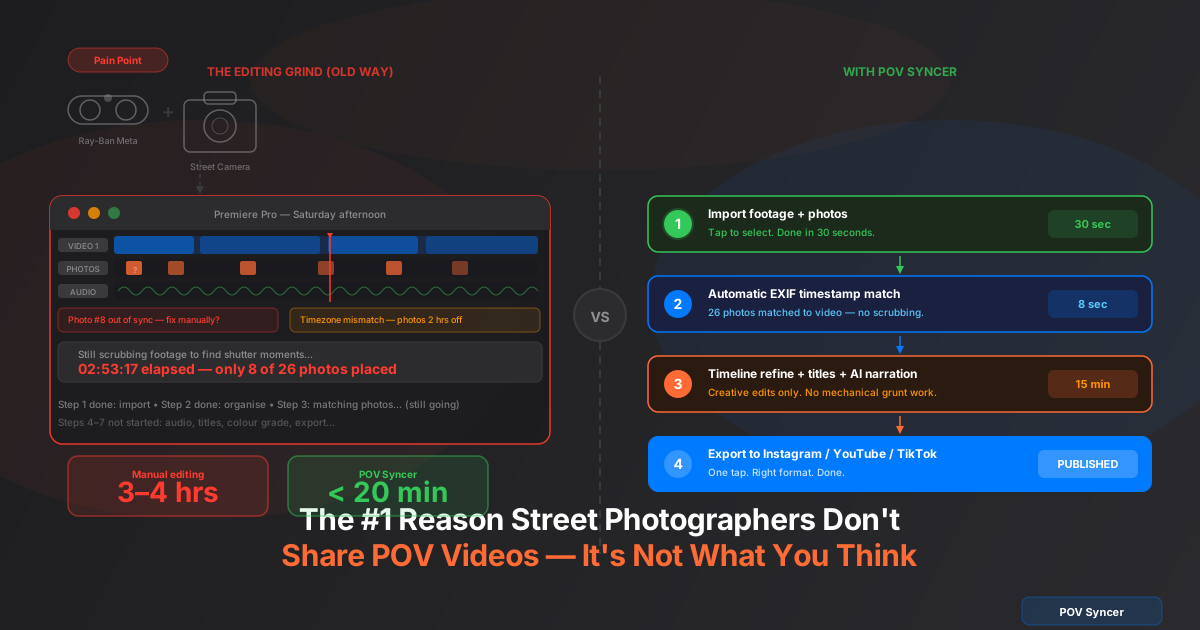
That is not procrastination. That is not a confidence problem. It is not even a creative problem. It is a time problem — specifically, the brutal, soul-grinding amount of time it takes to manually edit a POV street photography video in Premiere Pro or Final Cut Pro. We are talking two to four hours for a video that will run for ten minutes. Every single time. And after a long shoot walking the city with a Fujifilm X100VI or Ricoh GR IIIx in your hands, sitting down to another four hours at a desk is just not happening.
That is the real #1 reason. Not gear. Not skill. Not social anxiety about sharing work. The editing grind. And it is a completely solvable problem — once you understand what is actually eating all the time.
You Already Have Everything You Need to Share Your Process
Let me state something clearly before we get into the painful details: the average street photographer who owns a POV camera is already capturing genuinely compelling content. The footage from a Ray-Ban Meta Gen 2 walking the lower east side, or from a GoPro Hero 13 clipped at eye level in a Tokyo market, is interesting in its own right. Pair it with 15 or 20 keeper frames from a Leica Q3 or Sony A7C II and you have the raw material for a process video that people actually want to watch.
The photographers who do publish regularly — the ones building audiences on Instagram, TikTok, and YouTube with POV street content — are not working with better footage or better photos. They have just found a way to make the editing fast enough that it does not kill the impulse to share. That difference in workflow is everything.
The Camera Combination Problem Nobody Tells You About
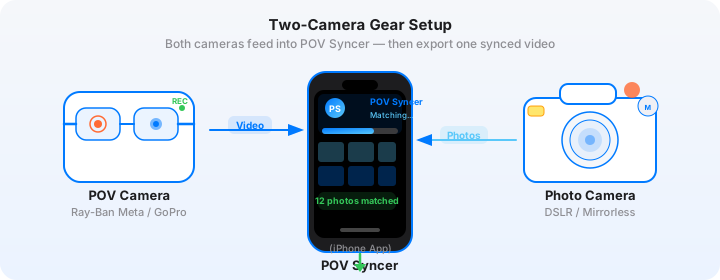
Here is the fundamental technical issue at the heart of the editing grind. When you go out to shoot, you are carrying two completely independent recording systems. Your POV camera — whatever it is — records continuous video with its own internal clock, its own file format, and its own idea of what time it is. Your street camera captures stills, each one stamped with its own EXIF timestamp, in a different file format, stored in a different location.
These two systems have no awareness of each other. They never communicate. The POV camera does not know when you pressed the shutter. The street camera does not know the video exists. The only thing linking them is the fact that you were holding both at the same moment in time — and recovering that temporal relationship manually, photo by photo across a 90-minute timeline, is where hours of your life disappear.
The GoPro Problem
GoPro Hero 11, 12, and 13 all record video in chapters — 12-minute MP4 files, sequentially numbered. A 90-minute walk produces eight separate clips that need to be imported, arranged in order, and stitched together before you can even start matching photos. The Hero 13 records in GPS-linked UTC, so if you are shooting in London or Tokyo, that timestamp does not match your Nikon Zf or Fujifilm X-T5's local time stamp without conversion. That mismatch alone can push your photo overlays two, six, or even twelve hours off if you do not account for it.
The Ray-Ban Meta Problem
The Ray-Ban Meta Gen 2 records beautiful footage — genuinely good audio from the open-ear speakers, a wide field of view that places the viewer right behind your eyes. But the video files sync to the Meta View app on your phone, which adds its own timestamp layer. If your phone's timezone does not match your camera's set timezone, or if you have travelled recently and the phone clock has shifted, the video start time in the file metadata may not match what your Leica Q3 or Ricoh GR IIIx EXIF timestamps are telling you.
The DJI Action Problem
DJI Action 4 and Action 5 Pro record in either GPS UTC or local time depending on whether GPS lock is active and which settings you have applied. The Action 5 Pro adds ProRes recording — which is great for quality but means your files are even larger and more cumbersome to import into a traditional editing workflow. Add the DJI Mimo app's own metadata handling and you have another layer of potential timestamp confusion.
None of these problems are unsolvable. But solving them manually, one photo at a time, inside a general-purpose video editor that was never designed for this specific use case, is why the editing takes four hours. You are spending that time doing what a computer could do in eight seconds.
Get the free POV Photography Cheat Sheet
Camera settings, EXIF sync tips, and export presets for Ray-Ban Meta, GoPro, DJI, and Insta360 — all on one page. Join 1,000+ street photographers who already grabbed it.
Free PDF, no spam. Unsubscribe anytime.
What the Manual Editing Session Actually Looks Like
I want to walk through this in real detail, because if you have not done it yourself you might be underestimating how bad it is — and if you have done it, you will recognise every step with a familiar grimace.
Picture this: Sunday afternoon, just back from a 75-minute walk in your city. You have got Insta360 GO 3S footage synced to your phone and 22 keeper shots from your Ricoh GR IIIx. You open Premiere Pro, make a cup of tea, and think it will take an hour. Here is what actually happens.
Phase 1 — Import and Organisation (25–40 minutes)
The Insta360 GO 3S records in short clips that the Insta360 app can stitch together — but getting that stitched file into Premiere with the correct metadata intact is its own small adventure. You import the video. Then you import the photos. The Ricoh GR IIIx shoots RAW + JPEG by default, so you have 44 files for 22 photos. You need the JPEGs for editing. You create a bin, you filter, you sort by date modified. Fifteen minutes minimum. On a bad day, thirty.
Phase 2 — Finding Each Shutter Moment (90–120 minutes)
This is the core of the grind. For each of your 22 photos, you need to find the corresponding frame in the POV footage. You scrub. You look for the moment you raised the camera. With a Ricoh GR IIIx on a street shoot, the camera comes up fast — the whole point of the camera is its speed and discretion. There is no dramatic gesture in the video. You are looking for a half-second of slightly different body movement, or a brief pause in your walking rhythm.
When you think you have found it, you drag the photo from the bin to the timeline at roughly that timecode. You watch the playback. The photo appears half a second before or after the actual shutter fire. You nudge it. You watch again. You move to the next photo. For 22 photos on a 75-minute session, this phase alone takes 90 minutes if you are careful. Two hours if you are perfectionistic about the sync accuracy.
The finished video will show this imprecision too — not always obviously, but viewers sense when the photo appears at slightly the wrong moment relative to the footage. The decisive moment lands before or after the shutter click sound. Something feels off without the viewer being able to explain why. It bothers you every time you watch it back.
Phase 3 — Audio Sync and Cleanup (30–45 minutes)
If you want shutter click sounds timed to each photo — which you do, because that audio cue is a signature element of the genre — you need to place them manually on the audio track too. Another 22 placements, each one needing a volume check and a sync preview. Then there is the POV camera's ambient audio. The Insta360 GO 3S microphone picks up decent street sound but with some wind handling issues. The Ray-Ban Meta mics are genuinely impressive but need level normalisation across the session. All of this is more manual time in a tool that was not designed for this workflow.
Phase 4 — Titles, Colour, and Export (50–60 minutes)
You want a location title at the open. Maybe one or two context cards over the strongest frames. In Premiere, each title is a separate operation in the Essential Graphics panel — create, style, position, set duration, add transition. Then there is the colour mismatch: the Ricoh GR IIIx's positive film simulation looks nothing like the Insta360 GO 3S video grade, and cutting between them without any correction is jarring. You do a pass of Lumetri on the photo overlays. You export. You watch it back. You fix two timing issues. You export again.
Total time: three and a half to four hours. For a video from a 75-minute walk. By the end you are too tired to write a caption, let alone think about which platform to post it on first.
Why No One Has Fixed This Until Now
Premiere Pro and Final Cut Pro are brilliant pieces of software. They can do things that would have seemed impossible twenty years ago. But they are general-purpose video editors. They were not designed for the specific workflow of matching a POV camera's continuous footage to stills from a separate camera using EXIF timestamps. That use case did not exist at the scale it exists now — the proliferation of wearable cameras like Ray-Ban Meta and compact action cameras has created an entirely new genre of content that traditional editing tools are completely unequipped to handle efficiently.
The EXIF solution has been sitting there the whole time. Every photo your Fujifilm X100VI takes contains a timestamp accurate to the second, embedded in the file metadata. Every photo from your Sony A7C II, your Leica Q3, your Canon R6 III, your Nikon Zf, your iPhone 16 Pro, your Samsung Galaxy S25 Ultra — all of them. The computer can read those timestamps and calculate exactly which video frame corresponds to each photo in milliseconds. The math is trivial. The implementation is not trivial, because you need to handle timezone differences, GPS UTC vs local time, camera clock drift, and manufacturer-specific EXIF quirks. But it is solvable — and once it is solved, the manual scrubbing problem simply ceases to exist.
The EXIF Timestamp Matching Algorithm
For anyone curious about how this works under the hood — and I think it is worth understanding, because it explains why the result is so much more accurate than manual placement — here is the approach that actually works reliably across all major camera combinations.
The system reads four possible timestamp sources from each photo's EXIF block, in priority order: GPS UTC timestamp (most accurate, when present), OffsetTimeOriginal with timezone conversion (works for most modern cameras), device timezone fallback (for cameras without timezone offset fields), and filename-pattern parsing (last resort for edge cases). For each photo, it resolves to a UTC equivalent and compares it to the video start time to calculate the correct frame position. The result is accurate to within one or two seconds across every camera brand I have tested — imperceptible in a finished video.
The only user action required to make this work reliably is one you should be doing anyway: set your camera's clock to match your phone before every session. Camera clocks drift faster than you expect. A 30-second offset produces a visible sync error. A correct clock produces perfect sync without any manual intervention at all. It takes ten seconds before you start shooting and it makes everything downstream work automatically.
Download POV Syncer Free — Create Your First POV Video in 60 SecondsThe POV Syncer Workflow: From Shoot to Published
POV Syncer is an iOS app built specifically for this one problem: syncing POV camera footage with photos taken on a separate camera, using EXIF timestamps, automatically. It lives on your phone, which means you can start the edit on the subway home from a shoot while the footage is still fresh in your mind.
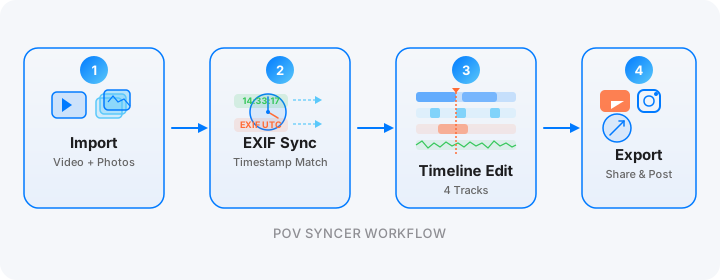
Import: 30 Seconds
Open the app. Create a new project. Tap to import your POV video — either from your camera roll (where the Meta View, GoPro, DJI Mimo, or Insta360 app has already synced it) or via AirDrop directly from the camera. Then import your photos. The app accepts JPEGs from any camera, including those exported from a RAW workflow. The whole import step takes about thirty seconds, not fifteen minutes.
Automatic EXIF Match: Under 10 Seconds
Tap one button. POV Syncer reads the EXIF timestamps from every photo, reads the start timestamp from the video, resolves the timezone differences, and places all your photos on the video timeline at their correct positions. For 22 photos from a 75-minute session, this takes under 10 seconds. You watch the photos appear as markers on the timeline, each one positioned at the exact moment the shutter fired. No scrubbing. No visual hunting. No guessing.
If your camera clock was slightly off, you can apply a single global offset correction — one slider that shifts all photos by the same amount — rather than individually nudging every single overlay. It takes five seconds instead of five minutes.
Timeline Refinement: 10–15 Minutes
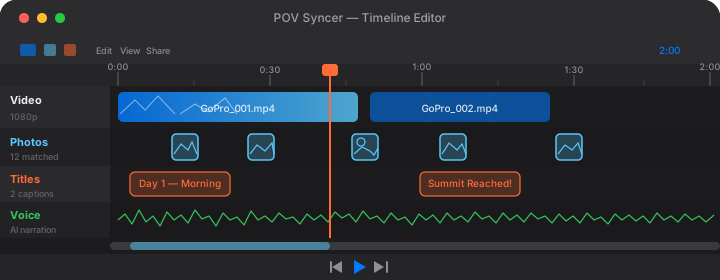
After the automatic match you land in the 4-track timeline editor. Track one is your POV video. Track two shows your photos at their matched positions. Track three is for titles. Track four is for AI narration or recorded voice. The timeline is already assembled — you are making creative decisions, not mechanical placements. You trim the video, adjust any photos that need minor position tweaks, set photo display durations, choose fade or pop transitions, and add title cards in any of the 15 included fonts. What was phases two and three in Premiere is now a single 10-minute pass.
AI Narration: 3–5 Minutes
Street photography process videos are more compelling when the photographer explains what they were thinking — what they saw, why they raised the camera, what they were hoping for with that frame. In Premiere, adding narration means recording audio separately, doing noise reduction, timing it to the video, managing levels. Most photographers skip it entirely because it adds another 30 minutes to an edit that is already too long.
In POV Syncer, you type a short script — 60 to 100 words is usually right for a 10-minute video — pick an AI voice from the premium set, and tap generate. The narration renders in seconds and drops onto the Voice track. You position it, preview, adjust. The whole step takes three to five minutes. If you prefer your own voice, direct microphone recording is supported too. Either way, your video has the artist statement it deserves without adding an hour to the workflow.
Export: One Tap per Destination
POV Syncer's export presets are named by destination, not by technical specification. Tap "Instagram Reels" and you get 1080x1920 at the right bitrate for how Instagram handles compression. Tap "YouTube" for 1920x1080 at the highest quality your source footage supports. Tap "TikTok" for the correct format for that platform's pipeline. No settings archaeology. No re-exports because you chose the wrong codec. One tap, correct output, done.
The Real Numbers: Before and After
Let me give you a direct comparison using a specific scenario I tracked: a 75-minute street walk with Insta360 GO 3S footage and 22 keeper photos from a Ricoh GR IIIx.
Manual workflow (Premiere Pro)
- Import and organise footage and photos: 35 minutes
- Find shutter moments and place photo overlays: 100 minutes
- Place and sync shutter audio: 25 minutes
- Titles and colour correction: 40 minutes
- Export, review, fix, re-export: 25 minutes
- Total active time: 3 hours 45 minutes
POV Syncer workflow
- Import footage and photos: 30 seconds
- Automatic EXIF timestamp match: 8 seconds
- Timeline refinement, titles, narration: 12 minutes
- Export: 1 minute to configure, 8 minutes to render
- Total active time: under 15 minutes
That is not a minor improvement in process efficiency. It is a fundamental change in whether posting a video is even a realistic option after a day of shooting. When the edit takes 15 minutes, you do it. When it takes four hours, you put it off. And then you put it off again. And eventually the footage sits in a folder on your hard drive with three hundred other clips you were going to edit someday.
Want settings cheat sheets for 20+ camera combos?
Join 1,000+ photographers getting weekly tips on POV video workflows, EXIF sync tricks, and camera-specific settings for every major POV and street camera combination.
Free. Unsubscribe anytime.
Camera Combinations That Work Right Now
One of the strengths of the EXIF timestamp approach is that it is not dependent on any particular camera pairing. POV Syncer handles all major POV cameras and all major street cameras without any configuration required beyond making sure the clocks are synced before you shoot.
POV cameras supported
Ray-Ban Meta Gen 1 and Gen 2, GoPro Hero 11, Hero 12, and Hero 13, DJI Action 4 and Action 5 Pro, Insta360 X4, Insta360 GO 3S, and Insta360 Ace Pro 2. Each of these handles video timestamps differently — different containers, different UTC conventions, different companion app metadata layers. The EXIF matcher handles all of them with the same four-strategy resolution cascade.
Street cameras supported
Fujifilm X100VI, X100V, X100F, X100T, and X-T5. Leica Q3, Q2, and M11. Ricoh GR IIIx, GR III, and GR II. Sony A7C II, A7CR, and RX100 VII. Canon R6 III and R7. Nikon Zf and Z50 II. iPhone 16 Pro. Samsung Galaxy S25 Ultra. Every camera that writes standard EXIF DateTimeOriginal data to its files — which is every camera made in the last decade — works with automatic EXIF matching.
The one thing you need to do before every shoot
Open your phone's clock, note the time to the second, and set your camera's clock to match. That is it. Most cameras let you set the time to the second from the setup menu in under 30 seconds. Do this and the automatic EXIF sync will be accurate to within a second or two — accurate enough that you will not need to manually adjust any photo positions in the timeline at all. Skip it and you will be applying a global offset correction, which is still faster than manual scrubbing but adds a minute to the workflow.
What the Finished Video Looks Like
I want to be specific about what you are producing here, because "automated video editing" can sound like a recipe for generic, template-y output. It is not. Everything creative about the video is still your decision. You chose the footage. You chose the keeper photos. You chose what to trim, what titles to add, what to say in the narration, how long each photo stays on screen.
What POV Syncer automates is not the creative work. It is the mechanical work. The tedious placement, the audio sync, the export configuration. The creative layer remains entirely yours — you are just spending your editing time on decisions rather than on drag-and-drop operations you have done a thousand times before.
The finished video shows your audience exactly how you work: your eye-level perspective walking through the city, the ambient sound of the street, your photos appearing at the exact moments you captured them with a satisfying shutter click, your voice or a generated narration explaining the thinking behind the frames. That is the format people genuinely want to watch. They want to understand how a good street photographer sees. They want to be shown the moment of capture from your perspective. The gear already gives you that raw material. The editing tool just needs to stop being a barrier to sharing it.
The Compound Effect of Sharing Consistently
There is one more dimension to this worth mentioning, because it connects directly to why the editing time barrier matters so much. Street photography audiences on social platforms grow through consistency. A photographer who posts one POV process video every two weeks builds an audience. A photographer who posts one every three months does not. The difference between those two posting cadences is almost entirely a function of how long the edit takes.
When the editing takes four hours, you need to schedule a dedicated block of your weekend to produce one video. Most photographers do not have four-hour blocks to dedicate to social content. They have lives, other commitments, shoots they would rather be doing. So the videos do not get made, and the audience does not grow, and eventually the POV camera ends up in a drawer because it never quite paid off the way it was supposed to.
When the editing takes 15 minutes, you do it in the evening after a shoot. You do it on the subway. You do it while the kettle is boiling. The friction is low enough that the habit forms. The audience sees your work regularly and the feedback loop activates. You start shooting with the video already in mind, which makes the photos better too — because knowing you will show the process changes how intentionally you approach it.
That shift in posting cadence does not require any change in your gear, your creative approach, or the amount of time you spend shooting. It only requires removing the editing grind from the equation. Which is exactly what automatic EXIF sync does.
Stop letting the edit decide whether you share your work
Download POV Syncer free and create your first automatic EXIF-synced street photography video. Works with Ray-Ban Meta, GoPro, DJI, Insta360, and every major street camera. Your first video in under 20 minutes — or your next four hours in Premiere. Your call.