Travel Photography POV Video: Grow Your Audience Between Trips
You have a gorgeous Instagram feed. Consistent color palette. Strong compositions. Every image edited to a professional standard. And your follower count has barely moved in six months.
This is not a quality problem. It is a format problem.
In 2026, travel photography feeds do not grow the way they did in 2019. The photo-only content format is saturated across every destination niche you can think of. Someone has already shot Lisbon at sunrise with better light and a more famous camera. Someone has already done the Kyoto bamboo grove in fog. The beautiful single image has, essentially, become the minimum requirement to be taken seriously — not the differentiator that builds a following.
What builds a following now is process. The photo dump format is oversaturated too. What viewers on Instagram Reels, TikTok, and YouTube Shorts actually watch and share is the experience of being on location — walking the streets, making the shots, showing what it took to get the frame. This is where travel photography video content lives in 2026. And it is where your GoPro footage and your Fujifilm stills, combined automatically using POV Syncer, give you a genuine advantage.
Why the Photo-Only Format Has Stopped Growing Travel Accounts
The Instagram algorithm has been explicit about this shift since 2022: it prioritizes Reels over static posts in discovery and explore. A static photo post reaches primarily your existing followers. A Reel has the potential to reach anyone. For a travel photographer whose commercial goal is growing an audience that eventually books workshops, licenses images, or purchases prints — discovery is everything.
TikTok amplifies this dynamic further. TikTok's algorithm is almost entirely interest-based rather than social-graph-based. A travel photographer with 500 followers can have a video reach 100,000 people if the content matches viewer intent. The format that consistently triggers this is the location-day Reel: a compressed, vivid experience of a day on location, with photographic moments built into the narrative.
You already have the raw material. Every trip generates GoPro footage (if you start shooting this way) and Fujifilm stills. POV Syncer connects them without an editing workflow that consumes more time than you spent in the location.
The Camera Setup: GoPro Hero 13 + Fujifilm X100VI
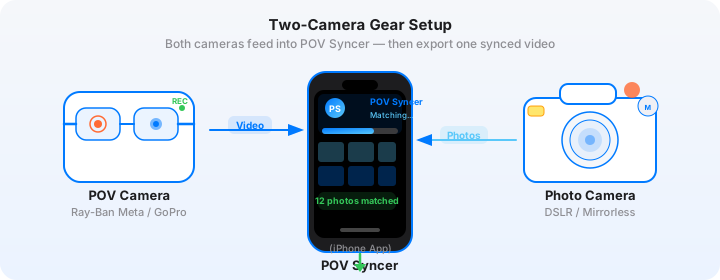
This combination works particularly well for travel because both cameras are compact, light enough to carry all day, and visually complementary. The GoPro Hero 13 provides wide-angle POV context — the streets, the markets, the rooftops, the journey between locations. The Fujifilm X100VI provides your stills — precise, considered frames made with the camera's exceptional 40mm equivalent lens and Film Simulation modes that give your JPEGs a distinct visual identity straight from the card.
Neither camera shouts "content creator" in a way that changes how locals interact with you. The GoPro is small enough to wear on a chest mount without drawing attention. The X100VI looks like a classic film camera, which actually opens doors in many cultures where a large mirrorless setup would be viewed with suspicion.
GoPro Hero 13 Settings for Travel
- Resolution: 4K at 30fps for standard travel footage. The Hero 13's HyperSmooth 6.0 stabilization means this footage is genuinely usable from a chest mount, a wrist strap, or hand-carry while walking.
- Frame rate for slow motion: 4K at 60fps if you want the option to slow down motion sequences by 50% in your edit. Useful for crowded market sequences where normal speed can feel chaotic.
- Color: Vibrant. The GoPro's color science at Vibrant produces punchy, travel-ready colors that complement the Fujifilm Film Simulation JPEGs. If you prefer to color-grade later, Natural is more neutral — but Vibrant exports well as-is for social media.
- Mount: Chest mount for walking footage (gives a stable eye-level perspective). Hand-carry for framing shots at attractions. Head strap for hands-free activity sequences where you are using both hands for the Fujifilm.
- Battery: The Hero 13 runs about 80 minutes at 4K. Carry two spares for a full travel day. The USB-C charging is compatible with any standard travel power bank.
GoPro and Time Sync When Travelling
This is the detail that trips up the most travellers. When you cross a timezone, your phone updates automatically. Your GoPro does not — unless you sync it manually via the GoPro app after arriving in the new timezone.
Make it a landing routine: when you land, update your phone timezone, open the GoPro app, connect the camera, and let it sync. The whole process takes 30 seconds. Skip it, and every photo you take that day will appear in the wrong position in your video — typically one to twelve hours off, which POV Syncer cannot automatically correct without a manual offset.
Get the settings right the first time
Download the free POV Photographer's Cheat Sheet — camera settings, EXIF tips, and export presets for Ray-Ban Meta, GoPro, DJI, and Insta360 on one printable page.
Free PDF, no spam. Unsubscribe anytime.
Fujifilm X100VI Settings for Travel Stills
The X100VI is a camera with a strong creative identity, and leaning into its Film Simulation modes is the right approach for travel stills that you want to use directly in video without color grading.
- Film Simulation: Classic Chrome for urban and street scenes — it desaturates slightly and adds contrast in a way that reads as cinematic and intentional. Velvia for landscapes and vivid color subjects. PROVIA/Standard for a neutral baseline when conditions are uncertain.
- Format: RAW + JPEG Fine. The JPEG is what POV Syncer uses for the video overlay — the Film Simulation is baked in and gives your video stills a consistent, distinctive look. Keep RAW for potential print or licensing use.
- ISO: Auto, 160-6400. The X100VI's 40MP BSI sensor handles high ISO cleanly enough that Auto ISO across the full range is practically safe in most travel environments.
- Aperture: f/4 for street scenes where you want subject and context both sharp. f/2 for isolating a subject against a busy background. The fixed 23mm f/2 lens is optically excellent — do not be afraid to shoot wide open.
- Shutter speed: Auto with a minimum of 1/250s to freeze pedestrian motion in busy locations. In low light, you can drop to 1/100s without visible blur on static subjects.
- Date and time: Menu > Set-Up > Date/Time Setting. Update the timezone when you arrive in each new location.
Handling EXIF Across Multiple Timezones
Multi-destination trips introduce a specific EXIF challenge. If you spent three days in Tokyo and then flew to Osaka, and you updated both cameras' timezones on arrival in each city, your EXIF timestamps are consistent within each location's shooting day. POV Syncer handles this correctly by reading the OffsetTimeOriginal field from Fujifilm JPEGs, which includes the UTC offset for the timezone in which each photo was taken.
If you forgot to update the GoPro in one location, you can apply a manual offset in POV Syncer after the fact. The timeline will show photos appearing at obviously wrong positions — several hours early or late — which makes the problem immediately visible. Apply the offset by the difference in hours between your home timezone and the shooting location, and the photos will snap into the correct positions.
The Location-Day Reel Format
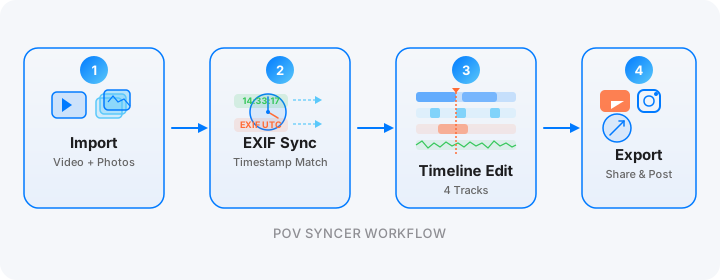
The location-day format is the most consistently effective structure for travel photography video content. It compresses a single shooting day into 45 to 90 seconds, showing the experience of being on location from a photographer's perspective. Here is how to build it.
Structure
- Opening title: Location and date, specific rather than vague. "Fes Medina, Morocco, 6am" rather than "Exploring Morocco." The specificity is what earns the viewer's trust and signals that this is genuine experience rather than stock content.
- Location establishment: Ten to fifteen seconds of GoPro POV footage — arriving, walking, the first impression of the space. This is the invitation. The viewer decides in these seconds whether to keep watching.
- The shooting moments: The heart of the format. EXIF-synced Fujifilm stills appearing at the exact moments they were taken, each with a shutter sound. The viewer watches you notice something, stop, compose — and then sees the frame. Three to six photos is the right number for a 60-90 second video.
- A final statement frame: Your strongest image from the day, displayed for four to five seconds. This is what people screenshot and share.
- Handle and CTA: Your Instagram or website in the Titles track. Keep it minimal — the content should speak for itself.
Multi-Location Trips
For a trip covering multiple cities or countries, POV Syncer's multi-clip timeline lets you build a single video from GoPro footage across multiple days. Import multiple GoPro clips in sequence, sync each day's Fujifilm stills to the appropriate clip, and build a four to six-minute trip summary that serves as a YouTube video — with individual day edits repurposed as Shorts and Reels.
This is the content production model that makes a two-week trip generate six weeks of posting material.
Try it free on the App StorePosting Between Trips: The Content Bank Strategy
The most effective travel photography accounts on social media in 2026 are not posting new content every day. They are posting consistently, even between trips — which means they have a content bank built from past travel. Every POV Syncer project you create becomes a reusable asset. A well-produced location-day Reel from eight months ago is still discoverable content if the location, the photography technique, and the format are perennial.
Use the time between trips to build content from archival GoPro footage and photo libraries. If you shot in Japan two years ago but did not produce video, those files still have their original EXIF timestamps. Import them into POV Syncer and build the location-day Reel that did not exist at the time. The content is new to your audience even if the trip is not.
Which Platform to Prioritize
For travel photographers, the platform priority in 2026 is: TikTok for new audience growth, Instagram Reels for converting viewers into followers and commercial inquiries, YouTube Shorts as a secondary discovery channel.
TikTok's travel content algorithm is particularly strong for location-specific content. A video of a specific neighborhood in a specific city at a specific time of day has a built-in audience of people who have been to that location, want to go, or are researching it. The more specific your location tagging and caption, the more precisely TikTok surfaces your content to people who care about it.
Instagram functions better for the commercial side — workshop bookings, print sales, licensing inquiries. Make sure your bio link goes somewhere that captures email or drives a specific conversion action.
What Makes a Travel POV Video Actually Good
The difference between a compelling travel POV video and a generic GoPro walk is the photography. The GoPro footage is the context; your Fujifilm stills are the reason the viewer stays. Your eye — the moments you chose to stop and photograph — is the content. The camera just captured where you were standing when you chose.
This is worth sitting with. Your value as a travel photographer is not the location. Anyone can go to Morocco. Your value is your eye — what you noticed, how you framed it, what you saw that other visitors walked past. The location-day Reel format makes this visible in a way that a static feed post never can.
Getting Started
POV Syncer is free to download on the App Store. The free tier lets you build a complete project from your existing travel footage — import, sync, timeline edit, export — before you commit to Pro. Pro unlocks unlimited projects, all 15 fonts, 10 background styles, and AI narration at $9.99 per month or $99.99 per year.
Your best trip might already be on your hard drive. Let's finally make content from it.
Ready to start growing your travel photography audience with video?
Download POV Syncer free and produce your first location-day Reel from your last trip today.
Download POV Syncer Free