Pet Photography POV Video: The Viral Content Format You Are Missing
A Labrador knocked over your reflector. A cat sat on your camera bag and refused to move. A puppy licked the lens three times before you got the shot you needed. And you got the shot — sharp, perfectly exposed, the look you were going for — but none of that story is in the image.
Here is the thing: the chaos is the content.
Pet content goes viral on TikTok and Instagram Reels because of personality, energy, and unpredictability — not because of technical excellence. Your polished pet portraits are beautiful, but they are competing with every other polished portrait on a platform that rewards personality and process over perfection. What TikTok's algorithm consistently surfaces is the relatable difficulty: the effort that goes into getting that perfectly composed portrait of a subject who has absolutely no intention of cooperating.
The chaos-to-perfection reveal format — POV footage of the session's most chaotic moments, followed by the final portrait that emerged from it — is among the most consistently viral structures on TikTok for photography content. This guide shows you how to produce it, efficiently and consistently, using a Ray-Ban Meta or GoPro Hero 13 for your session POV and POV Syncer to automatically sync your portrait selects to the footage.
Why Pet Photography Is Perfectly Suited to the POV Format
Most photographic disciplines involve a photographer in a relatively controlled environment making deliberate decisions. Pet photography involves a photographer in whatever environment the animal dictates, making rapid reactive decisions while managing a dog that just spotted a squirrel.
This unpredictability is a content goldmine. The behaviors that make pet sessions challenging — the sudden sprints, the disinterest in the camera, the inexplicable decision to sit facing completely the wrong way — are exactly the behaviors that audiences find funny and relatable. Every pet owner who watches your session footage thinks "this is exactly what my dog does."
The empathy and the laugh are the engagement. And the final portrait that emerges from the chaos — sharp eyes, perfect expression, the look you were working toward — is the payoff that makes people share the video.
TikTok's algorithm rewards this arc. High early watch time (the chaos is immediately engaging), strong completion rate (viewers stay for the reveal), and high share rate (pet owners send it to their partners with "this is us"). These metrics are exactly what the algorithm needs to distribute your content widely.
Camera Choice: Ray-Ban Meta vs. GoPro Hero 13
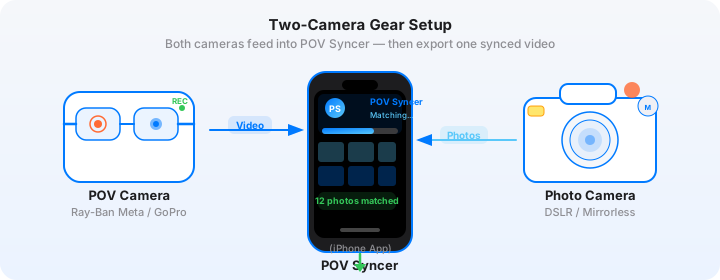
For pet photography POV content, you have two practical options depending on the session environment and the subject.
Ray-Ban Meta for Indoor and Studio Sessions
The Ray-Ban Meta glasses work exceptionally well for indoor sessions — home shoots, studio environments, and garden sessions where you are relatively stationary and the chaos comes to you. The glasses provide a true eye-level POV that captures your perspective as you crouch, angle, and reposition to get the shot. Viewers see exactly what you see: the dog charging toward you, the cat's dismissive look, the moment the light hit the subject perfectly.
For sessions with cats and nervous dogs, the glasses are also less intrusive than a mounted camera. There is nothing on your hands, nothing being pointed at the animal — you are just working, and the glasses are recording.
GoPro Hero 13 for Outdoor and Active Sessions
The GoPro Hero 13 is better suited for outdoor sessions where the subject is highly active — beach runs, park sessions, dog sports. The Hero 13's HyperSmooth 6.0 stabilization handles the rapid movement that outdoor pet sessions involve, and the waterproof design is practical for any encounter with a dog near water.
For the most engaging POV angle with dogs, mount the GoPro on a low-angle extendable pole and hold it at dog eye-level. The 155-degree ultrawide captures the dog's perspective — you see the world from where the dog is, looking up at you. This angle is unusual, visually engaging, and generates strong audience reactions. Combine this low-angle POV footage with your portrait stills, and the video moves between two very different perspectives of the same session.
Get the settings right the first time
Download the free POV Photographer's Cheat Sheet — camera settings, EXIF tips, and export presets for Ray-Ban Meta, GoPro, DJI, and Insta360 on one printable page.
Free PDF, no spam. Unsubscribe anytime.
Camera Settings for Pet Sessions
Ray-Ban Meta Settings
- Resolution: 1080p at 30fps. Studio and indoor light is generally sufficient for clean footage at this resolution. The fixed aperture performs well in well-lit indoor environments.
- Frame rate: 30fps for standard sessions. If the subject is highly active and you want to show slow-motion playback of a charge or a jump, switch to the video mode that supports 60fps — it gives you the option to slow the footage to half speed in the edit.
- Audio: On. The session audio is part of the content — your commands, the owner's attempts to get the pet's attention, the ambient sound of the environment. These are funny, relatable, and add authenticity.
- Clock sync: Connect to the Meta View app before the session. The glasses sync to your iPhone clock, which is what makes EXIF matching accurate for your portrait stills.
GoPro Hero 13 Settings for Pet Sessions
- Resolution: 4K at 30fps for outdoor sessions. The extra resolution gives you cropping headroom when you want to reframe the footage for different aspects ratios — 9:16 for Reels, 1:1 for feed posts.
- Stabilization: HyperSmooth — Auto Boost. Non-negotiable for active subjects — this is the difference between unusable shaky footage and watchable content.
- Low angle mount: Use the GoPro's magnetic mount and a short flexible arm for dog-level shots. The visual perspective from knee height looking toward the subject changes the entire feel of the footage.
- Audio: On, with wind reduction if shooting outdoors. The sound of the dog, the environment, and the session is content-grade audio for TikTok.
Your Main Camera: Settings for Pet Portraits
Whatever camera you shoot portraits with — Sony, Canon, Nikon, Fujifilm — the key settings for EXIF accuracy are:
- Format: RAW + JPEG. The JPEG is what POV Syncer reads for EXIF timestamps and uses as the video overlay. Deliver RAW to the client.
- Shutter speed: 1/500s or faster for active dogs. 1/1000s for sprinting subjects or anything with fast head movement. Eye-sharpness at fast motion requires this minimum.
- AF mode: Eye AF (animal) if your camera supports it — Sony, Canon R series, Nikon Z series all have reliable animal eye AF in 2026. This is the single most impactful setting for pet portrait quality.
- Date and time: Confirm the camera clock matches your POV device before every session. A mismatch of even 60 seconds is visible in the video — photos appear a shot or two away from where they should be.
The Chaos-to-Perfection Reveal Format
This is the specific TikTok format that generates the strongest results for pet photography content. Here is the structure, designed for a 30 to 60-second video built in POV Syncer.
Opening Hook (0-3 seconds)
The hook on the Titles track needs to be specific and immediately funny or compelling. "I was supposed to get one nice photo of this dog" is better than "Behind the scenes of a pet session." Specificity signals to the viewer that something is going to happen — and they stay to find out what.
The Chaos Section (3-25 seconds)
Select three to five clips from your POV footage that show the session's most chaotic or funny moments. The dog ignoring you. The cat leaving the frame. The moment the dog found something vastly more interesting than the camera. The owner making increasingly creative sounds to get the subject's attention.
Keep each clip short — two to four seconds each. Fast cuts maintain energy. The audio from these clips is part of the content; do not mute it.
The Portrait Reveals (25-50 seconds)
Your EXIF-synced portrait selects appearing in the timeline at the exact moments you fired the shutter. Two to three portraits is usually the right number. Let each one hold for two to three seconds. The shutter sound in POV Syncer's Effects track is the signal to the viewer that the chaos produced a result — it is a small satisfying moment every time.
The contrast is the content. The viewer has just watched the chaos, and now they see a technically excellent, beautifully lit portrait with perfect subject expression. That gap between the process and the result is funny, impressive, and relatable all at once.
Final Frame and CTA (50-60 seconds)
Hold the strongest portrait for three to four seconds at the end. Add your handle on the Titles track. Optionally: a brief AI narration line summarizing what you want the viewer to take away — "It took 47 attempts. This was number 47." — which reinforces the effort-to-result narrative.
Try it free on the App StoreEnergy-Driven TikTok Pacing: What to Avoid
Pet content on TikTok fails when it is too polished. Smooth transitions, careful color grading, narration that is overly formal — these signals tell the viewer that this is produced content rather than authentic experience. The format works precisely because it feels genuine.
Leave the imperfections in the footage. The moment you nearly dropped the camera. The blurred frame as the subject ran past. The session audio with the owner laughing. TikTok rewards authenticity with distribution, and authenticity in pet photography content means letting the chaos be genuinely chaotic.
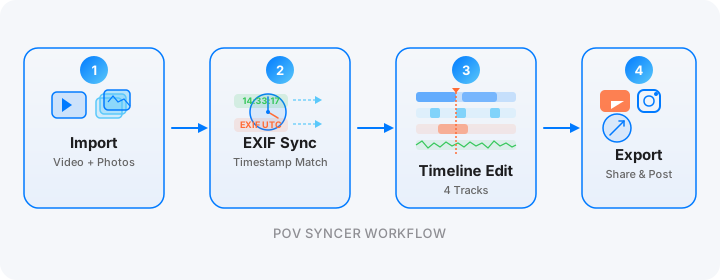
POV Syncer's approach aligns with this: the app does the technical work (EXIF sync, timeline editing, export) while letting the raw footage remain raw. You are not adding cinematic color grades or motion graphics — you are cutting together the genuine experience of the session and letting your portrait stills do the quality signaling.
Building a Following That Books Sessions
The commercial goal of TikTok and Instagram for pet photographers is bookings. The content strategy that best supports this is not "look how good my portraits are" — it is "look what the experience of booking a session with me feels like."
When a pet owner watches your chaos-to-perfection TikTok and laughs because their dog does exactly the same thing, they are no longer a stranger on the internet. They are someone who sees themselves in the video. And when they think about booking a portrait session, the photographer who made them laugh on TikTok last week is the person they think of first.
The portrait that appears in the reveal also serves as the portfolio. It says: even through all of that, this is the result you will receive. The chaos is the entertainment; the portrait is the sales pitch.
The Outtake TikTok
A variant format that performs extremely well for pet photography is the pure outtake video — no reveals, just the chaos. All the moments where the session did not go to plan, edited into 30 to 45 seconds of genuinely funny content.
These videos often outperform the reveal format on pure reach because they have no expectation barrier — a viewer does not need to know anything about photography to find a dog ignoring every command and then looking directly at the camera at the wrong moment funny. The audience is not the photography community; it is pet owners broadly.
Build these in POV Syncer without syncing any stills — just the raw POV clips trimmed and sequenced, with a title card at the end that credits your handle. The shutter sound effect is optional for this format; the session audio is the comedy track.
Getting Started
POV Syncer is free to download on the App Store. The free tier gives you one complete project — enough to test the full chaos-to-perfection format on your next session before committing. Pro unlocks unlimited projects, AI narration, 15 fonts, and 10 background styles at $9.99 per month or $99.99 per year.
Your next session is going to be chaos. You might as well publish it.
Ready to turn your next pet session into content that actually grows your following?
Download POV Syncer free and produce your first chaos-to-perfection TikTok from your next shoot.
Download POV Syncer Free