Concert Photography POV Video: The Content Format That Builds Your Following
You have access that audiences would genuinely pay for. Photo pit credentials at a sold-out arena show, a floor pass at a festival, a two-song window three metres from a headline act. Your stills are sharp, the composition is considered, and the images go up on Instagram to modest engagement from existing followers.
Meanwhile, a fan in the nosebleeds posts a shaky 60-second phone video with 400,000 views by morning.
The difference is not quality. It is format. Concert photography on social media in 2026 is dominated by process content — the behind-the-scenes, the access, the reveal. Audiences do not just want to see the perfect frame. They want to watch you get it. And the concert photography content video format that delivers this most effectively is the photo pit POV combined with your actual stills, synced together and published within 24 hours of the final encore.
This guide shows you exactly how to do that with an Insta360 GO 3S and a Sony A7C II, using POV Syncer to automatically sync your high-ISO stills to your POV footage without spending the night on a desktop edit.
Why Concert Photographers Are Perfectly Positioned for This Format
Most photographers chasing social media growth are working with accessible subjects — streets, travel, food. You are working with one of the most emotionally charged environments in live entertainment. The combination of dramatic stage lighting, physical proximity to performers, and the energy of a live crowd creates raw footage that almost any viewer finds compelling.
The photo pit itself is visually interesting even without a single frame of the artist. The wall of photographers, the lens choices, the urgent repositioning between songs — this is content that fans of both photography and music want to see. You are sitting on it every shoot, and most of it never gets published.
The practical challenge is time. You have a 24-hour window, roughly, before the cultural moment passes. An artist's best day for social engagement is the day of and the day after a show. Miss that window and your content competes with three weeks of archival posts rather than riding the same trending hashtag. Manual video editing — importing, cutting, layering stills, exporting — can easily take four to six hours. That is the problem POV Syncer solves.
The Camera Setup: Insta360 GO 3S on a Camera Strap
The Insta360 GO 3S is a 35mm cube camera that weighs 39 grams and shoots 4K at up to 60fps. It clips onto almost any surface, requires no configuration in the moment, and is genuinely inconspicuous when worn on a camera strap magnet mount — which is exactly how you want to wear it during a photo pit session.
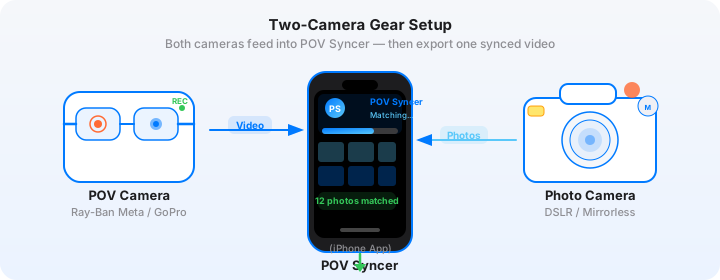
Mount the GO 3S on the front of your camera strap or on the shoulder strap of a bag, angled slightly upward to capture your eye-level perspective plus the stage above. The wide 155-degree field of view ensures you get everything — the pit, the security barrier, the stage — without any deliberate framing. You are just wearing the camera. It records while you work.
GO 3S Settings for Concert Environments
Low light is the defining challenge of concert photography, and the GO 3S handles it significantly better than its predecessors but still needs the right settings to be usable.
- Resolution: 2.7K at 30fps — the sweet spot between low-light performance and file size. 4K is available but will show more noise in dimly lit pit areas.
- Max ISO: 3200 — above this the noise pattern becomes distracting in the final composite.
- Stabilization: FlowState ON — essential in a pit where you are constantly repositioning, crouching, and reaching around other photographers.
- Interval mode: OFF — you want continuous video, not time-lapse. The EXIF sync relies on video timestamps.
- Auto Power Off: Set to 30 minutes minimum — you do not want the camera sleeping mid-pit.
Importantly, sync the GO 3S clock to your phone before you walk into the venue. Open the Insta360 app, connect to the camera, and confirm the time matches your Sony. This clock alignment is what makes EXIF sync accurate to within one second.
Get the settings right the first time
Download the free POV Photographer's Cheat Sheet — camera settings, EXIF tips, and export presets for Ray-Ban Meta, GoPro, DJI, and Insta360 on one printable page.
Free PDF, no spam. Unsubscribe anytime.
Sony A7C II Settings for the Pit
The Sony A7C II has a 33MP BSI-CMOS sensor that holds up exceptionally well at high ISO. For concert work in a typical arena or festival stage configuration:
- ISO: Auto, max 12800. The A7C II's noise is clean enough at 6400 that you rarely need to push further, but giving the camera headroom prevents motion blur when the stage lighting drops.
- Shutter speed: 1/400s minimum — stage lighting pulses at 50 or 60Hz depending on region, and a shutter speed faster than 1/250s avoids banding from LED fixtures.
- Aperture: f/2.8 or wider. The Sony FE 70-200mm f/2.8 GM II or the 85mm f/1.4 GM are the standard pit lenses. If you need to travel light, the FE 24-70mm f/2.8 GM II covers most pit situations.
- Format: RAW + JPEG. The RAW is your deliverable to the publication or label. The JPEG — specifically with Creative Style set to a neutral or slightly saturated profile — is what POV Syncer reads for EXIF and what appears in the video overlay. You do not need to color-grade your selects before syncing.
- Date and time: Settings > Setup 2 > Date/Time. Confirm the timezone is correct before entering the venue. If you travel for shows, update this every time you cross a timezone boundary.
A Word on Label and Venue Restrictions
Before you post any POV footage from a concert, check your press credential agreement. Many agreements restrict photo pit video content — either prohibiting it entirely, requiring label approval, or limiting the footage to behind-the-scenes documentary use with no performance audio.
The safest approach for social media is to build your POV content around the photographer experience rather than the performance itself. The GO 3S footage of you working — crouching, switching lenses, coordinating with other photographers — is almost universally unrestricted and is, frankly, more interesting content than another frontal stage shot. Your POV Syncer video can legally and compellingly focus on the photography process rather than the artist performance.
When in doubt, mute the performance audio in your export and add a music track from a royalty-free library. TikTok and Instagram both have built-in audio libraries with tracks you can add post-upload without copyright risk.
The Photo Pit POV Format: What Actually Works on TikTok
TikTok rewards watch time and completion rate above almost everything else. For concert photography content, the format that consistently achieves both is the reveal arc: the viewer watches you working in difficult conditions, building tension around what you might have captured, and then the photo appears.
Your POV video provides the tension. Your A7C II stills provide the payoff. The EXIF sync in POV Syncer places each photo at the exact moment in the video when you fired the shutter — so the reveal is perfectly timed to the decisive moment. The viewer watches you raise the camera, and then they see the shot you got.
This structure works in 30 to 60 seconds, which is the ideal length for TikTok concert content. Here is the edit structure that performs well:
- 0-3 seconds: Hook — a text overlay that says something specific: "3 songs, 2 metres from [artist], here's what I got." Specific numbers outperform vague setups.
- 3-20 seconds: POV footage of working — the pit environment, the repositioning, the gear in action. This is where GO 3S footage shines.
- 20-40 seconds: The photo reveals — each EXIF-synced still appearing over the relevant moment of POV footage. Three to five photos maximum. Let each one breathe for two to three seconds.
- 40-60 seconds: Final strong image held longer, with a caption or brief narration about the conditions or the shot.
The POV Syncer Workflow: From Show to Posted in Under an Hour
This is where the time advantage becomes concrete. After the show, on your iPhone:
Step 1: Transfer and Import
Transfer your GO 3S footage to your iPhone via the Insta360 app — the camera connects over Wi-Fi and the transfer for 30 minutes of 2.7K footage takes about four minutes. Your Sony JPEGs transfer via the Sony Imaging Edge Mobile app or directly from the card reader with a Lightning or USB-C adapter.
Open POV Syncer, tap "New Project," and select your GO 3S video clip. Then select your Sony JPEG selects — the 20 to 30 frames you would send to an editor. You do not need to pre-edit. POV Syncer only places photos whose timestamps fall within the video duration.
Step 2: EXIF Sync
Tap "Sync." POV Syncer reads the DateTimeOriginal field from each Sony JPEG and places it at the corresponding frame of the GO 3S video. Because you synced both cameras to the same time before the show, the accuracy is within one second — close enough that the reveal timing feels natural rather than approximate.
The timeline shows each photo as a marker. You can see immediately which frames from your stills correspond to which moments in the POV footage.
Step 3: Edit on the 4-Track Timeline
Select your three to five strongest stills for the video. Remove the others by tapping the marker and choosing "Remove." Adjust the display duration of each photo — for a fast-paced TikTok edit, 2 seconds per photo works well. For a slower reveal, push to 3.5 seconds.
Add a text title at the start on the Titles track. Something like "Photo Pit, [Venue], [Artist]" with your Instagram handle. Use a clean, bold font — POV Syncer has 15 options, and for concert content the condensed sans-serif styles read well over busy background footage.
The shutter sound effect on the Effects track is particularly useful here. When the photo appears, the mechanical click reinforces the photography process narrative that makes this format work.
Step 4: Export for TikTok
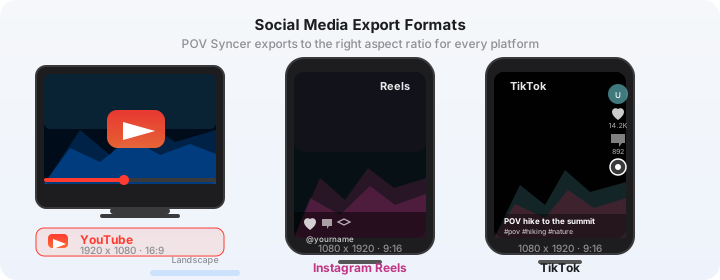
Choose the 9:16 vertical export preset. POV Syncer intelligently crops the 2.7K GO 3S footage to 1080x1920, keeping the center frame dominant. The output is ready to upload directly to TikTok or Instagram Reels. No further editing required.
Try it free on the App StorePosting Strategy: The 24-Hour Window
The most important thing about concert photography social media content is speed. Within 24 hours of a show, the trending hashtags are active, the fan communities are hungry for content, and the algorithm rewards recency for search discovery. After 48 hours, the window largely closes.
POV Syncer's mobile-only workflow makes the 24-hour window achievable. You can go from the venue to a posted TikTok in under an hour — shot selection, sync, trim, caption, upload. Compare that to a desktop workflow involving card transfers, Premiere or Final Cut, color grading, and export queues.
Platform Priority
Post to TikTok first. TikTok's algorithm gives new accounts significant reach potential on music and photography content, and the photo pit POV format is genuinely native to how TikTok serves discovery content. Use the same video for Instagram Reels immediately after — the 9:16 format and duration are identical. Repurpose to YouTube Shorts the following day.
For caption strategy on TikTok: lead with the specific artist and venue in the first line. Include both photography hashtags and fan community hashtags. Tag the venue and the artist — not to get a repost (unlikely) but because it signals the content's subject to the algorithm.
What the Finished Video Looks Like
A well-executed concert photography POV TikTok has a kinetic quality that static photography posts simply cannot match. The GO 3S footage grounds the viewer in the environment — the crowd noise (or if muted, the visual chaos), the lighting changes, the proximity to the stage. Then your Sony A7C II stills hit — sharp, composed, technically impeccable — and the contrast between the raw POV and the considered still image is the thing that makes people stop scrolling.
The shutter sound on each photo arrival is a small detail that lands surprisingly hard with photography audiences. It signals craft. It says: in the middle of all that chaos, I stopped, composed, and made a deliberate frame.
You are showing both the access and the skill. That combination is what builds a following among people who want to become concert photographers themselves — and that audience will hire you.
Start Building Your Concert Photography Content Now
POV Syncer is free to download. The free tier gives you one full import and export to test the workflow with your existing concert footage before your next shoot. Pro unlocks unlimited projects, AI narration, all 15 fonts, and all 10 background styles — everything you need for a professional-quality TikTok every show night.
Your access is the asset. POV Syncer is the tool that lets you publish it before the window closes.
Ready to turn your photo pit access into content that grows your following?
Download POV Syncer free and have your concert POV video ready to post before midnight.
Download POV Syncer Free