Wildlife Photography POV Video: Show the Patience Behind the Shot
You woke up at 4am, hiked two hours in the dark, found your hide, and waited. Three hours passed with nothing but birdsong and the distant sound of water. Then — four minutes of extraordinary activity, a burst of frames, and the shot that justified every cold, still minute of waiting.
What your audience sees is a single image on Instagram. What they cannot see — and what they would watch for 12 minutes on YouTube — is everything that came before it.
Wildlife photography is a discipline where the story behind the photograph is as compelling as the photograph itself. The preparation, the fieldcraft, the patience, the knowledge of animal behavior — these are genuinely fascinating to audiences who follow nature photography. The problem is that none of it is visible in a still image, and most wildlife photographers do not have the time or the video editing skills to produce the long-form YouTube content that would showcase it.
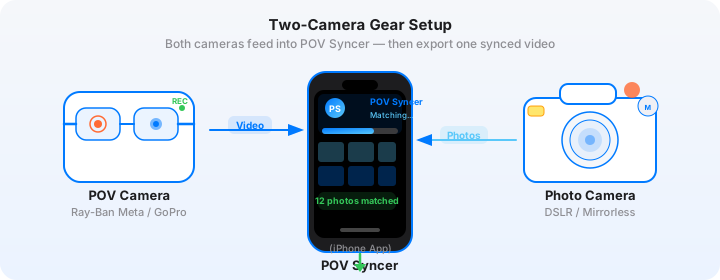
This guide changes that. Using a GoPro Hero 13 for POV field footage and a Nikon Zf for your stills, POV Syncer automatically syncs your decisive-moment frames to your field video — producing both a long-form YouTube field day video and 30-second Shorts, all from your iPhone, without touching a desktop editor.
Why YouTube Is the Right Platform for Wildlife Photography Content
Instagram rewards the single frame. TikTok rewards the hook and the reveal. YouTube rewards depth, and depth is what wildlife photography naturally produces.
A 10 to 15-minute YouTube video structured around a single field day — the pre-dawn setup, the wait, the encounter, the result — is exactly the content that the photography and nature communities on YouTube search for and subscribe to. Search volume for wildlife photography process content has grown consistently, and unlike fashion or street photography niches, it has not yet been saturated with creator content.
The other advantage is audience loyalty. Someone who watches your 12-minute field day video is far more likely to follow you, engage with future posts, and eventually hire you for a workshop or print purchase than someone who double-tapped an image on Instagram. YouTube builds an audience that is invested in you, not just your images.
The Camera Setup: GoPro Hero 13 for Field POV
The GoPro Hero 13 is the right tool for wildlife photography POV for several reasons. It is compact enough to mount on a head strap without disturbing animal behavior. It is weatherproof to IPX8 standard, which matters in rain and stream environments. And its HyperSmooth 6.0 stabilization means that footage from a hand-carry or head-mount is usable without any post-stabilization work.
GoPro Hero 13 Settings for Field Work
Wildlife environments present specific challenges — variable light, long recording durations, the need for quiet operation.
- Resolution: 4K at 30fps for standard field day footage. Drop to 2.7K if you are expecting a very long wait and want to preserve battery. The Hero 13 runs about 90 minutes on a single charge at 4K; carry at least one spare battery for a full day out.
- Stabilization: HyperSmooth — Auto Boost. In the field, you will often be moving slowly and deliberately, and the stabilization removes the micro-tremor that makes handheld footage look amateur.
- Audio: On, with wind noise reduction enabled. Field audio is part of the story — the birdsong that preceded the encounter, the sound of the environment — and the wind reduction makes it actually listenable.
- Hints mode: OFF — any on-screen prompts contaminate the footage.
- Mount for patience shooting: For hide work, mount the GoPro on a flexible arm attached to your tripod or hide structure rather than a head strap. This gives you a stable POV that shows your hands, your camera, and the environment, without requiring you to hold your head still for hours.
- Mount for active fieldwork: Head strap or chest mount for walking to location and setting up. Switch to the tripod arm mount once you are stationary.
GoPro and Time Sync
Connect your GoPro Hero 13 to the GoPro app on your phone before you leave home. The app syncs the camera clock to your phone's clock automatically. Confirm the time is correct — this single step is what makes EXIF sync accurate later. If you forget to sync and the GoPro clock drifts by even 30 seconds, your photo placements will be off, and you will need to apply a manual offset correction in POV Syncer.
Get the settings right the first time
Download the free POV Photographer's Cheat Sheet — camera settings, EXIF tips, and export presets for Ray-Ban Meta, GoPro, DJI, and Insta360 on one printable page.
Free PDF, no spam. Unsubscribe anytime.
Nikon Zf Settings for Wildlife Stills
The Nikon Zf is an unusual choice for wildlife compared to the D6 or Z9 bodies that dominate professional wildlife photography — but its 24MP BSI sensor, compact form factor, and exceptional high-ISO performance make it extremely capable for field stills, particularly for subjects at dawn and dusk when light is at its most beautiful and most limited.
- ISO: Auto, range 400-25600. The Zf handles 6400 with remarkable cleanliness, giving you flexibility in low-contrast dawn light without compromising detail.
- Shutter speed: 1/1000s or faster for birds in flight; 1/500s is generally sufficient for perched or slow-moving subjects.
- Aperture: f/5.6 to f/8 for subjects at medium distance. The Nikkor Z 100-400mm f/4.5-5.6 VR S is the natural pairing for the Zf in wildlife contexts.
- Format: RAW + JPEG Fine. Shoot RAW for your keepers, but the JPEG is what transfers to your iPhone for the video workflow. POV Syncer reads the JPEG EXIF perfectly.
- EXIF date/time: Menu > Setup > Time Zone and Date. Ensure "Date and Time" is set correctly and the timezone matches your location. This matters most when travelling — a camera set to the wrong timezone places every photo 1 to 12 hours off in the video timeline.
- Vibration Reduction: Sport mode for moving subjects, Normal for static subjects at long focal lengths.
EXIF Sync: Why "The Shot" Moment Appears Perfectly in Your Video
This is the part that feels almost magical the first time you see it. You import your GoPro footage and your Nikon JPEG selects into POV Syncer. You tap Sync. And there, in the video timeline, is a marker placed at the exact frame where you raised the Nikon and fired the shutter — because the JPEG's DateTimeOriginal timestamp matches the video's frame-level timecode.
For wildlife content, this creates something genuinely powerful. Your YouTube viewers have been watching the wait — the still environment, your hands on the camera, the ambient field sounds — and then the POV footage shows a sudden alertness, a repositioning, the reach for a longer lens. And at that exact moment, the Nikon frame appears. The result that justified the wait. The decisive moment that the viewer just watched you prepare for.
No manual sync required. No scrubbing through footage to find the right frame. The timestamps do the work.
The Long-Form YouTube Field Day Format
The field day format is a proven YouTube structure for nature and photography content. Here is how to build it using POV Syncer's 4-track timeline.
Structure
- Open: A text title with the location and date. Keep it simple — "Cairngorms National Park, February Dawn" tells the viewer exactly where they are. Add this on the Titles track with a clean font over a frosted glass background.
- Setup section: The pre-dawn footage — driving to the location, the walk in, the hide setup. This section can run four to six minutes for a YouTube audience and is usually the most relatable part for aspiring wildlife photographers.
- The wait: Condensed to the most interesting moments. Use POV Syncer's timeline to trim GoPro clips, selecting the moments where something almost happened, where you repositioned, where the light changed. Environmental audio is crucial here — this section should feel like the viewer is in the hide with you.
- The encounter: Your GoPro POV of the moment when the subject arrived, your Nikon stills synced to the exact moments you fired. Let each still display for three to four seconds. This is the payoff the viewer has been waiting for.
- The result: A final CTA section on the Titles track with your strongest frame and your Instagram handle or website. Add a brief AI-narrated line about the encounter if you want to add context without recording your own voice.
Length and Pacing
Aim for 10 to 15 minutes for your initial YouTube uploads. This length supports mid-roll ad placement once you are monetized, and it gives the algorithm enough watch time signal to recommend the video. Do not pad — every section should earn its place in the timeline. A tight 10-minute field day beats a bloated 20-minute one every time.
Try it free on the App StoreThe 30-Second YouTube Short Format
Every field day video should also produce a Short. The Short serves a completely different purpose — it is a discovery vehicle that introduces new viewers to your channel, while the long-form video retains and deepens the relationship with existing subscribers.
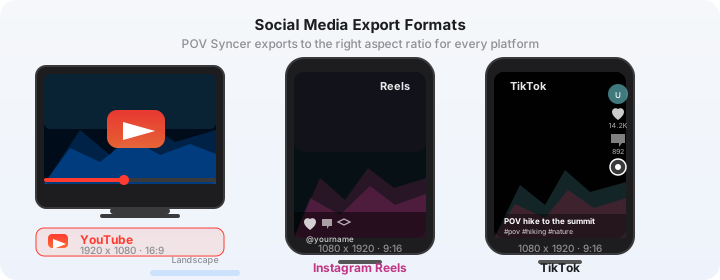
For wildlife photography, the Short format that works is the pure reveal: the wait condensed to ten seconds, then the photograph. No setup. No explanation. Just the tension and the result. POV Syncer's export preset for YouTube Shorts (9:16, 1080x1920, up to 60 seconds) handles the format automatically.
The hook matters enormously for Shorts. Write it on the Titles track at the start of the clip: something specific and surprising — "I waited 4 hours for this exact 3 seconds" outperforms generic hooks like "Wildlife photography behind the scenes" because it gives the viewer a reason to stay for the reveal.
AI Narration for Wildlife Content
Recording your own voiceover in a wildlife hide is often impractical — you cannot speak without risking disturbing the subject. POV Syncer's AI narration solves this neatly. Write your commentary after the shoot — notes about what you observed, why you chose the camera position, what the behavioral cues were before the encounter — and add it to the Voice track.
For wildlife content, a calm, measured narration voice works best. POV Syncer includes multiple voice options in its Pro library. Choose a voice with natural pacing rather than high energy — the contrast with the quiet field footage creates the right contemplative tone.
Keep narration to the moments that need context. Let the field audio breathe in sections where the environment itself is telling the story.
Building a YouTube Presence Without a Full-Time Edit Workflow
The reason most wildlife photographers do not have YouTube channels is not lack of compelling material — it is the editing time. A field day that takes four hours to shoot should not take eight hours to edit. With POV Syncer's mobile workflow, the edit of a 12-minute YouTube video and a 30-second Short from the same field day takes about 90 minutes: import, sync, select, trim, title, narrate, export.
The key insight is that you do not need cinematic video production. Your audience is there for the wildlife, the fieldcraft, and your eye — not for color-graded B-roll and professional audio. The GoPro footage is raw and honest, and that authenticity is an asset in the wildlife photography niche, not a liability.
Post consistently. One field day video per week is enough to build a YouTube audience if the content is specific, honest, and well-structured. POV Syncer makes that cadence achievable without giving up your field time to edit.
Getting Started
Download POV Syncer free on the App Store. The free tier lets you run the full workflow on your first field day video — import, sync, timeline edit, and export — so you can see exactly what the finished product looks like before subscribing. Pro unlocks unlimited projects at $9.99 per month or $99.99 per year.
The patience is already in your shots. POV Syncer is the tool that finally lets you show it.
Ready to turn your field days into compelling YouTube content?
Download POV Syncer free and produce your first wildlife field day video entirely on your iPhone.
Download POV Syncer Free