Product Photography POV Video: Behind-the-Scenes Content That Wins Clients
You spend your sessions solving genuinely interesting problems. How do you light a glass bottle so the label reads without blowing out the highlight? How do you position a flat-lay so the hero product stays dominant without the scene feeling sterile? How do you shoot cosmetics on a set that conveys luxury without looking like every other cosmetics shoot?
These problems — and the process of solving them — are exactly what prospective clients want to see before they hire a product photographer. Not just the finished images, but the thinking, the craft, the setup. Yet most product photographers post final images only. The studio session — which is visually rich and genuinely compelling — goes completely undocumented.
This guide shows you how to change that. Using Ray-Ban Meta smart glasses to capture your studio POV hands-free and a Sony A7C II for your product selects, POV Syncer automatically creates a product photography behind the scenes video that works on Instagram Reels, LinkedIn, and TikTok — without a video production budget or desktop editing time.
Why Behind-the-Scenes Content Wins Brand Clients
Brand and marketing managers who hire commercial photographers are not just buying images. They are hiring a process, a professional, and a predicted outcome. When they watch a BTS video that shows how you handle a product, how you solve lighting problems, how you manage a set — they are making a risk assessment. The BTS video reduces their perception of risk.
This is fundamentally different from how consumer audiences engage with photography content. On Instagram, a beautiful product shot in a beautiful Reel might generate engagement from fellow photographers. But a marketing manager at a skincare brand watching you methodically build a shot from a bare table to a finished frame that could run in their campaign — that is the content that results in an email inquiry.
LinkedIn amplifies this effect. Product photography BTS content performs well on LinkedIn precisely because the professional audience there is actively evaluating vendors. A 60-second Reel showing your studio process has a different function on LinkedIn than it does on Instagram — it is a portfolio demonstration in motion rather than a piece of entertainment.
The reason most product photographers do not produce this content consistently is time. Client budgets rarely include a video production line item. Hiring a video operator for every shoot is not economical. And self-recording, editing, and publishing BTS video after a shoot day is another two to four hours of unpaid work. POV Syncer eliminates the editing component.
Why Ray-Ban Meta Works Perfectly in a Studio
The studio environment plays to the Ray-Ban Meta's strengths. Unlike concert or wildlife scenarios, a studio is controlled, well-lit, and static. The glasses' 12MP ultrawide captures the set from your exact eye level — which is where the compositional decisions happen. Viewers watching the footage see what you see as you build the shot.
More practically: wearing the glasses while you work does not change your workflow at all. You are not carrying a second camera. You are not asking an assistant to follow you with a phone. The glasses run continuously while you set, adjust, and shoot — capturing the entire progression from empty set to finished hero frame without any deliberate recording decisions on your part.
Ray-Ban Meta Settings for Studio Work
- Resolution: 1080p at 30fps. Studio lighting is bright enough that the glasses' fixed aperture produces clean footage without the noise issues that appear in low-light environments.
- Audio: On. The ambient studio audio — the sound of you moving lights, speaking to an assistant, the shutter of the Sony — is a valuable layer in the final video. It grounds the viewer in the physical reality of the session.
- Clock sync: Connect to the Meta View app on your iPhone before the session. The glasses sync their clock to the phone, which is what makes EXIF matching accurate.
- Battery: The glasses record for approximately 60 minutes per charge. For longer sessions, record in separate clips and treat each setup or product as a distinct project in POV Syncer.
Get the settings right the first time
Download the free POV Photographer's Cheat Sheet — camera settings, EXIF tips, and export presets for Ray-Ban Meta, GoPro, DJI, and Insta360 on one printable page.
Free PDF, no spam. Unsubscribe anytime.
Sony A7C II Settings for Product Selects
Your Sony A7C II settings will vary by product type, but here is a baseline for controlled studio work:
- ISO: 100 to 400. Studio strobes give you enough light to stay at base ISO for noise-free results.
- Shutter speed: 1/200s or slower to sync with strobe flash duration. Set to 1/160s as a safe default for most studio strobe systems.
- Aperture: f/8 to f/11 for tabletop and flat-lay product work, where depth of field across the entire product is important. For single-product hero shots with intentional background separation, f/2.8 to f/4 with the Sony FE 90mm f/2.8 Macro G OSS creates a compelling result.
- Format: RAW + JPEG. Deliver RAW to the client. Use the JPEG for the video workflow — POV Syncer reads JPEG EXIF data precisely, and you do not need to color-grade before syncing.
- Tethering: If you shoot tethered to Lightroom or Capture One, your selects still exist as JPEG previews that transfer to iPhone. The EXIF timestamps are preserved through the tethering process.
- Date and time: Confirm the camera clock matches your iPhone before the session. Menu > Setup 2 > Date/Time on the A7C II.
The "How It Was Made" Reel Format
The content format that performs best on Instagram Reels for product photography BTS is the "how it was made" arc — the viewer watches the setup progress, sees the decisions being made, and arrives at the final photograph. This format works because it rewards the viewer's time with a genuine reveal.
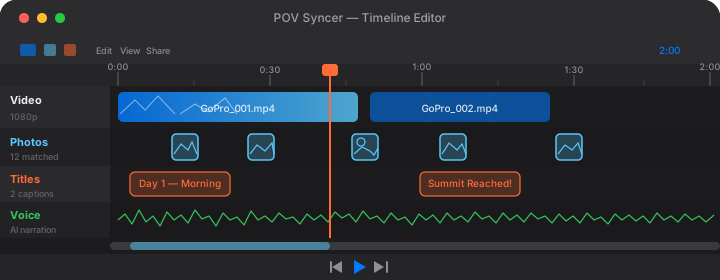
Here is the edit structure using POV Syncer's 4-track timeline:
Structure for a 60-Second Instagram Reel
- 0-5 seconds: A bold text title on the Titles track: "Here's exactly how I shot [product type] for [brand category] — watch to the end." The "watch to the end" prompt is specific to Instagram's algorithm and is consistently effective at improving completion rate.
- 5-25 seconds: The Ray-Ban Meta POV footage of setup — the empty set, the light positioning, the first test shot review on the camera's LCD. The viewer sees your studio from your perspective. This section is more interesting than it sounds: watching an expert work is inherently compelling.
- 25-50 seconds: EXIF-synced selects appearing over the POV footage at the moments you fired the Sony. Two to four photos, each displayed for three to four seconds. The shutter sound on the Effects track reinforces the photography process narrative.
- 50-60 seconds: The final hero frame held for three to four seconds, with a simple text overlay: your handle and "DM for brand inquiries" or a link to your portfolio. This is not aggressive — it is specific and professional, which is exactly right for a brand audience.
LinkedIn vs. Instagram Approach
For LinkedIn, the same video works but the caption does different work. On Instagram, your caption is conversational and community-oriented. On LinkedIn, write the caption as a professional observation: what you learned from this shoot, what the brief required, how you solved a specific technical challenge. The LinkedIn audience is evaluating your professional judgment, not just your aesthetic sense.
Try it free on the App StoreBTS Content as a Client Deliverable
Here is an angle that most product photographers overlook: your BTS video is not just marketing content for your own channels. It can be a deliverable to the client.
Brands increasingly need content for their own social media that goes beyond the product photography deliverables. A 60-second "how your product was photographed" Reel that the brand can post to their Instagram or LinkedIn has genuine value — it humanizes the brand's production process, which is a content category that performs well for B2C and B2B brands alike.
For new client pitches, offer BTS content as an add-on at a fixed rate: $200 to $400 for a POV Syncer-produced BTS Reel delivered with the final images. The production time is minimal — you are wearing the glasses anyway — and it gives you a product that clients are increasingly asking for. It is also a differentiator from photographers who offer stills only.
When this BTS video goes on the client's Instagram or LinkedIn, it includes your name in the caption. That is organic, distribution-amplified exposure to the brand's audience — which includes other brand managers and marketing directors who might need a photographer.
The Prospecting Tool Angle
Beyond reactive marketing, BTS content is an active prospecting tool for commercial photography clients. When you identify a brand you want to work with, you can send them a specific example: "I shot a similar product category last month — here's the BTS of that session." A 60-second video of your studio process, with the finished frames appearing at the relevant moments, is more persuasive than a PDF portfolio and faster to consume than a website.
This works particularly well on LinkedIn, where direct message outreach to marketing managers and brand directors is accepted professional practice. A video link in an outreach message performs significantly better than a text description of your services.
What the POV Syncer Workflow Looks Like in Practice
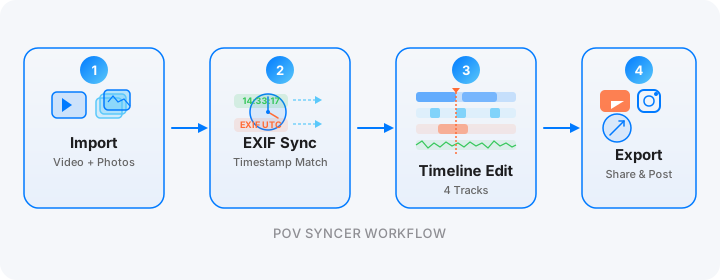
After a session, the workflow is: transfer Ray-Ban Meta footage to iPhone via the Meta View app. Transfer Sony JPEGs via Sony Imaging Edge Mobile or a card reader. Open POV Syncer, create a new project, import both. Tap Sync. Your Sony selects appear at the exact frames in the Meta footage where you fired the shutter. Select your three to four strongest frames, trim the POV footage to the key moments, add a title at the start and your handle at the end. Export at 9:16 for Reels and LinkedIn. Done.
From shoot wrap to published post: under 45 minutes, including caption writing. Without POV Syncer, the equivalent edit in a desktop tool takes three to four hours — which is why most product photographers simply do not do it.
Start Producing Client-Attracting Content from Your Next Session
POV Syncer is free to download. The free tier gives you one full project — enough to test the workflow on your next shoot before committing to Pro. Pro unlocks unlimited projects, AI narration, 15 fonts, and 10 background styles at $9.99 per month or $99.99 per year.
Your studio sessions are already interesting. The only question is whether you are letting the work speak for itself.
Ready to turn your next studio session into client-winning content?
Download POV Syncer free and publish your first product photography BTS Reel before the end of the week.
Download POV Syncer Free